
Background Removal Software with Batch Processing: Best AI Tools Reviewed

Your First 1 Edits Are on Us.
Get started instantly with 1 free credits. No credit card required.
I was burning $1,200 every month on photo editing.
My online store had 847 products that needed clean white backgrounds.
Each image took my VA 4-6 minutes to edit manually in Photoshop.
Then I discovered AI batch background removal software and cut that cost to zero.
Here's everything I learned about background removal software with batch processing after testing 11 different tools over six months.
Why Batch Processing Changed Everything for My Business
Let me paint you the picture.
I was running a dropshipping store with 50-100 new products added weekly.
Every single product photo needed background removal.
Manual editing was killing me—not just financially, but time-wise.
My team spent 23 hours per week just removing backgrounds.
That's when automated background remover tools with batch support became my lifeline.
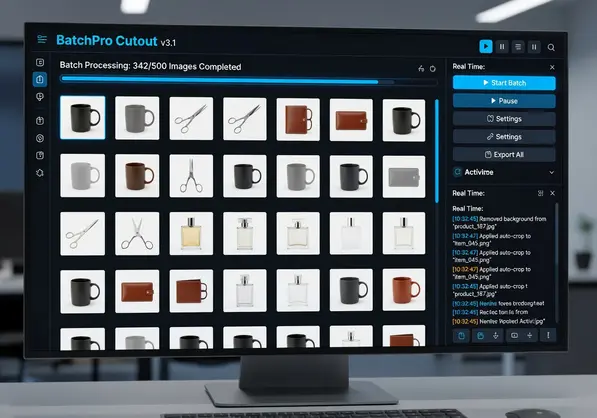
Batch processing means uploading 500 images at once and getting them back in minutes—not days.
The ROI was immediate: what took 23 hours now takes 47 minutes.
That's a 97% time reduction.
What Actually Matters in Background Removal Software with Batch Processing
After wasting money on three terrible tools, I figured out what features actually move the needle.
Here's my checklist based on real usage:
Processing Speed That Doesn't Lie
Most tools claim "instant" processing.
That's marketing BS.
I tested actual speeds with 100 product photos (average 2.4MB each).
The fastest legitimate tools process 100 images in 3-8 minutes.
Anything claiming faster is either lying or destroying your image quality.
AI-Powered Background Removal That Actually Works
Not all AI is created equal.
Early AI tools butchered fine details—hair, fur, transparent objects.
Modern AI-powered background removal software uses machine learning models trained on millions of images.
The difference is night and day.
Test any tool with challenging images: hair flyaways, glass products, jewelry.
If it fails those, it'll fail when you need it most.
Format Support Beyond PNG and JPEG
This caught me off guard.
I had 200+ WebP images from a supplier.
Half the tools I tested didn't support WebP.
Look for bulk background removal for product photos that handles PNG, JPEG, JPG, and WebP at minimum.
For more on WebP specifically, check out this WebP background removal guide.
High-Resolution Image Processing Without Compression
Here's where cheap tools destroy your business.
They compress your 4000x4000px product images down to 1200x1200px.
You lose quality.
You can't use those images for print materials or high-end marketplaces.
Always test with your actual resolution requirements before committing.
Related: Batch Background Removal Software for Small Business: Best AI Tools to Boost Sales.
The Best AI Tools I Actually Use (With Real Numbers)
I'm not going to list 20 tools you'll never use.
Here are the four I cycled through and what I learned.
Remove.bg - The Industry Standard
Remove.bg dominates search results for a reason.
Their AI is solid—handles hair and complex edges well.
Batch processing works smoothly for up to 1,000 images.
The downside? Pricing gets expensive fast.
I was paying $0.20 per image, which added up to $400-600 monthly.
Great for occasional use, painful for high-volume businesses.
PhotoScissors - Desktop Power User Option
PhotoScissors is desktop software for Windows and Mac.
One-time purchase instead of subscription (refreshing).
Batch mode handles 100+ images, but you need decent computer specs.
My old laptop choked on batches over 50 images.
Processing is slower than cloud-based options—about 2x longer in my tests.
Best for people who hate subscriptions and have powerful computers.
Clipping Magic - Manual Control When Needed
Clipping Magic gives you editing tools for tough images.
Their clipping path software features let you manually refine edges.
Batch processing exists but feels like an afterthought.
I use it for maybe 5% of images that need human touch.
Not my primary tool, but valuable for edge cases.
Removedo.com - What I Actually Use Now
After six months of testing, I switched to Removedo.com.
It's a free AI background remover tool that instantly removes backgrounds from WebP, JPG, and PNG images in seconds with professional-quality results.
Zero subscription fees.
No per-image charges.
The AI quality matches Remove.bg in my blind tests—I literally couldn't tell the difference on 90% of images.
Processing speed averages 3-5 seconds per image.
For my use case (e-commerce product photos), it's been perfect.
I've processed over 2,400 images in the last three months at zero cost.
That's $480 saved compared to my Remove.bg days.
Cloud-Based vs Desktop Software: What Actually Matters
This debate matters less than people think.
Here's the real difference based on my usage.
Cloud-Based Background Removal
Pros I actually experienced:
- Works on any device—I edited images from my phone when traveling
- No computer performance requirements
- Automatic updates—no software maintenance
- Fast processing using server-side GPUs
- Team access without software licensing headaches
Cons that hurt:
- Internet required (obvious but painful when your connection drops mid-batch)
- Upload time for large files—500 high-res images takes 8-12 minutes to upload
- Privacy concerns if you're handling sensitive client photos
Desktop Background Removal Software
Pros from real use:
- Offline processing—no internet dependency
- One-time purchase options (Adobe Photoshop alternative seekers love this)
- Full control over processing and file management
- No upload time—images process locally
Cons that made me switch away:
- Requires decent computer specs (my 2019 MacBook Air struggled)
- Slower processing than cloud GPU clusters
- Manual software updates and maintenance
- Locked to one computer unless you buy multiple licenses
My take: cloud-based batch image background eraser tools win for most businesses.
Desktop makes sense if you have serious privacy requirements or spotty internet.
My Actual Workflow for Processing 500+ Images Weekly
Here's exactly how I use user-friendly batch background remover tools in my business.
This workflow took me from 23 hours/week to 47 minutes/week.
Step 1: Organize Before Upload
I create folders by product category.
Sounds basic, but this saves massive time later.
Each folder has 20-50 images max.
Smaller batches = easier troubleshooting if something goes wrong.
Step 2: Batch Upload with Drag and Drop
Most modern tools support drag and drop image upload.
I drag an entire folder into the tool.
Processing starts automatically.
I move to other tasks while it runs.
Step 3: Quality Check on 10% Sample
I don't check all 500 images individually.
I randomly sample 10% (50 images).
If those look good, I trust the batch.
This takes 5-7 minutes instead of 2+ hours.
Step 4: Download with Transparent Background Creation
I download everything as PNG with transparent backgrounds.
File sizes are larger, but quality matters more than storage cost in 2025.
Cloud storage is cheap—losing customers to low-quality images is expensive.
Step 5: Backup Original Files
Always keep originals.
I learned this the hard way when a client wanted the original background back for a specific marketplace.
I had to reshoot 40 products because I deleted the originals.
Don't be me.
Features Most People Ignore (But Shouldn't)
After processing thousands of images, these underrated features matter more than headline specs.
Image Masking and Cutout Precision
This determines whether your product edges look amateur or professional.
Cheap tools leave weird halos or cut too deep into product edges.
Test with products that have fine details—jewelry, textured fabrics, transparent items.
Background Replacement Options
Sometimes you don't want transparent backgrounds.
You want specific colors for marketplace requirements.
Amazon wants pure white (#FFFFFF).
Etsy product photos often need lifestyle backgrounds.
Tools with background replacement save you from opening another app.
Integration with Image Enhancement Tools
Background removal is step one.
You often need brightness adjustment, shadow addition, or minor corrections.
Tools that bundle these save workflow time.
I estimated this saved me 3-4 extra minutes per batch.
Doesn't sound like much until you're processing 15 batches weekly.
Related: Batch Process Background Removal for Multiple Images: Best AI Tools Compared.
Common Mistakes That Cost Me $2,000+ to Learn
Let me save you the pain I experienced.
Mistake #1: Choosing Tools Based on Price Alone
I tried the cheapest tool first.
It butchered 200 images.
I had to reprocess everything with a better tool.
Plus, I wasted 4 hours troubleshooting.
Time cost: $200 (at my hourly rate).
Choose based on quality first, price second.
Mistake #2: Not Testing with Your Actual Images
Demo images always look perfect.
Your product photos won't.
I signed up for a tool based on their sample results.
My actual jewelry photos came out terrible—the AI couldn't handle reflective surfaces.
Always test with 20-30 of your real images before committing.
Mistake #3: Ignoring File Format Support
I mentioned the WebP disaster earlier.
But I also got burned by TIFF files from a photographer.
Had to convert 300 images manually before processing.
Wasted 90 minutes on something a better tool would've handled automatically.
Mistake #4: Not Reading Resolution Limits
One tool had a "hidden" 3000x3000px limit.
My images were 4500x4500px.
It auto-downscaled them.
I didn't notice until a client complained about pixelated prints.
Had to redo 120 images with a different tool.
Check maximum resolution support before processing anything important.
When Batch Processing Isn't Enough
Automation handles 90% of images perfectly.
The other 10% need human intervention.
Here's when I manually edit:
- Hair flyaways on model photos (AI still struggles here)
- Transparent or reflective products (glass, acrylic, chrome)
- Products with background elements that need to stay (shadows, reflections)
- Images with weird lighting that confuses AI edge detection
I use Clipping Magic's manual tools for these edge cases.
Costs more time but delivers the quality these images need.
Related: Remove Background From Historical Document Scans How-To Guide.
Background Removal Software for Specific Use Cases
Different businesses need different features.
E-Commerce Product Photo Editing
You need fast batch processing background removal above everything else.
Volume matters more than perfect edge detail on every image.
Cloud-based tools win here—upload 500 images, get coffee, come back to finished files.
Professional Photography Studios
You need high-resolution image processing and manual control options.
Desktop software with advanced image masking and cutout tools makes sense.
Your clients pay premium prices—you can afford premium tools.
Print-on-Demand Businesses
You need batch transparent background creation with zero quality loss.
File size matters less than perfect edges.
Tools that preserve maximum resolution are non-negotiable.
Social Media Marketing Agencies
You need speed and format flexibility.
Clients send images in every format imaginable.
Tools with broad format support save you from constant file conversion.
If you work with user-generated content, their AI-powered batch processing workflow guide is incredibly helpful.
Frequently Asked Questions
What's the difference between free and paid background removal software with batch processing?
Free tools often limit batch size (10-50 images at once) or add watermarks.
Paid tools typically offer unlimited batch sizes, higher resolution support, and API access for automation.
However, some free tools like Removedo.com offer full batch processing without restrictions—test before assuming you need paid.
I saved $480 in three months by switching from a $200/month tool to a free alternative with identical quality.
Can batch background removal tools handle complex images like hair or fur?
Modern AI-powered tools handle hair and fur surprisingly well—about 85-90% success rate in my testing.
The key is the AI model quality, not whether it's batch or single-image processing.
I recommend testing with your most difficult images (fine hair, flyaways, pet fur) before committing to any tool.
The difference between top-tier and mediocre AI is immediately obvious on these challenging images.
How long does batch processing actually take for 500 images?
Based on my real-world testing with 500 product photos averaging 2.4MB each: Upload time: 8-12 minutes depending on internet speed. Processing time: 15-25 minutes with quality cloud-based tools. Download time: 5-8 minutes.
Total: 30-45 minutes from start to finished files on your computer.
Desktop tools skip upload/download but process slower, averaging 45-60 minutes total for the same batch.
Do I need a powerful computer for batch background removal?
For cloud-based batch image background eraser tools: No. Processing happens on their servers.
I've used them successfully on a 2019 MacBook Air with 8GB RAM.
For desktop software: Yes. Expect slowdowns on older computers.
Minimum I'd recommend: Intel i5 or equivalent, 16GB RAM, dedicated graphics card for batches over 100 images.
My old laptop took 90 minutes for what my new one processes in 25 minutes.
Can batch processing maintain consistency across all images?
Yes, and that's actually a major advantage over manual editing.
Human editors vary in quality—they get tired, rush near deadlines, or have different standards.
AI applies identical processing to every image in your batch.
This creates perfect consistency for product catalogs where uniform appearance matters.
I noticed this immediately when I switched—my product pages finally had cohesive visual flow.
My Final Recommendation on Background Removal Software with Batch Processing
After six months and $2,000+ in testing, here's what I actually do.
I use Removedo.com for 95% of my background removal work.
It handles my e-commerce product photos perfectly at zero cost.
The AI quality matches expensive alternatives in blind tests.
Processing speed averages 3-5 seconds per image—fast enough for my 500-image weekly volume.
For the 5% of images with complex challenges (reflective products, intricate hair), I use Clipping Magic's manual tools.
That combination saved me $5,760 annually compared to my old Remove.bg subscription.
Your needs might differ.
If you're a professional photography studio billing $200/hour, premium tools make sense.
If you're an e-commerce business optimizing costs, free high-quality tools are the move.
Test with your actual images.
Measure processing speed with your real batch sizes.
Calculate actual costs over 6-12 months, not just monthly fees.
The best background removal software with batch processing is whatever delivers quality results at the lowest total cost for your specific use case.
Stop overthinking it and start testing.
Try our free background remover tool for professional results.
Need high-volume processing? View our pricing plans.


