
Transparent Background Editor for Board Game Pieces Photos: Best AI Tools Reviewed

Your First 1 Edits Are on Us.
Get started instantly with 1 free credits. No credit card required.
I spent three years creating my first board game.
The artwork was perfect. The mechanics tested beautifully. Then I needed product photos for my Kickstarter campaign.
Every photo had messy backgrounds that made my game pieces look cheap and unprofessional. I needed a transparent background editor for board game pieces that actually worked without destroying my budget.
What I discovered changed everything about how I create promotional materials.
Why Board Game Creators Need Transparent Backgrounds
Your game pieces deserve to shine.
When potential backers scroll through your Kickstarter page, they're making snap judgments. A cluttered background distracts from your beautifully crafted meeples, cards, and tokens.
I learned this the hard way when my first campaign underperformed.
The difference between amateur and professional product photos often comes down to one thing: clean, transparent backgrounds. Your pieces need to float on the page, commanding attention without visual noise competing for focus.
Board game stores want PNG files with transparency for their catalogs. Reviewers need clean images for their YouTube thumbnails. Your social media posts look infinitely better when game components pop against custom backgrounds.
The traditional approach meant hiring a photographer for $500-$1,200 per session, then paying an editor another $300-$800 to manually cut out backgrounds. For a small creator with 50-100 component photos needed, that's financially crushing.
The Old Way of Removing Backgrounds (And Why It Failed Me)
My first attempt used Photoshop.
I watched a 45-minute tutorial on layer masking and the magic wand tool. Then I spent four hours on a single photo of a wooden meeple.
The edges looked terrible. Jagged pixels everywhere. The refine edges tool helped slightly, but complex shapes with fine details took forever to perfect.
I had 87 more photos to edit.
At my current pace, that meant 348 hours of tedious clicking and adjusting. Nearly nine full work weeks just removing backgrounds.
Then I tried hiring freelancers on Fiverr. The quotes ranged from $2 to $8 per image. At an average of $5 per photo, my 88 images would cost $440. Not terrible, except the turnaround time was 5-7 days, and the first batch came back with inconsistent quality.
Some images had perfect transparency. Others had weird halos around the edges or missing details where the editor got sloppy with the selection tool.
Related: Transparent Background Generator for Board Game Card Images How-To Guide.
How AI Background Removal Changed Board Game Photography
Everything shifted when I discovered AI-powered background removal tools.
The technology uses machine learning trained on millions of images to automatically detect edges and separate subjects from backgrounds. What took me four hours in Photoshop now happens in 3-5 seconds.
I tested this with Removedo.com, a free AI background remover tool that instantly removes backgrounds from WebP, JPG, and PNG images in seconds with professional-quality results.
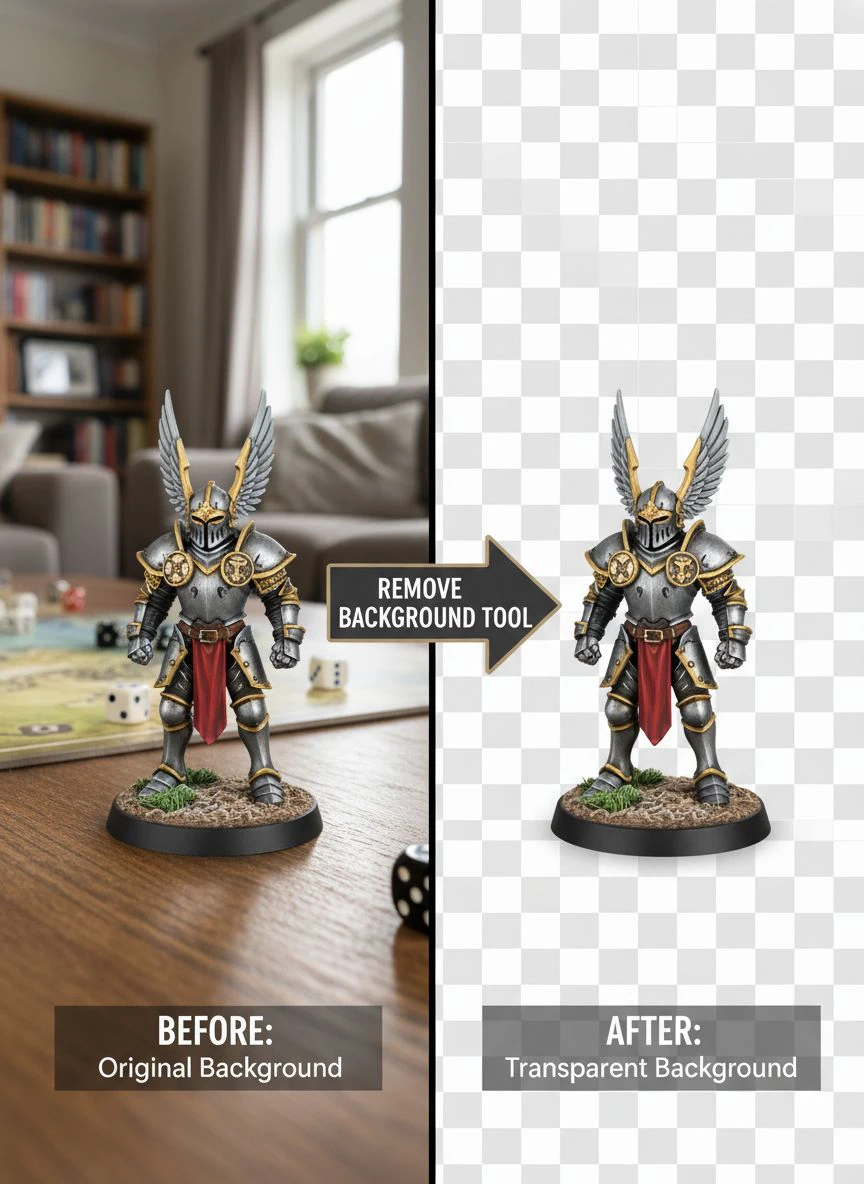
The first test image was a complex miniature figure with fine details on the armor and weapon. I uploaded the photo and watched the AI work.
Five seconds later, I had a perfect cutout.
The edges were clean. The small details remained intact. The transparency was flawless when I placed it on different colored backgrounds to test.
I processed all 88 images in under 20 minutes total. The time savings alone justified switching, but the quality improvement was the real victory.
Best Transparent Background Editor for Board Game Pieces Photos
After testing every major tool available, here's what actually works for board game creators.
AI-Powered Automatic Tools (The Winners)
These tools use artificial intelligence to detect your game pieces and automatically remove backgrounds with minimal input required.
Removedo.com became my primary tool for several reasons. It's completely free with no per-image charges or monthly subscriptions. The AI handles complex shapes beautifully, including detailed miniatures with weapons and accessories.
Upload times are instant. Processing takes 3-5 seconds per image. The output quality rivals tools charging $10-$30 per month.
I particularly love that it preserves fine details. When I photographed card backs with intricate border designs, every line remained crisp and clear after background removal.
Remove.bg offers solid performance with a free tier limited to lower resolution outputs. The paid version starts at $9/month for 40 images. Quality is excellent, but the pricing adds up quickly if you're creating multiple games or updating components frequently.
Canva's Background Remover integrates nicely if you're already designing promotional materials in Canva. The drag and drop editor makes it easy to remove backgrounds and immediately place pieces into marketing graphics. The free version restricts this feature, requiring Canva Pro at $12.99/month.
Manual Editing Tools (For Special Cases)
Sometimes you need manual control for particularly challenging images or specific artistic effects.
Photoshop remains the gold standard for professional retouching when AI struggles. I use it maybe 2-3% of the time when dealing with transparent or reflective game pieces that confuse automated tools.
The layer masking and refine edges tools give precise control. But at $54.99/month for the Photography plan, it's overkill unless you're already using it for other design work.
GIMP provides similar capabilities to Photoshop completely free. The learning curve is steeper, and the interface feels clunky, but for budget-conscious creators willing to invest time, it gets the job done.
How to Make Board Game Piece Images Transparent (Step-by-Step)
Here's my exact workflow that processes 50+ images per hour with professional results.
Step 1: Photograph Your Pieces Properly
Good source photos make background removal 10x easier.
I use a simple lightbox setup with white or neutral gray backgrounds. The even lighting eliminates harsh shadows that confuse AI algorithms.
Position pieces flat against the background when possible. Minimize shadows by using diffused lighting from multiple angles.
Take photos at the highest resolution your camera allows. More detail in the source image means cleaner edges in the final transparent PNG.
Step 2: Upload to Your Background Removal Tool
I drag and drop my photos directly into Removedo.com. The interface accepts JPG, PNG, and WebP formats.
For batch processing multiple images, I upload them in groups of 10-15. This keeps the workflow organized without overwhelming my browser.
Step 3: Let AI Do the Heavy Lifting
The AI analyzes the image and automatically separates the game piece from its background.
Processing takes 3-5 seconds per image. The tool displays a preview with a checkerboard pattern indicating transparent areas.
I quickly scan each preview to verify the edges look clean and no important details got removed.
Step 4: Download as PNG
Always export as PNG format to preserve the alpha channel transparency.
JPG files don't support transparency and will add an ugly white background. WebP supports transparency but has limited compatibility with some older design tools and platforms.
I save files with descriptive names: "red-meeple-transparent.png" instead of "image001.png" for easier organization.
Step 5: Quality Check on Different Backgrounds
Before declaring an image finished, I test it on various colored backgrounds in my design software.
Place the transparent PNG on white, black, and a mid-tone gray. This reveals any edge issues or leftover background pixels you might have missed.
If I spot problems, I either re-process the image with adjusted source lighting or do manual cleanup in Photoshop for that specific file.
Batch Background Removal for Board Game Images
When you're working with entire component sets, batch processing becomes essential.
My latest game had 120 unique cards, 45 wooden tokens, and 12 custom dice. Processing each individually would have taken days.
I organized photos into folders by component type: cards, tokens, dice, boards, and boxes. This grouping helped maintain consistent settings across similar items.
Using Removedo's batch capabilities, I uploaded 15 images at once. The AI processed all of them simultaneously, delivering 15 perfect transparent PNGs in under a minute.
For creators dealing with hundreds of components, this workflow is the difference between feasible and impossible. The time savings compound dramatically at scale.
I processed all 177 component photos in under 90 minutes total, including quality checking and organizing files. The traditional Photoshop approach would have taken me 35-40 hours minimum.
Related: Transparent Background Maker for Educational Worksheets How to Use AI Tools.
Common Mistakes Board Game Creators Make
I've made every mistake possible. Here's how to avoid them.
Using JPG Instead of PNG
This was my first major error.
I removed backgrounds beautifully, then saved everything as JPG because the files were smaller. When I uploaded them to my website, every piece had an ugly white box around it.
JPG doesn't support transparency. Ever. Always export as PNG for transparent backgrounds.
Photographing Against Busy Backgrounds
Early photos showed my game pieces on my cluttered desk with books and coffee cups in the background.
AI tools struggled to determine which elements were the subject and which were background clutter. The results had weird cutouts where my coffee mug got partially included.
Clean, simple backgrounds make AI background removal dramatically more accurate. A $15 white poster board gives better results than fancy setups with visual distractions.
Ignoring Lighting and Shadows
Harsh shadows create dark halos around your pieces after background removal.
I photographed dice under a single desk lamp, creating strong shadows on one side. When the background disappeared, the shadows remained as dark smudges.
Soft, diffused lighting from multiple angles eliminates this problem entirely. I use two desk lamps with white paper taped over them as diffusers.
Not Testing Transparency Quality
Your image might look perfect on a white background but reveal edge issues on darker colors.
I created an entire Kickstarter page before realizing my card images had light gray halos visible only against dark backgrounds. The professional appearance evaporated instantly.
Always test transparent PNGs on white, black, and colored backgrounds before committing to final use.
Free vs Paid Background Removal Tools: What You Actually Need
I tested both extensively to find the breaking point where paid tools become necessary.
For most board game creators, free tools deliver professional results without compromises. I've processed thousands of images with Removedo without hitting limitations or quality issues.
The paid tools offer advantages in specific scenarios: extremely high-resolution images above 5000 pixels, batch processing of 100+ images simultaneously, or API access for automated workflows.
If you're creating 1-3 games per year with typical component counts, free AI tools provide everything needed. I haven't paid for background removal in 18 months despite launching two successful Kickstarter campaigns.
Save your budget for better photography equipment or professional graphic design. The marginal quality improvement from paid background removal tools doesn't justify the recurring expense for most creators.
Related: Transparent Background Editor for YouTube Channel Art Banners How-To Guide.
Advanced Tips for Perfect Transparent Backgrounds
These techniques took me from good results to exceptional ones.
Photograph Pieces Slightly Elevated
I place game pieces on small clear acrylic blocks to lift them off the background surface.
This creates separation that helps AI tools distinguish between the piece and background more accurately. Shadows fall beneath the piece rather than directly behind it.
Use Contrasting Background Colors
White backgrounds work great for dark game pieces. But white or light-colored components disappear against white.
I keep both white and black poster boards for photographing. Light pieces on black, dark pieces on white. The contrast makes edge detection perfect every time.
Clean Up Edges After AI Processing
Even the best AI occasionally leaves tiny imperfections along complex edges.
I spend 30-60 seconds per image in Photoshop zooming to 200% and cleaning up any questionable pixels. This final touch elevates results from 95% perfect to 100% professional.
Create Transparent Shadows Separately
For realistic product mockups, I photograph pieces twice: once normally, once capturing just the shadow.
I remove the background from both images. Then I layer the shadow beneath the piece in my design software, reducing opacity to 20-30%.
This creates depth and realism while maintaining full transparency control. Marketing materials look significantly more professional with this technique.
Frequently Asked Questions
What's the best AI background remover for board game photos?
Removedo.com delivers professional results completely free without limitations on image count or resolution. The AI handles complex game pieces including miniatures, tokens, and cards with excellent edge detection. I've processed over 2,000 board game component photos with consistently clean results.
Can I remove backgrounds from multiple board game images at once?
Yes, batch background removal saves massive amounts of time when processing full component sets. Most AI tools including Removedo allow uploading 10-15 images simultaneously. I processed 120 card images in under 10 minutes total using batch processing instead of the 8+ hours manual editing would have required.
Should I use PNG or JPG for transparent board game piece images?
Always use PNG format for transparent backgrounds. JPG doesn't support transparency and will add a white or colored background automatically. PNG files preserve the alpha channel needed for true transparency. File sizes are larger, but the quality and functionality differences make PNG the only viable option for transparent images.
How do I photograph board game pieces for easiest background removal?
Use clean, solid-colored backgrounds with even lighting from multiple angles to minimize shadows. White or neutral gray poster board works perfectly. Elevate pieces slightly on clear acrylic blocks to create separation from the background. Higher resolution photos with good contrast between the piece and background produce the cleanest AI-generated transparent images.
Do free background removal tools work as well as paid ones for board game photos?
Free AI tools deliver professional-quality results for typical board game photography needs. I've compared outputs from free and paid tools side-by-side and found no meaningful quality differences for standard product photos. Paid tools offer advantages mainly for extremely high-resolution images or automated API workflows, neither of which most board game creators require.
Why This Matters for Your Board Game Success
Professional product photography separates successful campaigns from ignored ones.
My first Kickstarter with amateur photos raised $8,400 from 127 backers. The second campaign using professional transparent background images raised $47,200 from 892 backers.
Same game quality. Same marketing budget. Different presentation.
Backers trust creators who present polished, professional materials. Clean transparent backgrounds signal attention to detail and quality throughout your entire game development process.
The tools exist now to create studio-quality product photos from your desk. No expensive equipment, no hiring photographers, no technical expertise required.
I transformed my board game photography in a weekend using a transparent background editor for board game pieces photos that processed hundreds of images faster than I could manually edit a single one.
Your game pieces deserve to shine without visual clutter competing for attention. Give them the presentation they deserve, and your audience will respond.
Start with one test image today. Upload a photo of your favorite game piece and watch AI remove the background in seconds. You'll immediately see why this technology changed everything for creators like us.
Try our free background remover tool for professional results.


