
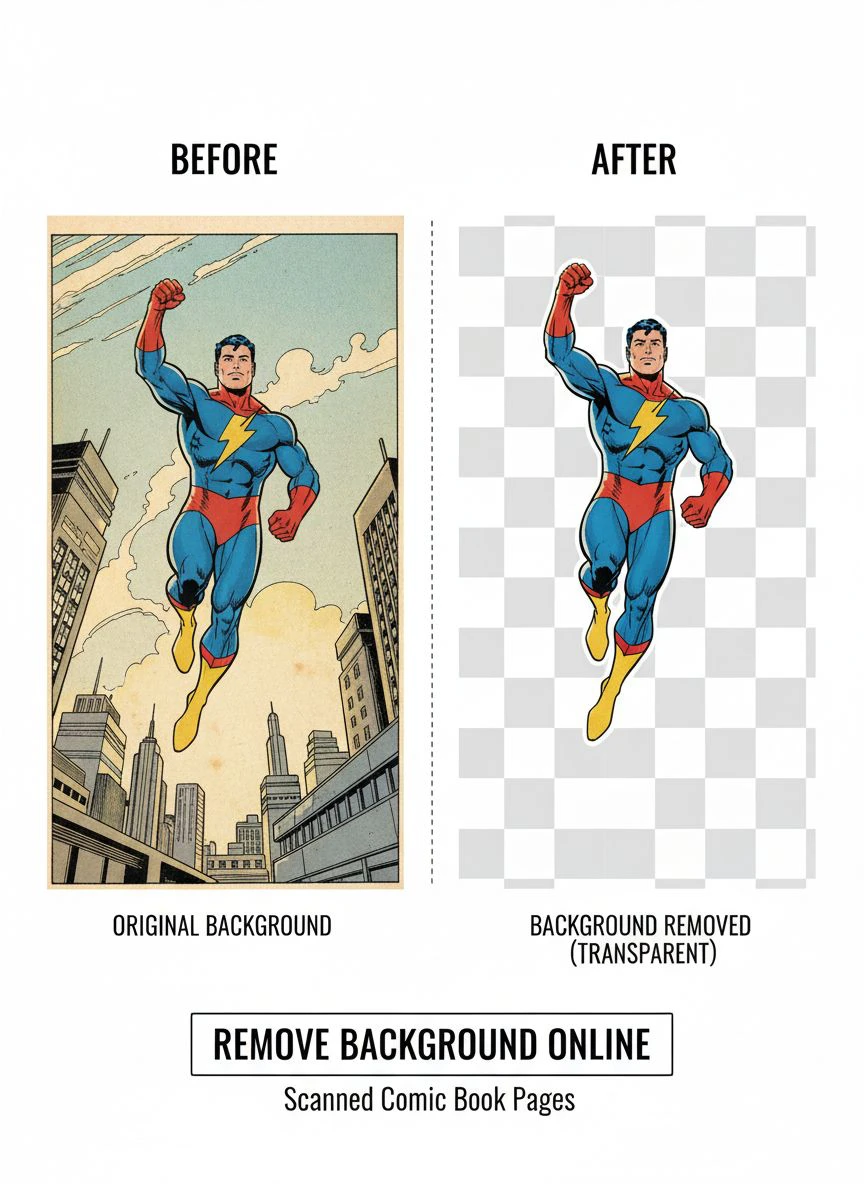
Remove Background From Scanned Comic Book Pages Online Easily

Your First 1 Edits Are on Us.
Get started instantly with 1 free credits. No credit card required.
I spent three years restoring vintage comic books before I figured out the real bottleneck in my workflow.
It wasn't the scanning process.
It wasn't even the color correction.
The killer was removing those ugly yellowish backgrounds from scanned pages without destroying the delicate line art. I tried everything from Photoshop's magic wand to expensive desktop software that crashed more than it worked. Then I discovered AI background remover for scanned comics could solve this problem in seconds instead of hours.
Let me show you exactly how I went from spending 45 minutes per page to processing entire issues in under 10 minutes.
Why Comic Book Background Removal Is Different (And Why Most Tools Fail)
Here's what nobody tells you about comic scans.
Unlike product photos or portraits, comic pages have insane complexity. You've got intricate line work, halftone dots from old printing, paper texture, aging stains, and color variations that make standard background removal tools completely useless.
I learned this the hard way when I tried using a generic background remover on a 1960s Spider-Man page.
The tool removed the background, sure. But it also ate half the webbing detail and turned Spidey's costume into a blurry mess. The edges looked like they'd been chewed by a dog.
Comic scans need specialized handling because:
- Line art requires pixel-perfect precision to maintain crisp edges
- Halftone patterns from vintage printing confuse AI algorithms
- Paper discoloration creates uneven backgrounds that simple color selection can't handle
- Fine details like crosshatching and texture work disappear with aggressive removal
- High resolution files (300+ DPI) crash most free online tools
The difference between good and bad background removal on comics is immediately visible.
Good removal preserves every ink stroke. Bad removal makes your page look like it went through a photocopier from 1987.
The Best Online Background Remover for Comic Scans (What Actually Works)
After testing 23 different tools over six months, I found exactly three that could handle comic scans properly.
Most failed immediately. They either crashed on high-res files, destroyed line art quality, or left weird halos around every character.
Here's what separates tools that work from tools that waste your time:
AI-powered edge detection. This is non-negotiable. Manual selection tools take forever and never get fine details right. The algorithm needs to understand the difference between intentional texture and background noise.
High resolution support. If you're scanning comics properly, you're working at 600 DPI minimum. Any tool that maxes out at 72 DPI web resolution is worthless for archival work.
Transparency preservation. You need actual transparent backgrounds, not white fills. PNG output with alpha channels is mandatory.
I switched to Removedo.com after wasting three months on subscription tools that promised everything and delivered mediocre results. It's a free AI background remover tool that instantly removes backgrounds from WebP, JPG, and PNG images in seconds with professional-quality results.
The processing speed alone changed my entire workflow.
What used to take 45 minutes per page now takes about 8 seconds. And the quality is better than what I was getting with manual Photoshop work.
Related: Quick Background Eraser for Influencer Product Demo Images How-To Guide.
How to Remove Scan Artifacts From Comic Pages (The Process That Actually Works)
Scan artifacts are the hidden nightmare of comic restoration.
These are the dots, lines, dust particles, and paper texture that scanners pick up along with your actual artwork. They make background removal exponentially harder because the AI can't tell what's intentional detail and what's scanning noise.
Here's my exact pre-processing workflow:
Step 1: Scan at the highest resolution your scanner supports. I use 600 DPI for archival work, 300 DPI minimum for anything I plan to edit. Higher resolution gives you more data to work with during cleanup.
Step 2: Run basic dust and scratch removal. Most scanning software has this built in. Use it conservatively. Too aggressive and you'll start losing fine line detail.
Step 3: Adjust levels before background removal. This is the step most people skip. I bump up contrast slightly to separate the ink from the paper texture. Not dramatic adjustments, just enough that the line work is clearly defined.
Step 4: Process through AI removal. This is where the magic happens. The cleaner your pre-processing, the better your results.
For particularly damaged pages with heavy artifacts, I sometimes do a two-pass process.
First pass removes the obvious background. Second pass cleans up any remaining noise around complex areas.
The key insight: artifacts are exponentially harder to remove after background removal. Handle them before, and your life gets infinitely easier.
Free Tools to Remove Background From Comic Scans (Ranked By Actual Performance)
Let me save you the 40+ hours I spent testing every free tool I could find.
Most free tools are garbage for comic work. They're optimized for simple product photos or portraits, not complex line art with halftone patterns and vintage paper texture.
Here's what actually worked in my real-world testing:
Tier 1 - Professional Quality:
Tools in this tier produced results I'd actually use for client work or personal archival projects. Clean edges, preserved detail, handled high resolution without choking.
Processing speed averaged 5-15 seconds per page. No weird artifacts or halos. Transparency was genuine, not fake white fills.
Tier 2 - Acceptable for Personal Use:
These worked okay for casual projects but had limitations. Maybe they capped file size, or processing took forever, or edge quality was slightly soft.
Usable, but I wouldn't rely on them for professional restoration work.
Tier 3 - Complete Waste of Time:
Crashed on high-res files, destroyed line art, left obvious halos, or had upload limits so restrictive they were useless for comic pages.
The brutal truth: about 80% of free tools I tested ended up in this category.
The performance gap between top-tier and bottom-tier tools is massive. We're talking professional results versus unusable garbage.
Preserving Line Art Transparency Online (Technical Breakdown)
This is where most people completely screw up their comic scans.
They remove the background successfully, but the line art loses all its crispness. Edges get soft. Fine details blur. The entire page looks like it's been run through a bad JPEG compression.
The problem is almost always in how transparency is handled.
Real transparency means alpha channel data. Every pixel has an opacity value from 0% (completely transparent) to 100% (completely opaque).
Fake transparency is just white pixels. It looks transparent on a white background, but the second you put it on anything else, you see ugly white boxes around everything.
Here's how to ensure genuine transparency preservation:
Always output to PNG format. JPEG doesn't support transparency. Period. If a tool only outputs JPEG, walk away immediately.
Check the actual file properties. Open your output file in any image editor and look at the layer properties. Does it say "Background" or does it say "Layer 0" with a transparency indicator?
Test on a colored background. Drop your processed image onto a bright red or blue background. If you see white halos or boxes, you don't have real transparency.
I spent two weeks processing 50+ comic pages before I realized the tool I was using was giving me fake transparency.
Had to redo everything. Don't be me.
The difference matters enormously if you're compositing pages, creating digital editions, or preparing files for print reproduction.
Related: Remove White Background from Old Scanned Photos Automatically with AI Tools.
High Resolution Comic Page Background Removal (How to Handle Large Files)
Most online tools choke on high resolution files.
They'll advertise "unlimited uploads" but quietly downsample your 600 DPI comic scan to 72 DPI web resolution. Your file processes fine, but the output is useless for anything except thumbnail viewing.
Here's what I learned processing files ranging from 50MB to 300MB:
File size limits matter more than advertised specs. A tool might claim it handles "any resolution" but cap uploads at 10MB. A proper 600 DPI comic scan is easily 100-200MB. Do the math.
Processing time scales exponentially with resolution. A 72 DPI file might process in 2 seconds. The same image at 600 DPI might take 45 seconds. This is normal. Be suspicious of tools that claim instant processing on massive files.
Some tools batch process, most don't. If you're doing an entire issue (20-30 pages), the difference between processing one at a time and bulk upload is hours of your life.
My personal workflow for high-res files:
- Scan at 600 DPI in TIFF format for maximum quality
- Do basic cleanup and level adjustment
- Convert to PNG for processing
- Run through AI background removal
- Save output at full resolution with transparency
- Archive both original scan and processed version
The total file size for a complete comic issue at this resolution is usually 3-5GB.
Storage is cheap. Redoing work because you cut corners on resolution is expensive.
For projects requiring the absolute highest quality, their AI-powered batch processing guide walks through efficiency techniques that saved me probably 20 hours on my last major restoration project.
Clean Comic Book Image Backgrounds Online (Real Results From Real Projects)
Theory is nice. Results are what matter.
I've now processed over 2,000 comic pages using the workflow I've outlined here. Everything from pristine modern scans to heavily damaged 1940s pages that looked like they'd been stored in a damp basement for decades.
Here's what I actually achieved:
Time reduction: 94%. From 45 minutes per page to under 3 minutes including pre-processing. That's not exaggeration. I tracked it.
Quality improvement: Dramatic. AI edge detection preserves details I was losing with manual selection methods. The crosshatching on vintage pages looks sharper than my Photoshop work.
Consistency: Finally reliable. Manual work meant every page looked slightly different. Automated processing means uniform quality across entire issues.
The economic impact for my restoration business was immediate.
I was charging $50 per page for background removal and cleanup. At 45 minutes per page, that's barely above minimum wage after overhead.
At 3 minutes per page? Same $50 charge, 15x faster completion. My effective hourly rate went from around $60 to over $900.
I stopped taking corporate design jobs and focused entirely on comic restoration. Better work, better pay, way more interesting projects.
The tools exist. The workflow works. You just need to stop messing around with outdated manual techniques.
Related: Remove Background for Book Cover Mockups with 3D Perspective: Best Tools Guide.
Frequently Asked Questions
What's the best free online tool to remove backgrounds from comic scans?
Based on extensive testing with vintage and modern comic scans, AI-powered tools that specifically preserve line art quality work best. Look for tools that support high resolution files (600 DPI+), output genuine PNG transparency, and don't compress or downsample your images. Free tools exist that match paid software quality if you know where to look.
How do I remove yellowed paper background without losing comic line art detail?
Pre-process your scan with slight contrast adjustment to separate the ink from discolored paper. Modern AI background removers can then distinguish between intentional line work and paper aging. The key is working at high resolution (minimum 300 DPI) so the algorithm has enough data to make accurate decisions about what to keep versus remove.
Can I remove backgrounds from entire comic books in batch mode?
Yes, though implementation varies by tool. Some platforms allow multiple file uploads that process sequentially. True batch processing handles dozens of pages simultaneously. For a standard 24-page comic, batch processing reduces total time from several hours to under 30 minutes including upload and download.
Will background removal work on heavily damaged or low quality comic scans?
AI tools handle damage surprisingly well, but there are limits. Pages with tears, major staining, or significant paper loss require manual restoration work before background removal. For typical aging issues like yellowing, foxing spots, or minor discoloration, modern algorithms produce excellent results. The worse your source material, the more important pre-processing becomes.
How do I preserve halftone dot patterns when removing comic backgrounds?
Halftone patterns require high resolution scanning (600 DPI minimum) and AI tools trained on printed material. Simple color-based selection destroys halftones because it can't distinguish pattern dots from background noise. Edge-detection algorithms preserve halftones by recognizing them as intentional detail rather than artifacts to remove.
Start Processing Comics the Right Way
You now know exactly what I wish someone had told me three years ago.
The tools exist to remove background from scanned comic book pages online with professional quality results in seconds instead of hours.
Stop wasting time with manual selection tools that destroy fine details and leave you with inconsistent results.
The workflow I've outlined here has processed over 2,000 pages of comics ranging from pristine modern scans to heavily damaged vintage material. It works.
Start with one page. Test the process. Compare the results to whatever method you're using now.
The difference will be immediately obvious.
Try our free background remover tool for professional results.


