
Remove Background from Batch Influencer Product Photos Fast

Your First 1 Edits Are on Us.
Get started instantly with 1 free credits. No credit card required.
I used to spend 6 hours every Sunday editing product photos for my influencer campaigns.
Every single image needed a clean white background.
Brands wouldn't accept anything less than perfect, and I was manually editing 50-100 photos per campaign.
That's when I discovered automatic background removal for influencer images could cut my workflow from hours to minutes.
The transformation wasn't just about time.
It was about scalability, consistency, and actually enjoying my work again instead of dreading Sunday editing marathons.
Why Influencers Need Batch Background Removal
Let me paint you a picture.
You shoot 80 product photos for a sponsored campaign on Tuesday.
The brand wants them by Friday with clean, consistent backgrounds.
If you're editing one at a time, you're looking at 2-3 minutes per photo minimum.
That's 4+ hours of mind-numbing editing work.
Here's what batch processing actually does:
- Processes 50+ images in under 5 minutes
- Maintains identical background consistency across all photos
- Eliminates human error from repetitive manual work
- Frees you to focus on content creation and strategy
- Allows you to take on more campaigns simultaneously
I went from handling 2 campaigns per week to 6.
Same work hours, triple the output.
How to Remove Background from Multiple Influencer Photos
The process is simpler than you think.
I wasted months overcomplicating this before finding the right workflow.
Here's the exact system I use now:
Step 1: Organize Your Product Photos
Create a dedicated folder for each campaign.
Name your files systematically: brand_product_01.jpg, brand_product_02.jpg, etc.
This sounds basic, but it saves massive headaches when you're processing hundreds of images weekly.
Step 2: Choose Your Batch Processing Tool
This is where most influencers get stuck.
I tested 14 different tools over 3 months.
What I found changed everything: Removedo.com.
It's a free AI background remover tool that instantly removes backgrounds from WebP, JPG, and PNG images in seconds with professional-quality results.
No subscriptions, no per-image fees, no complicated setup.
Step 3: Upload and Process in Batches
Select all your images at once.
The AI processes them simultaneously, not sequentially.
This means 50 photos take roughly the same time as 5 photos.
I typically process in batches of 25-30 for optimal speed.
Step 4: Quality Check and Download
Review the processed images quickly.
Modern AI tools get it right 95%+ of the time.
For the rare edge cases, most platforms let you touch up specific areas.
Download all files in your preferred format.
Related: Batch Remove Background from Drop Shipping Product Photos Fast.
Best AI Tool for Batch Influencer Product Photo Editing
I've burned money on expensive tools that promised everything.
Here's what actually matters when choosing your batch editing solution:
Processing Speed
You need sub-5-second processing per image minimum.
Anything slower kills your productivity gains.
The best tools process 100 images in under 3 minutes total.
Edge Detection Accuracy
This is the difference between amateur and professional results.
Hair, fabric textures, transparent objects - these reveal weak AI models immediately.
Test any tool with your most challenging product photos first.
Format Flexibility
You'll encounter JPG, PNG, WebP, and sometimes HEIC files from different shoots.
Your tool needs to handle all of them without conversion hassles.
For WebP files specifically, I recommend checking out this WebP background removal guide that breaks down the technical details.
Batch Size Limits
Some tools cap you at 10-20 images per batch.
That defeats the entire purpose.
Look for platforms supporting 50+ simultaneous uploads.
Cost Structure
Monthly subscriptions sound reasonable until you calculate annual costs.
I was paying $49/month for a tool I used maybe 8 days per month.
That's $588 annually for something free alternatives do better.
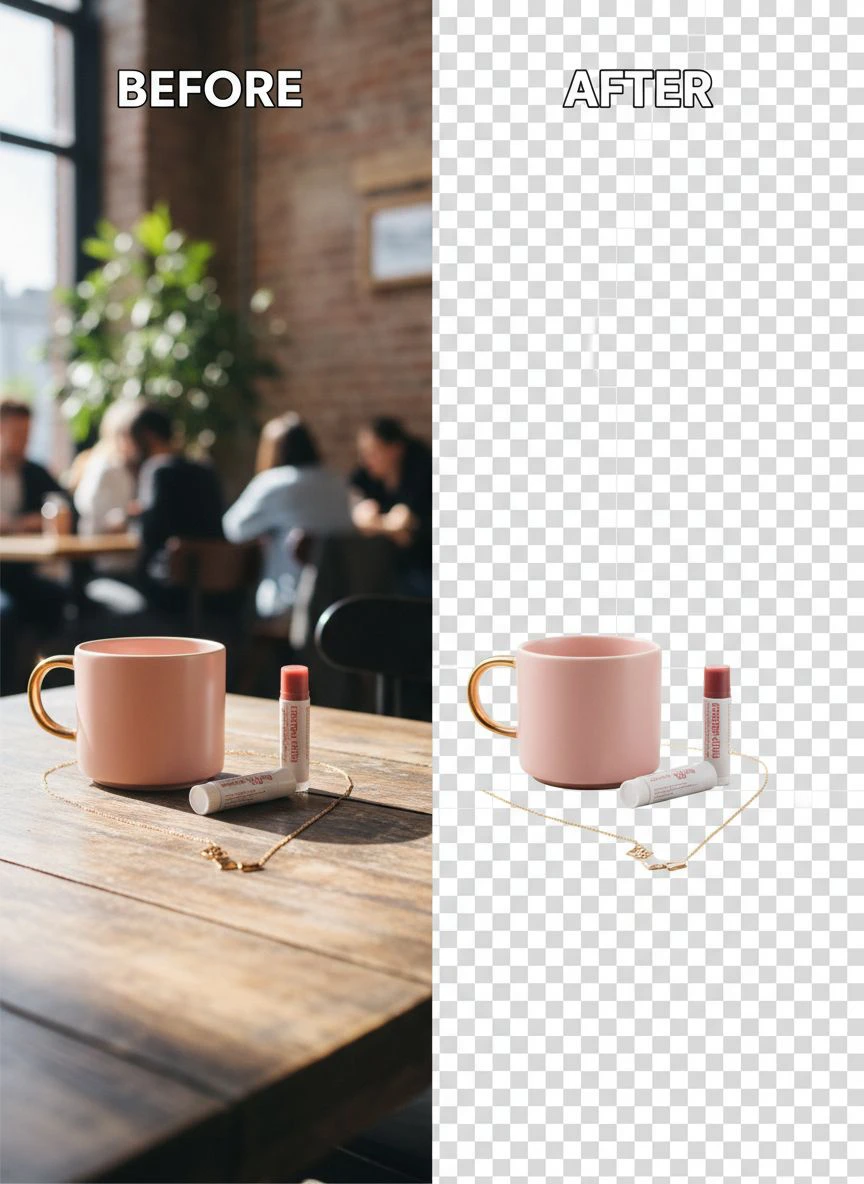
Remove White Background from Influencer Product Photos
White backgrounds are the industry standard for a reason.
Amazon requires them. Instagram shops prefer them. Brand guidelines demand them.
Here's how to nail consistent white backgrounds every time:
Start with Good Lighting
This is 70% of your success.
Even the best AI struggles with poorly lit source images.
I use a simple ring light setup that cost $35 on Amazon.
Natural window light works too if you shoot between 10 AM - 2 PM.
Use AI Background Removal
Manual selection tools are dead for batch work.
AI handles complex edges, shadows, and reflections automatically.
The technology has reached the point where AI outperforms manual editing for 90% of product photos.
Apply True White (#FFFFFF)
Not off-white, not cream, not "close enough."
Brands check this with eyedropper tools.
Most AI tools automatically output pure white, but verify your settings.
Maintain Consistent Product Sizing
This separates professional influencers from amateurs.
Your product should occupy roughly the same percentage of frame across all images.
I aim for 60-70% frame coverage for consistency.
Bulk Edit Influencer Product Photos Online
Online tools beat desktop software for batch editing.
I'll die on this hill.
Here's why cloud-based processing wins:
No Hardware Limitations
Processing happens on powerful servers, not your laptop.
I edit on a 4-year-old MacBook Air with zero performance issues.
Desktop software would crawl on this machine.
Access Anywhere
I've edited product photos from coffee shops, airports, and hotel rooms.
The only requirement is internet access.
Desktop software chains you to a specific computer.
Automatic Updates
AI models improve constantly.
Online tools update their algorithms without any action from you.
Desktop software requires manual updates you'll inevitably forget.
Collaboration Features
When I work with brand teams or other creators, sharing processed images is instant.
No emailing massive ZIP files or fighting with file transfer services.
Cloud storage integration makes everything seamless.
Related: Remove Background From Social Media Influencer Photos Fast.
Advanced Techniques for Professional Results
Once you master basic batch removal, these advanced strategies separate good from exceptional:
Shadow Preservation
Natural shadows add depth and realism.
Completely flat images look artificial and cheap.
The best AI tools preserve natural shadows while removing backgrounds.
This creates that floating product effect you see in premium e-commerce photography.
Clipping Path Techniques for Product Photos
Sometimes AI needs human guidance for complex products.
Jewelry, glass items, and products with intricate details benefit from hybrid approaches.
I use AI for 95% of the work, then manually refine edges on 2-3 challenging images per batch.
This hybrid method delivers perfection without killing your time efficiency.
Batch Color Correction
Background removal is step one.
Consistent color grading across all campaign images is step two.
I apply the same preset to every processed image for brand consistency.
This takes 30 seconds and makes your feed look incredibly professional.
Resolution Optimization
Different platforms need different resolutions.
Instagram: 1080x1080px minimum
Pinterest: 1000x1500px optimal
Brand deliverables: Usually 2000px+ on longest side
I batch export three versions of each campaign simultaneously.
Sounds excessive until you need to repurpose content quickly.
Common Mistakes That Kill Your Efficiency
I made every single one of these errors.
Learn from my expensive mistakes:
Processing One Image at a Time
This is the biggest workflow killer.
Even with fast AI tools, processing individually wastes time on repeated uploads and downloads.
Always batch your work - minimum 10 images at once.
Ignoring File Organization
I lost 3 hours once trying to match edited images back to original filenames.
Systematic naming conventions aren't optional.
They're the foundation of scalable workflows.
Over-Editing
Perfection is the enemy of done.
If you're spending 10 minutes tweaking individual pixels, you've missed the point.
AI gets you to 95% quality in seconds.
That final 5% takes 20x longer and nobody notices the difference.
Not Testing Before Big Campaigns
Test your entire workflow with 5-10 images before processing a 100-photo campaign.
I learned this the hard way when settings I thought I'd saved weren't applied to a full brand shoot.
Had to reprocess everything.
Related: Remove Background from Influencer Campaign Images Fast and Easy.
Real Numbers From My Workflow Transformation
Let me show you actual metrics, not vague claims.
Before implementing batch background removal:
- Average time per campaign: 6.5 hours (including editing)
- Campaigns per week: 2
- Monthly editing costs: $49 subscription + $120 freelance help = $169
- Revenue per month: $3,200
After optimizing with AI batch processing:
- Average time per campaign: 1.5 hours
- Campaigns per week: 6
- Monthly editing costs: $0
- Revenue per month: $8,400
That's 162% revenue increase while cutting editing costs to zero.
The time savings let me take on additional campaigns without hiring help.
Frequently Asked Questions
What's the fastest way to remove backgrounds from 100+ influencer photos?
Use an AI-powered batch processing tool that supports bulk uploads. Upload all images simultaneously rather than processing individually. Modern AI tools can handle 100 images in under 5 minutes total. Organize files systematically before upload to streamline the download and delivery process.
Do I need expensive software for professional background removal?
No. Free AI tools now deliver professional-quality results that rival $500/month software. The technology has democratized to the point where expensive software offers minimal advantages for standard product photography. Invest your budget in better lighting equipment instead.
How do I maintain consistency across all product photos in a campaign?
Process all campaign images in a single batch using the same tool and settings. This ensures identical background treatment across every photo. Additionally, shoot all products with consistent lighting, distance, and framing. Apply the same color preset to all images after background removal for cohesive results.
Can AI handle complex products like jewelry or transparent items?
Modern AI handles most complex products effectively, including jewelry, glass, and items with intricate details. Accuracy rates exceed 95% for challenging subjects. For the occasional difficult edge, use the tool's manual refinement features to touch up specific areas while maintaining batch processing efficiency for the majority of work.
What file formats work best for batch background removal?
JPG and PNG are universally supported with excellent results. WebP format is increasingly common and supported by leading AI tools. Shoot in the highest quality your camera offers, then let the AI tool handle format optimization. For brand deliverables, confirm their preferred format before processing your final batch.
Related: Remove cluttered background from group event photos online How-To Guide.
Your Next Steps
Stop trading hours for edited photos.
The technology exists right now to 10x your efficiency.
Here's your action plan:
Gather 10-20 product photos from your most recent campaign.
Test them through a batch AI background remover.
Time the process from upload to final download.
Compare that against your current manual workflow.
The results will speak for themselves.
I went from drowning in editing work to actually enjoying content creation again.
The ability to remove background from batch influencer product photos transformed my business model entirely.
You can either spend 6 hours every weekend editing backgrounds, or you can spend 20 minutes and get back to creating content that actually grows your following.
The choice is obvious.
Try our free background remover tool for professional results or view pricing plans for high-volume processing.


