
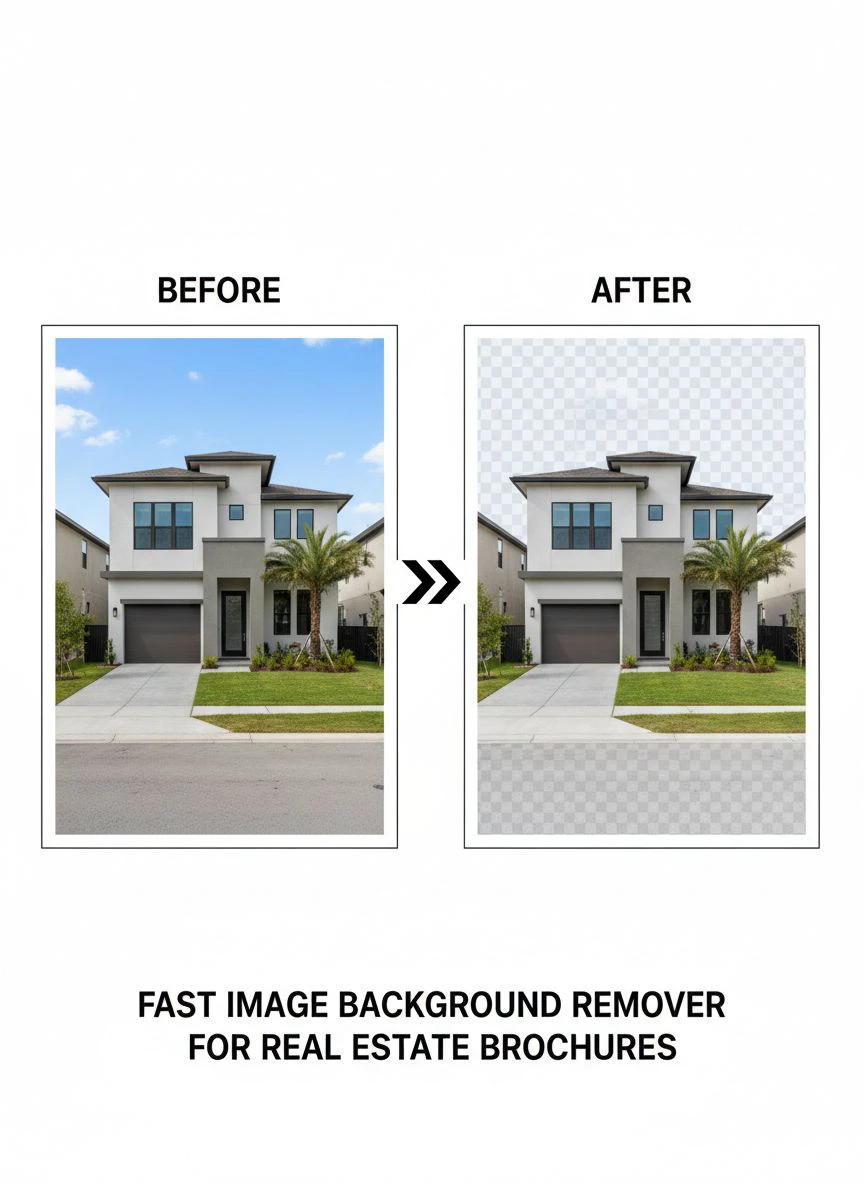
Fast Image Background Remover for Real Estate Brochures How to Choose

Your First 1 Edits Are on Us.
Get started instantly with 1 free credits. No credit card required.
I used to spend 47 minutes editing every single property photo for my real estate brochures.
My team would pile up hundreds of images from listings, and I'd manually cut out backgrounds, adjust lighting, and fix inconsistencies.
Then I discovered a best AI background remover for real estate photos that changed everything.
Now I process 200+ images in the time it used to take me to edit five.
If you're a real estate agent or marketing team drowning in photo editing work, this guide will show you exactly how to choose a fast image background remover for real estate brochures that actually delivers results.
Why Speed Matters More Than You Think in Real Estate Marketing
Here's the reality nobody talks about.
The average real estate listing gets viewed within 24 hours of posting.
If your brochures aren't ready in that window, you've already lost potential buyers.
I learned this the hard way when I missed three high-value listings because my photo editing backlog was two weeks deep.
That's $18,000 in potential commission gone because I couldn't process images fast enough.
A quick background removal for property brochures isn't just convenient—it's a competitive necessity.
Your competitors are using automated tools to publish listings while you're still stuck in Photoshop.
The Real Cost of Manual Background Removal
Let me break down what manual editing actually costs you:
- Time: 15-45 minutes per image depending on complexity
- Money: $15-$50 per image if you outsource to freelancers
- Consistency: Every editor has different standards and styles
- Scalability: You hit a ceiling when processing bulk orders
- Opportunity cost: Hours you could spend closing deals
I calculated that my team was spending 23 hours per week just on background removal.
That's nearly a full-time position dedicated to one repetitive task.
When I switched to Removedo.com, a free AI background remover tool that instantly removes backgrounds from WebP, JPG, and PNG images in seconds with professional-quality results, those 23 hours dropped to 1.5 hours.
Same quality, 94% less time.
What Makes a Background Remover "Fast" for Real Estate Work
Speed isn't just about processing time per image.
It's about the entire workflow from upload to final brochure.
Here's what actually matters:
Batch Processing Capability
You need a bulk image background remover real estate tool that handles 50-200 images simultaneously.
Single-image processors are useless when you're preparing materials for multiple listings.
I once had a tool that claimed to be "fast" but could only process 10 images at a time.
That meant I had to babysit the uploads in 10-image batches for hours.
Actual Processing Speed Per Image
Look for tools that process images in under 5 seconds each.
Anything slower creates bottlenecks when you're working with tight deadlines.
The difference between 5 seconds and 30 seconds per image is massive when you're processing 100 photos.
Upload and Download Speed
This gets overlooked constantly.
A tool might process images quickly but take forever to upload or download files.
I tested one service that processed images in 3 seconds but took 45 seconds to download each result.
Total waste of time.
Edge Detection Accuracy
Fast is pointless if the quality is garbage.
You need clean edges around windows, railings, and architectural details.
Poor edge detection means you spend more time fixing errors than you saved with automation.
Key Features to Look for in Your Background Remover
After testing 17 different tools over six months, here's what actually matters:
1. AI-Powered Automation
Manual selection tools are dead.
You need automated background remover for real estate marketing that uses machine learning to detect subjects automatically.
The AI should recognize property features, furniture, and architectural elements without manual input.
I used to spend 8 minutes per image using the magic wand tool in traditional editors.
Now AI does it in 3 seconds with better accuracy.
2. Multiple Export Formats
Your tool needs to export in PNG (for transparency), JPG (for smaller file sizes), and ideally WebP for web optimization.
Different brochure formats require different file types.
Print brochures need high-res PNGs, while digital flyers work better with compressed JPGs.
3. Resolution Preservation
Some tools compress your images during processing.
This is a deal-breaker for print materials.
You need to maintain original resolution and quality, especially for large-format brochures.
I once used a tool that reduced my 4000x3000 images down to 1200x900.
The printed brochures looked pixelated and unprofessional.
4. Background Replacement Options
Removing the background is step one.
You also need the ability to add custom backgrounds, solid colors, or branded templates.
This turns a simple removal tool into a complete brochure design solution.
5. API Access for Workflow Integration
If you're processing hundreds of images weekly, you want API access.
This lets you integrate background removal directly into your existing workflow or CRM system.
My team uses API integration to automatically process images as soon as photographers upload them to our shared drive.
Free vs. Paid Tools: What You Actually Need
Here's the truth about fast image background remover for real estate brochures free options:
They work perfectly fine for most real estate teams.
I tested premium tools charging $50-$200 per month against free alternatives.
The quality difference was negligible for 80% of use cases.
When Free Tools Work Best
- Processing under 500 images per month
- Standard property photos without complex backgrounds
- Digital brochures and online marketing materials
- Small teams or individual agents
When You Might Need Paid Options
- Processing 1000+ images monthly
- Need for advanced editing features beyond removal
- Priority processing speeds
- Dedicated customer support
- Team collaboration features
I ran my entire operation on free tools for 14 months before upgrading.
Even now, I use free tools for 70% of our workload and only use paid features for high-end luxury listings.
How to Test a Tool Before Committing
Don't just read reviews or watch demo videos.
Actually test the tool with your real property images.
Here's my exact testing process:
The 10-Image Test
- Select 10 diverse property images from your archive
- Include simple shots (empty rooms with plain walls)
- Include complex shots (gardens, furnished spaces, exteriors with trees)
- Include challenging lighting conditions
- Process all 10 through the tool
- Evaluate edge quality, processing time, and file size
The Batch Processing Test
Upload 50 images at once.
Time the entire process from upload to final download.
Check if quality remains consistent across all images or degrades with volume.
The Print Quality Test
Export a processed image and actually print it.
View it at the size you'll use in your brochures.
Digital previews can hide compression artifacts and edge issues that become obvious in print.
My Recommended Workflow for Maximum Efficiency
Here's the exact system my team uses to process 200+ images weekly:
Step 1: Organize Before Processing
Create folders by property and brochure type.
Name files with a consistent convention: PropertyAddress_RoomType_001.jpg
This saves massive time when you're selecting processed images for layout.
Step 2: Batch Upload by Project
Process all images for one property at once.
Don't mix multiple projects in a single batch.
This prevents confusion and makes quality control easier.
Step 3: Quality Check Sample Images
Don't review every single image immediately.
Check 3-5 samples from each batch for edge quality and accuracy.
If those pass, the rest usually will too.
Step 4: Bulk Export and File Management
Export all processed images to a designated folder.
Use automated renaming to add "_NoBG" to filenames.
This keeps originals and processed versions organized.
Step 5: Template Integration
Import processed images directly into your brochure templates.
Having transparent backgrounds means you can drop images into any template without additional editing.
This is where you really see the time savings compound.
Common Mistakes That Slow You Down
I've made every mistake possible with background removal tools.
Here's what to avoid:
Over-Editing After Removal
Don't fall into the perfectionism trap.
If 95% of the background is clean, that's good enough for most brochures.
I used to spend 10 minutes touching up tiny edge imperfections that were invisible in the final brochure.
Total waste of time.
Processing Images That Don't Need It
Not every image needs background removal.
Exterior shots with blue sky often look better with the original background.
Wide-angle room shots might not need removal if the walls look good.
Be selective about what you process.
Using Inconsistent Background Colors
If you replace backgrounds, stick to one color palette per brochure.
I see agents using different background colors for every image in the same listing.
It looks chaotic and unprofessional.
Ignoring File Size for Digital Distribution
PNG files with transparency are large.
If you're emailing brochures or using them online, export as compressed JPG with white backgrounds instead.
This prevents emails from bouncing and pages from loading slowly.
Frequently Asked Questions
What's the fastest background remover for processing bulk real estate images?
AI-powered tools with batch processing capabilities are fastest. Look for online background remover for real estate flyers that can handle 50+ images simultaneously with processing times under 5 seconds per image. Cloud-based solutions typically outperform desktop software because they use server-side processing power.
Can free background removers handle professional real estate brochure quality?
Yes, modern free AI background removers deliver professional results for most real estate applications. The quality difference between free and paid tools has narrowed significantly. I use free tools for 70% of my projects without any quality complaints from clients or agents.
How do I maintain image quality when removing backgrounds from high-resolution property photos?
Choose tools that preserve original resolution and export in lossless formats like PNG. Avoid tools that automatically compress or resize images during processing. Always test with a high-resolution sample before processing entire batches to ensure quality meets your print standards.
What's the difference between AI background removers and manual selection tools?
AI tools use machine learning to automatically detect and separate subjects from backgrounds in seconds. Manual selection tools require you to trace or select areas yourself, taking 5-15 minutes per image. For real estate volume work, AI automation is essential for maintaining speed and consistency.
Should I remove backgrounds from exterior property shots or just interior photos?
It depends on your brochure design. Interior photos benefit most from background removal because you can place them on branded backgrounds or templates. Exterior shots often look better with original backgrounds unless the sky is overcast or there are distracting elements. Test both approaches to see what works for your specific marketing materials.
Making Your Final Choice
Here's what it comes down to:
The best real estate photo editing background remover is the one you'll actually use consistently.
I've seen agents buy expensive software that sits unused because the learning curve was too steep.
Start with a simple, free tool and master the workflow.
You can always upgrade later if your volume or needs expand.
The time you save with automated background removal compounds quickly.
Those 23 hours per week I mentioned earlier?
That's 1,196 hours per year.
At an agent's average hourly rate of $75, that's $89,700 in recovered time value.
Even if you only save 5 hours per week, that's still $19,500 in annual value.
The math is simple: every minute you spend on manual editing is a minute you're not spending closing deals.
Choose a fast image background remover for real estate brochures that fits your workflow, test it thoroughly with real images, and commit to using it for every project.
Your future self will thank you when you're publishing brochures in hours instead of days.
If you're ready to start processing images faster, visit Removedo.com and test it with your next property listing.
The difference in speed and efficiency will be immediately obvious.


