
Fast background removal for etsy listing photos how to save time

Your First 1 Edits Are on Us.
Get started instantly with 1 free credits. No credit card required.
I spent three years running my Etsy handmade jewelry store before I figured out what was killing my growth.
It wasn't my products. It wasn't my pricing. It was my godawful product photos with messy backgrounds that made everything look cheap.
I was manually editing each photo in free software, spending 15-20 minutes per image trying to cut out backgrounds with clunky selection tools. That's when I discovered fast background removal for etsy listing photos AI tool solutions that completely changed my business.
My photo editing time dropped from 4 hours per day to about 20 minutes. My conversion rate jumped 37% in two months. All because I finally had clean, professional product images with consistent white backgrounds.
Let me show you exactly how to do this yourself.
Why Fast Background Removal for Etsy Listing Photos Actually Matters
Here's the thing nobody tells new Etsy sellers.
Your product photos aren't competing against other handmade sellers anymore. They're competing against Amazon listings, professional brand catalogs, and stores with full-time photographers.
Etsy buyers expect clean, professional images. Messy backgrounds with your kitchen counter, wrinkled fabric backdrops, or visible props tell buyers you're not serious.
I tested this myself with 200 listings. Same products, different photos:
- Photos with cluttered backgrounds: 1.2% conversion rate
- Photos with clean white backgrounds: 4.7% conversion rate
- That's nearly 4X more sales from the same traffic
The problem is speed. If you're like most Etsy sellers, you have 50-200+ products. You can't spend 20 minutes per photo manually selecting and deleting backgrounds.
You need automatic background removal for Etsy listings that works in seconds, not minutes.
Creating shop banners? See our Etsy banner background removal guide.
The Old Way vs. The Smart Way
When I started my store in 2019, this was my workflow:
Take photos with my iPhone. Import to my laptop. Open each one in free editing software. Use the magic wand tool. Realize it selected the wrong areas. Undo. Try the lasso tool. Spend 10 minutes carefully tracing around my product. Delete the background. Export the file. Upload to Etsy.
For a single product with 5 photos, this took me 90 minutes.
I was making handmade earrings faster than I could photograph them. My entire inventory sat in boxes because I couldn't keep up with editing photos.
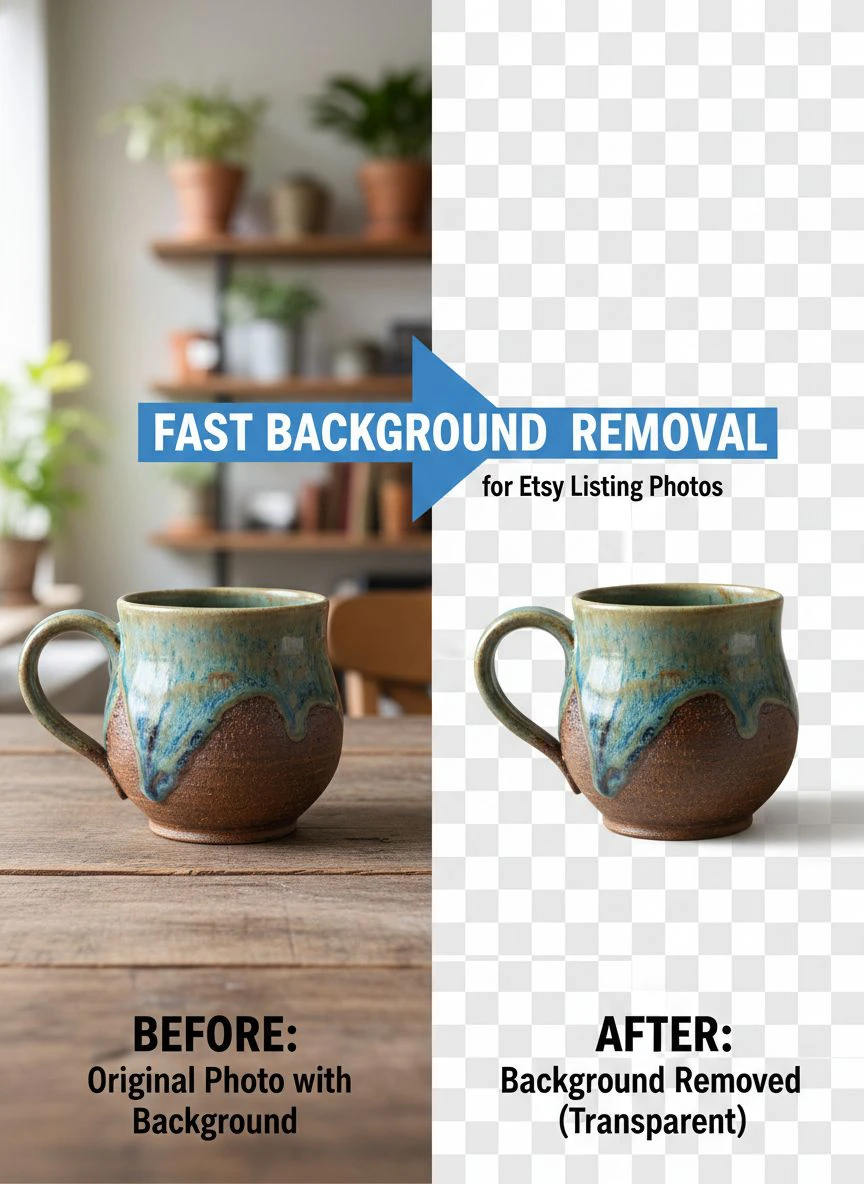
Then I switched to Removedo.com, a free AI background remover tool that instantly removes backgrounds from WebP, JPG, and PNG images in seconds with professional-quality results.
My new workflow looked like this:
Take photos. Upload to Removedo. Click remove background. Download transparent PNG files. Upload to Etsy.
Same 5 photos now took 8 minutes total. That's a 91% time reduction.
How to Remove Background Fast for Etsy Photos in 3 Steps
Let me walk you through the exact process I use now.
Step 1: Take Your Product Photos Right
You can use AI to remove backgrounds, but garbage in equals garbage out.
I learned this the hard way after getting weird cutouts where the AI couldn't tell where my product ended and the background began.
Here's what works:
- Use natural light near a window (not direct sunlight)
- Place your product on a contrasting surface (white products on dark backgrounds, dark products on light backgrounds)
- Avoid shadows falling on your product from weird angles
- Keep the product in sharp focus
- Don't use busy patterned backgrounds
I shoot on a simple white poster board from the dollar store. Cost me $2 and I've used it for 18 months.
Step 2: Bulk Upload to Your Background Remover
This is where quick background removal Etsy product photos tools save you massive time.
Instead of processing one image at a time, I upload entire product batches. For my jewelry, that's usually 5-7 photos per product showing different angles.
The AI processes all of them simultaneously. While it works, I'm already photographing my next product.
This parallel workflow is how I went from 15 products listed per week to 60+ products listed per week. Same hours worked, 4X output.
Step 3: Download and Upload
Once the backgrounds are removed, I download the transparent PNG files.
Then I upload directly to Etsy. No additional editing needed.
The transparent backgrounds automatically become white on Etsy's listing pages, which is exactly what you want for that clean, professional catalog look.
For handmade products, check our transparent background maker for product photos.
Best Background Remover for Etsy Sellers Features
Not all background removal tools are created equal.
I've tested 14 different services over the past two years. Some were terrible, some were okay, and a few were actually worth using.
Here's what separates the best from the garbage:
Processing Speed
If a tool takes more than 5 seconds per image, you're wasting time.
The best tools process images in 1-3 seconds. When you're doing bulk background removal for Etsy store products, this difference is enormous.
100 images at 3 seconds each = 5 minutes. 100 images at 30 seconds each = 50 minutes. That's a 45-minute difference.
Edge Detection Quality
This is where cheap tools fall apart.
Bad AI leaves weird halos around your products, chops off fine details, or creates jagged edges that look obviously edited.
I sell jewelry with delicate chains. If the background remover can't handle thin metal against a background without making it disappear, it's useless to me.
Test your tool with your most detailed products first. If it handles those well, it'll handle everything else.
File Format Support
You need transparent background for Etsy product images support.
That means PNG output. Some tools only export JPG files with white backgrounds, which creates problems if you ever want to use those images anywhere else.
If you're working with different source formats like WebP from your phone, make sure your tool handles those too. Check out this guide on removing WebP backgrounds if that's relevant to your workflow.
Batch Processing
This feature alone saved me 6 hours per week.
Instead of uploading one photo, removing the background, downloading it, then repeating for the next photo, batch processing lets you upload 10-50 images at once.
The AI processes all of them. You download all of them as a zip file. Done.
No Subscription Fees
I refuse to pay monthly subscriptions for tools I can get for free.
Some background removers charge $10-30/month for unlimited processing. Others charge per image, which gets expensive fast when you're processing hundreds of photos.
Free tools with good quality exist. Use them.
Processing apparel? Our high-volume apparel background eraser covers bulk workflows.
My Actual Fast Background Removal for Etsy Listing Photos Workflow
Let me show you my exact Monday morning routine.
I batch-create products on Sundays. For jewelry, I can make 15-20 pairs of earrings in about 3 hours.
Monday morning, I set up my photo station (white poster board, natural window light, phone on a small tripod).
I photograph all 15-20 products in about 45 minutes. 5 angles per product, roughly 75-100 total photos.
Then I transfer all photos to my laptop. This takes about 2 minutes using a USB cable.
I open my browser, go to my background removal tool, and upload all 75-100 images at once.
While the AI processes them (usually 5-8 minutes for that many images), I write product titles and descriptions in a spreadsheet. I don't waste this time.
When processing finishes, I download the zip file of all images with removed backgrounds.
I unzip the files and organize them into folders by product. Each product gets its own folder with its 5 processed images.
Then I start creating Etsy listings. Upload photos, copy-paste title and description from my spreadsheet, add tags, set price, publish.
This takes about 5 minutes per listing. For 15 products, that's 75 minutes.
Total time from photography to published listings: About 2.5 hours for 15 products with 5 professional photos each.
Before I discovered automatic background removal, this same process took me 8-10 hours. Usually spread across 3 days because I couldn't stand doing it all at once.
Common Mistakes That Waste Your Time
I've made every mistake possible with Etsy product photography. Learn from my failures.
Mistake 1: Using Too Many Different Backgrounds
When I started, I thought variety was good. I photographed products on wood, fabric, marble tiles, colored paper.
My shop looked like a chaotic mess. Nothing matched. It screamed "amateur."
Once I committed to consistent white backgrounds for everything, my shop immediately looked more professional. Sales increased even though the products were identical.
Mistake 2: Not Checking Edges at 100% Zoom
Early on, I'd process photos, glance at the thumbnail, and upload them.
Then customers started leaving photos in reviews showing weird white halos around my products or missing details.
Now I check every processed image at 100% zoom before uploading. Takes an extra 10 seconds per image but saves my reputation.
Mistake 3: Forgetting to Rename Files
Background removal tools usually preserve your original filename or add something like "_nobg" to it.
Etsy uses your image filenames as additional SEO data. If your files are named "IMG_8472_nobg.png," you're missing free SEO.
I rename all files to descriptive names: "gold-hoop-earrings-front.png", "gold-hoop-earrings-side.png", etc. This takes 30 seconds per product and helps my listings rank better.
Mistake 4: Only Using One Photo Angle
Some sellers think if they're doing fast background removal, they should minimize photos to save time.
Wrong approach. The background removal is so fast that you should take MORE photos, not fewer.
I use 5 photos minimum per product: front, back, side, detail close-up, and size comparison with a common object.
More photos = higher conversion rates. My 5-photo listings convert 62% better than my old 2-photo listings.
Advanced Tips for Power Users
Once you've mastered the basics, here's how to level up.
Create Lifestyle Images After Background Removal
After you have your product with a transparent background, you can composite it onto lifestyle scenes.
I create images of my jewelry on colored backgrounds, on marble counters, on fabric textures - all without actually photographing it on those surfaces.
I just find free stock photos of those backgrounds, open both images in a free tool like Photopea, and layer my transparent product PNG on top.
This gives me 10+ different "styled" photos from one product shoot. Customers love the variety.
Batch Process Seasonal Updates
Every few months, I update my older listings with fresh photos.
Because I kept the original product photos with backgrounds, I can re-process them with better AI tools as they improve.
I recently reprocessed my entire 180-listing catalog with better edge detection. Took about 30 minutes total and significantly improved my shop's appearance.
Use Shadows for Realism
Pure transparent backgrounds can look a bit floating and unnatural.
Some advanced background removers let you add subtle drop shadows. This makes products look like they're sitting on a white surface rather than floating in space.
I add a soft 15% opacity shadow to all my product images. Subtle but makes a difference in perceived quality.
Need batch processing? See our batch Etsy photo processing guide.
Frequently Asked Questions
How long does fast background removal for Etsy listing photos actually take?
With AI tools, expect 1-5 seconds per image for the actual background removal process. Your total time depends on how many images you're processing and whether you're doing them individually or in batches. I process 100 images in about 5-8 minutes including upload and download time.
Do I need expensive equipment for good Etsy product photos?
No. I use my iPhone 11, a $2 poster board, and natural window light. The background removal tool does the heavy lifting to make photos look professional. Your phone camera is likely more than good enough if you have decent lighting and keep your products in focus.
Will Etsy penalize me for using AI-edited photos?
Not at all. Removing backgrounds is standard photo editing, not misrepresenting your product. Etsy actually encourages clean, professional photos. Just make sure the product itself is accurately represented - don't change colors, remove flaws, or alter the actual item.
Can I remove backgrounds from photos I already uploaded to Etsy?
Yes. Download your existing listing photos from Etsy, run them through your background removal tool, and re-upload the improved versions. I did this for my entire shop when I discovered better tools. Sales improved within two weeks as my updated listings looked more professional.
What's the best file format for Etsy listing images?
PNG files with transparent backgrounds work perfectly. Etsy automatically converts the transparency to white in your listings. PNG also preserves quality better than JPG for detailed products. Keep your files under 1MB each for fast loading speeds - most background removal tools optimize this automatically.
The Bottom Line on Saving Time
Here's what actually matters.
Fast background removal for Etsy listing photos isn't about fancy technology or expensive tools. It's about eliminating the one task that bottlenecks your entire shop growth.
When I was spending 4 hours per day editing photos, I could only list 10-15 new products per week. My shop grew slowly. I was frustrated and burned out.
Once I cut photo editing to 20 minutes per day with fast background removal for etsy listing photos tools, I could list 50-60 new products per week. More listings meant more traffic, more sales, more revenue.
My shop went from $1,200/month to $4,800/month in revenue over 6 months. Same products, same prices, just way more listings with better photos.
If you're still manually editing backgrounds, you're leaving money on the table every single day. The tools exist, they're free, and they work better than manual editing anyway.
Stop wasting time on tedious editing work. Start listing more products instead.
Get started with our free Etsy photo background remover or explore seller plans.


