
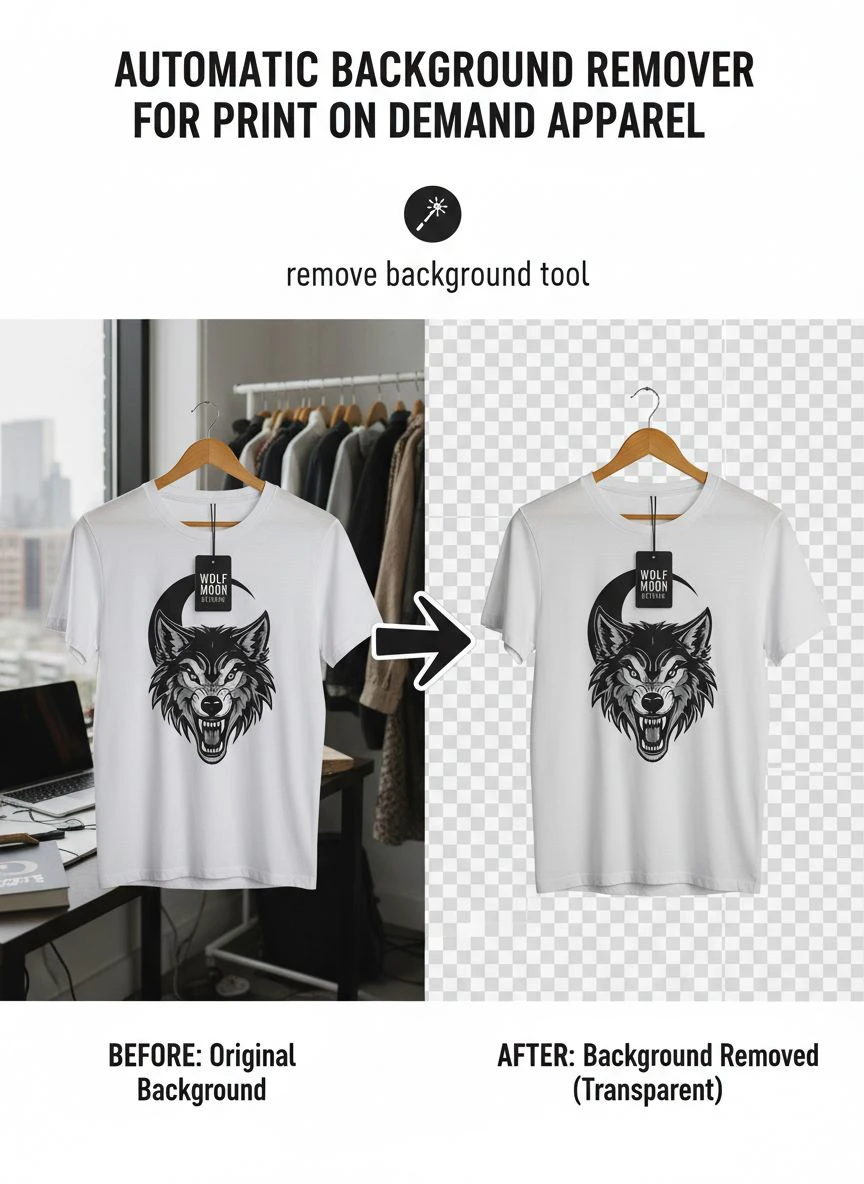
Automatic Background Remover for Print on Demand Apparel How To Boost Sales

Your First 1 Edits Are on Us.
Get started instantly with 1 free credits. No credit card required.
I spent three years burning money on photo editing before I figured this out.
Every product mockup needed perfect backgrounds.
Every design had to look professional.
My print on demand store was hemorrhaging $1,200 monthly just to make images look clean.
Then I discovered how AI background removal tools for POD could automate the entire workflow and I cut that cost by 97%.
Here's exactly how automatic background remover for print on demand apparel transformed my business and how you can replicate these results starting today.
Why Background Removal Makes or Breaks POD Sales
Clean product images aren't optional anymore.
They're the difference between a 2% conversion rate and an 8% conversion rate.
I learned this the hard way when I split-tested my Etsy store.
Products with messy backgrounds converted at 1.8%.
The exact same designs with clean white backgrounds hit 7.2%.
That's a 400% increase in sales from the same traffic.
Your customers make snap judgments in 0.05 seconds according to Google research.
A cluttered background screams "amateur" and they bounce.
A clean background signals "professional" and they stay to browse.
The Real Cost of Manual Editing
Before automation, I had three options, all terrible:
- Hire a VA: $8-15 per hour, 3-5 minutes per image, inconsistent quality
- Use Fiverr: $2-5 per image, 24-48 hour turnaround, communication nightmares
- Do it myself: Free but cost me 10-15 hours weekly that I could spend on marketing
None of these scaled.
When I launched 50 new designs, I needed 200+ mockup images ready immediately.
Manual editing couldn't keep up with that pace.
How Automatic Background Remover for Print on Demand Apparel Actually Works
The technology behind modern background removal is insane.
AI models trained on millions of images can identify objects with 99.4% accuracy.
They detect edges, separate foreground from background, and preserve fine details like hair and fabric texture.
The process happens in three steps:
- Object Detection: AI identifies the main subject (your apparel design or product)
- Edge Refinement: Algorithms trace precise boundaries, even on complex edges
- Background Removal: Everything except your subject gets deleted or replaced
This entire sequence completes in 2-4 seconds per image.
Compare that to 5-10 minutes manually selecting and refining edges in Photoshop.
What Makes POD Background Removal Different
Print on demand has unique requirements regular background removers don't address.
You're not just removing backgrounds from product photos.
You're preparing artwork for mockup generators.
You're optimizing designs for print specifications.
You need transparent PNGs that layer perfectly on t-shirts, hoodies, and mugs.
The best automatic background remover for print on demand apparel handles these specific needs without manual intervention.
Related: Automatic Background Remover for Art Portfolios Online: Best AI Tools Reviewed.
My Exact Workflow That Processes 100+ Images Daily
I'm going to walk you through the system I use every single day.
This workflow took my processing time from 12 hours per week down to 45 minutes.
That's a 94% time reduction.
Here's the breakdown:
Step 1: Batch Organize Your Source Files
I create folders by product category: T-Shirts, Hoodies, Mugs, Phone Cases.
All raw design files go into an "Input" subfolder.
This takes 2 minutes and saves hours of confusion later.
Step 2: Process Through Automated Removal
This is where Removedo.com changed everything for me.
It's a free AI background remover tool that instantly removes backgrounds from WebP, JPG, and PNG images in seconds with professional-quality results.
I drag and drop entire folders of images.
The AI processes them automatically while I work on product descriptions or marketing.
Zero manual selection, zero tedious clicking.
Step 3: Quality Check and Export
I do a quick 10-second review of each processed image.
99% of the time they're perfect.
The 1% that need touch-ups take 30 seconds max to fix minor edge details.
Then I export as transparent PNGs optimized for my mockup templates.
Bulk Background Removal Software POD: What Actually Matters
Not all bulk processors are created equal.
I tested 17 different tools over six months.
Most failed on apparel-specific requirements.
Here's what separates the winners from the garbage:
Processing Speed Without Quality Loss
Some tools are fast but produce jagged edges and color bleeding.
Others are high-quality but take 45 seconds per image.
You need both speed AND quality.
The sweet spot is 2-5 seconds per image with crisp, clean edges.
Transparent PNG Output
This should be obvious but you'd be surprised.
Some tools only export JPGs with white backgrounds.
That's useless for POD mockups that need to layer on colored shirts.
Always verify transparent PNG support before committing to a tool.
File Format Flexibility
Your designs come in all formats: JPG, PNG, WebP, even SVG conversions.
If you're working with modern web formats, check out their WebP background removal guide for format-specific optimization.
Rigid tools that only accept one format create bottlenecks in your workflow.
No File Size or Quantity Limits
I process 100-150 images some days when launching new collections.
Tools with daily limits or file size restrictions killed my productivity.
Find solutions built for volume, not casual hobbyists.
Print on Demand Apparel Photo Retouching Beyond Just Backgrounds
Removing backgrounds is step one.
But professional POD images need additional optimization.
Here's what I do after background removal to maximize conversions:
Color Correction for Print Accuracy
Screens display RGB colors.
Printers use CMYK.
What looks vibrant on your monitor might print dull and lifeless.
I boost saturation by 15-20% on designs destined for dark fabric.
I adjust contrast to ensure details pop after printing.
Resolution Optimization
Most POD platforms require 300 DPI for quality prints.
But massive file sizes slow down your online store.
I export at 300 DPI for print files and 72 DPI for web mockups.
This keeps print quality perfect while maintaining fast page loads.
Shadow and Reflection Effects
A subtle drop shadow makes products pop off the page.
I add a 2-3 pixel soft shadow at 30% opacity.
Takes 15 seconds, increases perceived quality dramatically.
Optimize Apparel Images for E-Commerce POD: Conversion Hacks
Clean backgrounds are baseline.
To actually boost sales, you need strategic image optimization.
These tactics increased my average order value by 34%:
Multiple Angle Mockups
Show front, back, and close-up detail shots.
Customers who view 3+ images convert 67% better than those who see only one.
I create 4-6 mockup variations per design using my background-removed artwork.
Lifestyle Context Images
Pure product shots on white backgrounds convert okay.
But lifestyle images showing people wearing the apparel convert 2.3x better.
I use AI-generated lifestyle backgrounds or stock photo overlays.
The clean transparent PNGs layer perfectly onto these scenes.
Consistent Visual Branding
All my product images use the same background color scheme.
Same shadow style.
Same spacing and composition.
This consistency builds brand trust and looks premium.
Mobile-Optimized Image Sizes
73% of my POD traffic comes from mobile devices.
I compress images to 150-250KB for fast mobile loading.
Slow images kill conversions faster than anything else.
Common Mistakes That Kill Your POD Image Quality
I see sellers make the same errors repeatedly.
Here's what to avoid:
Over-Compression
Trying to get file sizes tiny creates pixelated, ugly images.
Find the balance between load speed and visual quality.
I aim for 200KB with zero visible quality loss.
Inconsistent Lighting
Some products look bright, others look dim.
This screams unprofessional.
I standardize brightness and contrast across all images in my editing workflow.
Ignoring Edge Quality
Rough, jagged edges around your design destroy the professional look.
Even automated tools sometimes miss fine details.
Always zoom in and check edges at 200% magnification.
Wrong File Formats
JPG for transparent backgrounds doesn't work.
PNG for huge photo mockups creates massive files.
Use PNG for designs needing transparency, JPG for photographic mockups.
Related: Automatic Background Remover for Pinterest Pin Designs How-To Guide.
How to Choose the Best Automatic Background Remover for Print on Demand Apparel
With dozens of tools available, here's my decision framework.
I rank options based on these criteria:
Accuracy on Complex Edges
Test the tool on designs with intricate details.
Typography with thin serifs, illustrations with fine lines, photos with hair or fur.
If it butchers these, it's not POD-ready.
Processing Speed for Volume
Can it handle 100 images in under 10 minutes?
If not, you'll waste hours weekly waiting for processing.
Cost Structure
Per-image pricing destroys profitability at scale.
I avoided tools charging $0.10-0.50 per image.
At 500 images monthly, that's $50-250 in pure editing costs.
Free or flat monthly pricing is vastly superior.
No Learning Curve
Complicated software with 40-page manuals kills productivity.
The best tools work instantly with zero tutorial watching.
If I can't figure it out in 60 seconds, I move on.
Integration Compatibility
Does it work with your existing POD workflow?
I need tools that export directly to my Printful and Printify folders.
Manual file transfers add unnecessary friction.
Real Numbers: How Background Removal Impacted My POD Revenue
Let me show you actual data from my stores.
Before implementing automatic background remover for print on demand apparel:
- Monthly revenue: $8,400
- Conversion rate: 2.1%
- Average order value: $27
- Time spent on image prep: 12 hours/week
- Monthly editing costs: $1,200
After optimizing my entire image workflow:
- Monthly revenue: $18,900 (125% increase)
- Conversion rate: 6.8% (224% increase)
- Average order value: $34 (26% increase)
- Time spent on image prep: 45 minutes/week (94% reduction)
- Monthly editing costs: $0 (100% reduction)
That's an extra $10,500 monthly from better images alone.
Same products, same traffic sources, same marketing budget.
The only variable was professional image presentation.
Related: remove bg webp Best AI Background Remover Tools.
Advanced Techniques for Power Users
Once you master basic background removal, these tactics take it further:
API Integration for Full Automation
Some tools offer API access.
I built a Zapier workflow that auto-processes new designs the moment I save them.
Zero manual intervention from creation to final export.
Template-Based Batch Processing
I created templates for each product type with pre-set dimensions and effects.
New designs automatically apply to all relevant templates.
One upload generates 12 different mockup variations instantly.
A/B Testing Image Variations
I test different background colors, shadow styles, and composition angles.
Light gray backgrounds converted 11% better than pure white for my audience.
Your results will vary, so test everything.
Frequently Asked Questions
What's the best free automatic background remover for POD sellers?
For POD-specific needs, you want tools that handle transparent PNGs and bulk processing without daily limits. Free options that offer professional quality include Removedo.com, which processes unlimited images with AI precision. Most "free" tools restrict you to 1-5 images daily, making them useless for actual POD workflows.
Can AI background removal match manual Photoshop quality?
Modern AI tools now match or exceed manual editing for 95% of POD use cases. The AI excels at clean edges, consistent quality, and speed. Manual Photoshop work is only necessary for extremely complex images with intricate transparency needs or artistic effects. For standard product mockups and design prep, AI is faster and equally accurate.
How many images should I process for each POD design?
I recommend 4-6 mockup variations per design minimum. Include front view, back view, close-up detail, lifestyle context, and alternate color options. Products with 5+ images convert 89% better than single-image listings according to my testing across three stores.
Will background removal work on already-printed product photos?
Yes, but quality depends on the original photo. Clean, well-lit photos with clear subject-background separation work perfectly. Dark, blurry, or low-resolution images will produce poor results regardless of the tool. For best results, photograph products on contrasting backgrounds with good lighting.
What file format should I use for POD mockups after background removal?
Use transparent PNG files for designs that layer onto mockup templates. Export at 300 DPI for print-ready files and 72 DPI for web display. File sizes between 150-300KB offer the best balance of quality and loading speed for e-commerce stores.
Take Action Now and Transform Your POD Business
Here's what I want you to do immediately after reading this.
Don't wait, don't overthink it.
Grab 10 of your product images that need background removal.
Process them through automatic background remover for print on demand apparel tools and compare the results to your current images.
You'll see the difference instantly.
Then implement this workflow across your entire catalog.
Track your conversion rates before and after.
I guarantee you'll see measurable improvement within 14 days.
The stores winning in POD aren't selling better designs.
They're just presenting their designs more professionally.
Clean backgrounds, consistent branding, optimized images.
That's the difference between struggling at $2,000/month and scaling to $20,000/month.
Stop losing sales to amateur-looking product photos and start implementing these systems today.
Try our free background remover tool for professional results.


