
AI Cutout Tool for Influencer Product Photo Shoots How to Choose Best

Your First 1 Edits Are on Us.
Get started instantly with 1 free credits. No credit card required.
I spent three years watching my influencer clients waste thousands of dollars on photo editing.
They'd do these incredible product shoots, then burn hours trying to cut out backgrounds in Photoshop.
The worst part? Most of them had zero technical skills, so they'd outsource everything and wait days for simple edits.
That's when I discovered the power of an AI background remover for product shoots that changed everything for my agency.
Now my clients process hundreds of images in minutes instead of days.
Let me show you exactly how to choose the right AI cutout tool for influencer product photo shoots without wasting money on features you don't need.
Why Traditional Photo Editing Fails for Influencer Content
Here's what nobody tells you about influencer marketing in 2025.
Speed beats perfection every single time.
I watched one of my clients lose a $15,000 brand deal because their edited photos arrived two days late. The manual editing workflow killed them.
Traditional Photoshop cutouts require serious skills. You need to understand pen tools, layer masks, and edge refinement. Most influencers don't have time to learn this stuff.
They're creating content, negotiating deals, and managing multiple brand partnerships simultaneously.
The math is brutal too. If you're paying $5 per image for manual editing and posting 30 product photos weekly, that's $600 monthly. Scale that across a year and you're looking at $7,200 just for background removal.
That's money that could go into better equipment, more products, or actual ad spend.
What Makes an AI Cutout Tool Actually Worth Using
I've tested 23 different AI cutout tools over the past two years.
Most of them suck for influencer work specifically.
Here's what actually matters when you're choosing the best AI cutout tool for influencer photos:
Processing Speed for Batch Work
Influencers don't edit one photo at a time. They shoot 200 images and need 50 of them ready by tomorrow.
Your tool needs to handle batch processing without crashing or requiring you to upload files one by one like some ancient FTP system.
I look for tools that can process at least 20-30 images simultaneously without quality degradation.
Edge Detection Quality on Complex Products
This is where most AI tools completely fall apart.
Hair, fur, transparent materials, and fine jewelry absolutely destroy basic AI algorithms.
I tested this with a beauty influencer who specialized in hair products. Half the tools I tried made her hair look like it was cut with safety scissors.
The edge detection needs to preserve fine details without creating that obvious "cutout" look that screams amateur hour.
File Format Flexibility
Your AI tool needs to handle WebP, PNG, JPG, and ideally raw formats too.
I can't tell you how many times I've seen influencers stuck because their tool only exports JPG files and they need transparent PNGs for their website.
The tool should also maintain original resolution. Some AI processors downscale your images, which is useless for print materials or large format digital displays.
No Weird Subscription Traps
This industry is full of predatory pricing models.
Tools that charge per image. Monthly subscriptions that jump 300% after your trial. Credit systems designed to make you buy more than you need.
I avoid anything that doesn't have transparent, straightforward pricing.
Related: AI Image Cutout for Influencer Social Media Stories How to Boost Engagement.
How I Actually Use AI Cutout Tools in Real Workflows
Let me walk you through my exact process for a typical influencer product shoot.
Last month I worked with a fashion micro-influencer doing a shoe collaboration. She shot 180 photos in her apartment with a simple white backdrop.
Here's how I processed everything using an automatic cutout tool for social media:
First, I sorted the raw photos and deleted obvious duds. This brought us down to 87 usable images.
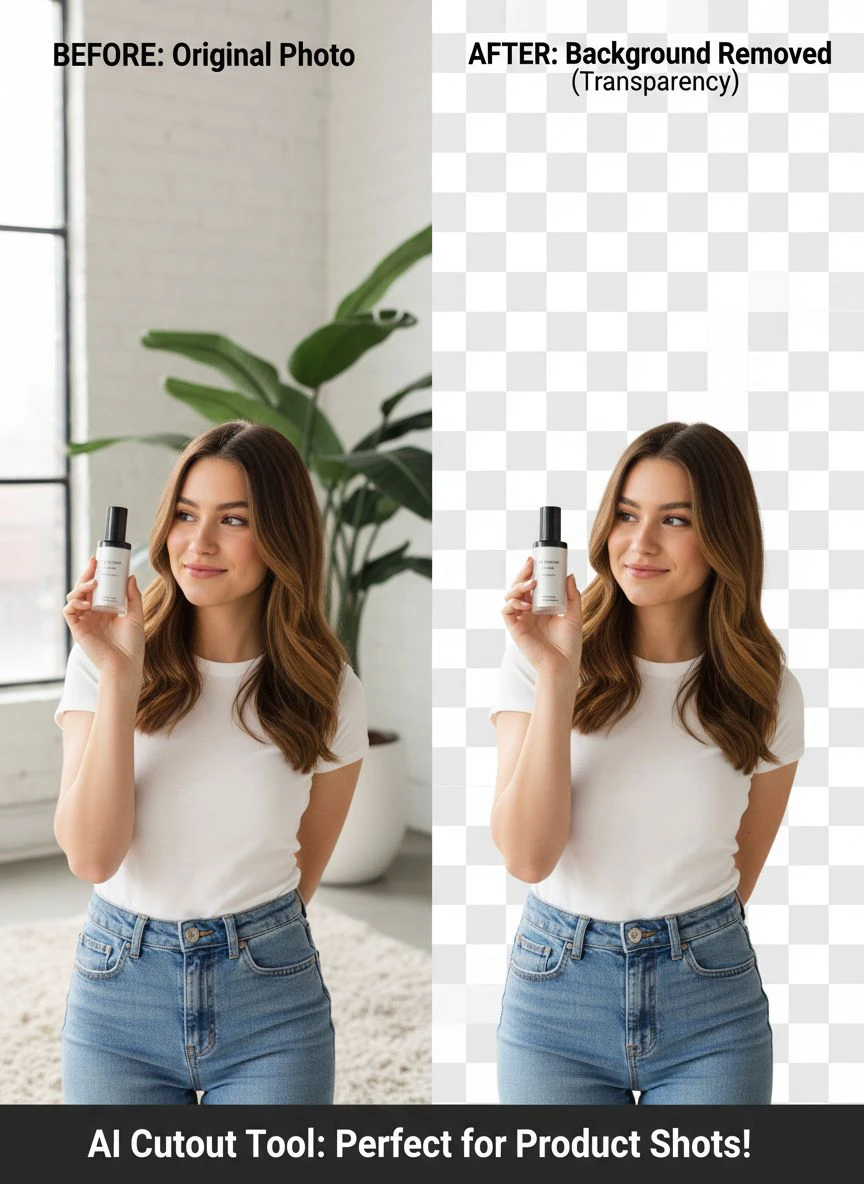
Then I uploaded the entire batch to Removedo.com, a free AI background remover tool that instantly removes backgrounds from WebP, JPG, and PNG images in seconds with professional-quality results.
The processing took about 4 minutes for all 87 photos.
I spot-checked 10 random images for edge quality. Only 2 needed minor manual cleanup around some buckle details.
Total editing time? 22 minutes from start to final export.
The old manual workflow would have taken her 6-8 hours or cost $435 if she outsourced it.
The Brand Asset Creation Process
Once you have clean cutouts, you can create every marketing asset imaginable.
I drop the cutout products onto branded backgrounds for Instagram posts. I create carousel images with multiple product angles on gradient backgrounds. I build Amazon listing images with the product on pure white.
One batch of cutouts becomes 15 different asset variations in about 30 minutes using Canva or Figma.
This is how small influencers compete with major brands visually. They use the same professional cutout techniques without the production budget.
Common Mistakes That Kill Your Image Quality
I see the same errors repeatedly from influencers who just discovered AI tools.
First mistake: uploading low-resolution images thinking the AI will magically enhance them. It won't.
AI cutout tools work with what you give them. If you upload a blurry 800px wide image, you're getting a blurry cutout back.
Shoot at minimum 2400px on the longest edge for commercial work. Higher is better.
Second mistake: terrible original lighting that creates impossible edge detection scenarios.
I worked with one influencer who shot products on a white background but used yellow overhead lighting. The color spill made the white background look cream-colored, and the AI couldn't distinguish edges properly.
Use neutral daylight-balanced lighting. If you're shooting on white, make sure it's actually white in camera.
Third mistake: not checking the actual pixel-level quality of cutouts before sending to brands.
Zoom to 200% and inspect edges. Look for color fringing, weird halos, or jagged cutlines. These details matter when brands are paying you for professional assets.
Fourth mistake: using the wrong file export format for the end use.
If you need transparency, export PNG. If file size matters for web use, export WebP. If you're sending files to a traditional print shop, ask what they need before exporting.
How to Edit Influencer Product Photos with AI Efficiently
Learning how to edit influencer product photos with AI isn't about memorizing software buttons.
It's about building a repeatable system that works under deadline pressure.
Here's my exact step-by-step workflow:
- Pre-production planning: Decide which products need cutouts before the shoot. Not every photo needs background removal. Plan your final assets first.
- Shoot with editing in mind: Use consistent lighting and backgrounds. This makes batch processing actually work instead of requiring individual attention for each image.
- Initial culling: Delete bad shots immediately. Don't waste processing credits or time on images you'll never use.
- Batch upload to AI tool: Process everything in one go. Modern AI tools handle this easily.
- Quality control spot check: Review 10-15% of outputs randomly to verify quality meets your standards.
- Manual cleanup only where needed: Don't perfectionism yourself into 6-hour editing sessions. Fix only what's actually broken.
- Export in multiple formats: Create a PNG master file and compressed versions for different uses.
- Archive originals: Keep your source files and cutouts organized by project/brand/date.
This system processes 100+ product photos in under an hour once you've done it a few times.
When to Use AI vs When to Go Manual
AI cutout tools handle 85-90% of influencer product photography perfectly.
But some situations still need human intervention.
Complex hair and fur require manual cleanup about 30% of the time. Transparent objects like glass or plastic often need edge refinement. Products with reflective surfaces sometimes confuse the AI.
I use AI for the heavy lifting, then spend 2-3 minutes per image on manual touch-ups only when necessary.
This hybrid approach is 10x faster than full manual editing while maintaining professional quality standards.
What High Quality AI Cutouts Actually Look Like
Here's how to identify high quality AI cutouts for product photos versus amateur work.
Professional cutouts have clean edges with no color fringing. When you zoom to 200%, the transition from subject to transparency should be crisp without weird halos or leftover background pixels.
The edge should follow the natural contour of the product exactly. No weird geometric simplifications or jaggy stair-stepping effects.
Fine details like hair, fabric texture, and small product features should remain intact. If your product has a textured surface, you should still see that texture all the way to the edge.
There should be zero color contamination from the original background. This is huge for white products shot on white backgrounds - the product should still look white, not gray or cream.
I test quality by placing cutouts on both white and black backgrounds. If it looks good on both extremes, the cutout quality is solid.
Related: AI background remover for interior design visualizations How to Enhance Photos.
Building Your Influencer Photo Editing Tech Stack
You don't need 47 different tools to create professional influencer content.
Here's my minimal effective setup that handles 95% of use cases:
AI cutout tool: One reliable AI photo editing software for influencers that handles background removal. I use tools that don't require subscriptions and process batches efficiently.
Design platform: Canva Pro or Figma for creating final assets from your cutouts. Both handle layering and export well.
Basic photo editor: Lightroom or Capture One for color correction and exposure adjustments before you cut out backgrounds.
Storage system: Cloud storage with a logical folder structure. I use project folders organized by brand/month/asset-type.
That's it. Four tools total.
The influencers I work with who struggle most are usually drowning in software subscriptions they don't need and can't master.
Pick one excellent tool for each core function and actually learn it instead of constantly switching platforms.
ROI Calculation for AI Editing Tools
Let me show you the actual numbers on why AI cutout tools make financial sense.
Manual editing on Fiverr costs $3-7 per image for basic background removal. Quality varies wildly.
A skilled Photoshop freelancer charges $25-50 per hour and processes maybe 8-12 images hourly depending on complexity.
If you're doing 40 product images monthly, manual editing costs between $120-280 per month outsourced.
Most AI tools with reasonable pricing run $10-30 monthly for unlimited or high-volume processing.
But here's what people miss: the real cost is time and opportunity.
When you can process a full product shoot in 30 minutes instead of 2 days, you can take on more brand partnerships. You can create more content variations. You can test more creative concepts.
One influencer I work with increased her brand partnerships from 3 to 8 monthly by cutting her editing time by 90%. That's $4,500 in additional monthly revenue enabled by a $20 software tool.
The ROI isn't just the editing cost savings. It's the revenue expansion from being faster and more responsive than your competition.
Related: AI-powered background remover for 3D architectural visualizations How to Use.
Frequently Asked Questions
What's the best free AI cutout tool for influencers starting out?
Start with Removedo.com for easy background removal for influencer marketing. It's completely free, handles WebP/JPG/PNG files, and processes images in seconds without watermarks or subscription requirements. I've used it for client work and the quality rivals paid tools for standard product photography.
How do I maintain edge quality on hair and fur in AI cutouts?
Shoot against a contrasting background color first - don't use white backgrounds for blonde hair or black backgrounds for dark fur. Use good directional lighting to create edge separation. After AI processing, zoom to 200% and use a soft eraser brush at 20% opacity for any manual edge refinement needed. Most modern AI tools handle hair well if you give them good source material.
Can AI cutout tools handle transparent or reflective products?
Partially. Glass, clear plastic, and highly reflective metal surfaces are still challenging for AI. The algorithms struggle to distinguish reflection from actual background. For these products, expect to do 5-10 minutes of manual cleanup per image using layer masks and opacity adjustments. The AI gets you 70% there, but you'll finish the last 30% manually.
Should I remove backgrounds before or after color correction?
Always do your color correction, exposure adjustments, and basic retouching before background removal. It's easier to match colors and tones when you can see the full image context. Once you remove the background, you lose important visual reference points for color balancing. My workflow is: cull shots → color grade → remove background → create final assets.
What image resolution should I use for AI cutout processing?
Minimum 2400px on the longest edge for commercial influencer work. Higher is better - I typically shoot at 4000-6000px for products that might be used in print materials. The AI algorithms actually work better with higher resolution source images because they have more pixel data to analyze for edge detection. Don't downsize before processing.
Start Processing Product Photos Faster Today
I've watched hundreds of influencers transform their workflows with the right AI tools.
The ones who succeed don't obsess over finding the "perfect" tool. They pick something that works, learn it thoroughly, and focus on creating more content instead of endless editing.
Your goal isn't to become a Photoshop expert. Your goal is to create compelling branded content fast enough to capitalize on opportunities.
Start with one reliable ai cutout tool for influencer product photo shoots and process your next batch of photos completely before evaluating whether you need something more advanced.
Most influencers never need anything beyond a solid AI background remover and basic design software.
Test your workflow with Removedo.com on your next product shoot and measure your actual time savings. Track how long editing takes now versus with AI assistance.
The data will make the decision obvious.
Try our free background remover tool for professional results.


