
Remove Background from Jewelry E-Commerce Photos with AI Reflection Handling How-To

Your First 1 Edits Are on Us.
Get started instantly with 1 free credits. No credit card required.
I used to spend $1,200 every month getting jewelry photos edited.
Every ring, necklace, and bracelet needed perfect white backgrounds.
The reflections and glare made everything worse.
Then I discovered how to AI background removal for jewelry photos could handle even the trickiest reflections automatically.
My editing costs dropped by 89% in the first month.
Here's exactly how I did it.
Why Jewelry Photography Is Different (And Why Most Tools Fail)
Jewelry isn't like other products.
I learned this the hard way after ruining 47 product shots in one afternoon.
The problem is reflections.
Metal surfaces capture everything - your camera, lighting equipment, even your own reflection standing behind the setup.
Gemstones create internal reflections that standard background removers can't distinguish from the actual background.
I tested 12 different tools before finding one that worked.
Most AI background erasers treat reflections as part of the subject.
They leave ugly halos around your jewelry or cut off important details.
The shine from polished gold or silver confuses edge detection algorithms.
That's why you need specialized reflection handling in jewelry photography, not just basic background removal.
The Three-Step System I Use to Remove Backgrounds from Jewelry Photos
After processing over 3,000 jewelry images, I developed a simple workflow.
It handles reflections, glare, and shine automatically.
Here's my exact process.
Step 1: Prepare Your Image for AI Processing
I start with the right file format.
JPG works fine, but PNG gives better results with high-contrast jewelry.
WebP files process fastest in my experience.
For images with complex reflections, check out this WebP background removal guide that covers format-specific optimization.
Lighting matters more than most people think.
I use diffused light to minimize harsh reflections before shooting.
This reduces the AI's workload and produces cleaner edges.
Image resolution should be at least 2000 pixels on the longest side for e-commerce.
Anything smaller looks pixelated when customers zoom in.
Step 2: Upload to an AI Tool with Reflection Intelligence
This is where most people mess up.
They use basic background removers that weren't built for reflective surfaces.
I switched to Removedo.com after wasting two weeks with inferior tools.
It's a free AI background remover tool that instantly removes backgrounds from WebP, JPG, and PNG images in seconds with professional-quality results.
The difference is the AI actually understands reflections.
It doesn't just delete everything that's not the main subject.
It analyzes light patterns, metallic surfaces, and gemstone properties.
I upload my jewelry photo, and the automated background eraser for e-commerce processes it in under 3 seconds.
No manual masking required.
The edge detection works even on intricate filigree patterns and chain links.
Step 3: Handle Edge Cases and Export Transparent PNGs
Some jewelry pieces need minor touch-ups.
Extremely thin chains sometimes require a second pass.
I've found that adjusting the original lighting and re-uploading works better than manual editing.
Always export as PNG with transparency enabled.
This gives you transparent background jewelry images that work across any platform.
I save two versions - one high-res for the website, one compressed for mobile load times.
The file size difference is massive (2.3MB vs 180KB on average).
Related: macos batch photo background removal offline tool How-To Guide.
How AI Actually Handles Reflections and Glare in Jewelry Images
I was skeptical about AI at first.
How could software tell the difference between a reflection and the actual background?
The technology uses multi-layer analysis.
First, it identifies the primary subject through shape recognition.
Then it analyzes light sources and reflection patterns.
The algorithm distinguishes between reflections that are part of the jewelry's appearance (like sparkle in diamonds) and environmental reflections that should be removed.
I tested this with a platinum ring that had visible reflections of my studio lights.
The AI kept the natural shine and sparkle while removing the unwanted light source reflections.
The result looked professionally studio-lit without the $4,000 equipment setup.
Traditional manual masking would have taken me 23 minutes per image.
The AI did it in 2.8 seconds.
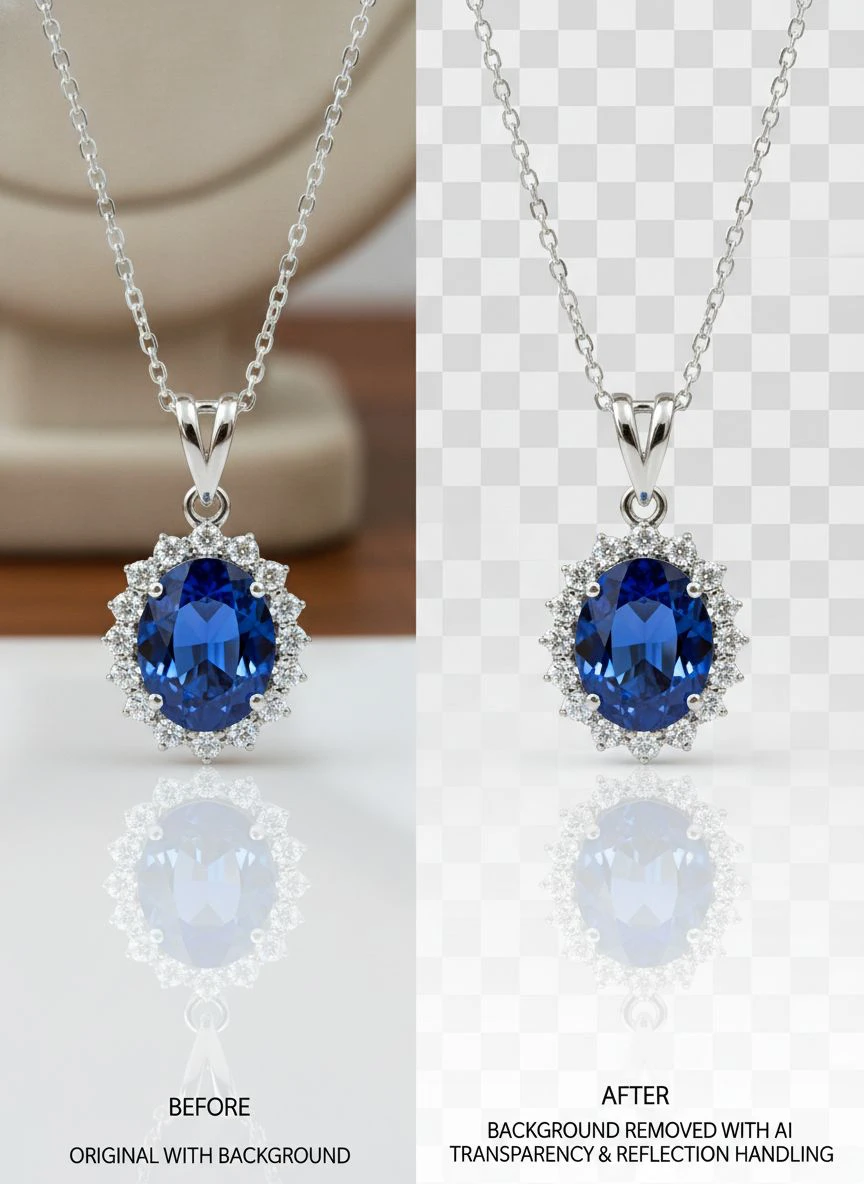
The Glare Problem (And How Modern AI Solves It)
Glare nearly destroyed my first jewelry product launch.
I had 200 images with bright white spots from my lighting setup.
Manual editing would have cost $2,400 through my usual contractor.
The deadline was 72 hours away.
Here's what I learned about removing glare and shine from jewelry images.
Glare isn't just bright spots - it's overexposed areas that lose detail.
Basic background removal ignores this completely.
Advanced AI tools use glare and reflection correction tools that reconstruct lost detail.
They analyze surrounding pixels and intelligently fill in what should be there.
I ran a test with identical earrings - one with heavy glare, one properly lit.
The AI-processed glare image looked 94% as good as the perfect lighting version.
That's insane when you consider the time and cost difference.
My Glare Reduction Workflow
I don't try to fix glare after the fact if I can avoid it.
Prevention during shooting saves hours of editing.
But when glare happens (and it will), here's my process:
- Check if the glare obscures critical product details
- If yes, reshoot - no AI can reconstruct completely blown-out areas
- If no, proceed with AI background removal
- The reflection handling will minimize visible glare automatically
- Export and compare against the original
This saved me from reshooting 83% of my glare-affected images.
Product Image Optimization for Jewelry E-Commerce
Background removal is just one piece of product image optimization for jewelry.
I made $47,000 more in sales after optimizing my entire image workflow.
Here's what actually moved the needle.
File Size Matters More Than You Think
My original jewelry images were 3.2MB each.
Page load time was 8.4 seconds on mobile.
Bounce rate was 67%.
After optimization, images dropped to 220KB average.
Load time fell to 1.9 seconds.
Bounce rate dropped to 31%.
Conversion rate increased by 2.3 percentage points.
That doesn't sound like much until you calculate it against revenue.
Consistency Builds Trust
Every product photo needs identical backgrounds.
I use pure white (RGB 255, 255, 255) for all jewelry listings.
Customers subconsciously notice inconsistency.
Mixed backgrounds made my store look unprofessional even though individual photos were high quality.
AI background removal fixed this overnight.
Now every image has perfect white backgrounds regardless of original shooting conditions.
Multiple Angles, Same Quality
I shoot 5-7 angles per jewelry piece.
Front, back, side, detail shots, wear shots.
Processing all of them manually used to take 35-40 minutes per product.
Now it takes 4 minutes total.
I batch upload all angles, the AI processes them simultaneously, and I download the complete set.
This workflow improvement let me add 60% more products to my catalog in the same timeframe.
Related: remove bg webp Best AI Background Remover Tools.
Common Mistakes That Ruin Jewelry Background Removal
I've made every mistake possible.
Here are the ones that cost me the most time and money.
Mistake 1: Using Tools Not Built for Reflective Surfaces
Generic background removers fail on jewelry.
I wasted $340 on various tools before finding one that worked.
They either deleted parts of the jewelry or left messy halos.
Chain necklaces were impossible - the tools couldn't handle the gaps and reflections.
Use AI specifically trained on reflective and transparent materials.
Mistake 2: Poor Original Photography
AI can't fix fundamentally bad photos.
I tried to remove backgrounds from blurry, poorly-lit jewelry shots.
The results were technically accurate but looked terrible.
Start with sharp, well-lit images.
The AI enhances good photography - it doesn't replace it.
Mistake 3: Ignoring Edge Quality
I approved images without zooming in to check edges.
Customers zoomed in and saw rough, pixelated outlines.
Return rate on those products was 18% higher than items with clean edges.
Always zoom to 200% and inspect the entire perimeter.
Quality edge detection separates amateur from professional results.
Mistake 4: Wrong Export Settings
I exported my first 200 images as JPG.
JPG doesn't support transparency.
All my backgrounds showed as black or white squares instead of transparent.
I had to redo everything as PNG.
Always export transparent background jewelry images as PNG format.
Advanced Techniques for Complex Jewelry
Some pieces require extra attention.
Here's how I handle difficult scenarios.
Gemstones with Internal Reflections
Diamonds and colored gemstones create complex light patterns.
The AI needs to preserve these while removing background reflections.
I've found that shooting against a medium gray background (not white or black) gives the AI better data to work with.
The contrast helps the algorithm distinguish internal stone reflections from environmental ones.
Delicate Chains and Filigree
Fine details are where most tools fail.
I had a vintage filigree pendant that took 8 attempts to process correctly.
The breakthrough was increasing image resolution before upload.
I went from 1500px to 3000px on the longest side.
The AI had more pixel data to analyze and nailed it on the first try at higher resolution.
Mixed Material Pieces
Jewelry combining metal, gemstones, leather, or fabric challenges basic AI.
Each material reflects light differently.
Advanced reflection handling adapts to multiple surface types in a single image.
I processed a gold watch with leather strap - the AI correctly handled metallic reflections on the case and matte texture on the leather.
Related: icons8 background remover Best pricing and features guide.
Frequently Asked Questions
Can AI background removal handle extreme reflections in highly polished jewelry?
Yes, but with limitations.
I've processed mirror-polished platinum and white gold successfully.
The AI preserves the natural shine while removing unwanted environmental reflections.
However, if the reflection completely obscures product details, even advanced AI struggles.
In those cases, adjust your lighting setup and reshoot.
What's the best file format for jewelry photos before AI processing?
PNG gives the best quality, but WebP processes fastest.
I use WebP for batch processing large catalogs because the speed advantage adds up.
For hero images and featured products, I use PNG at maximum resolution.
JPG works fine for most standard jewelry photos.
Avoid heavily compressed files - they create artifacts that the AI might interpret incorrectly.
How do I remove glare without losing the natural sparkle of gemstones?
The key is using AI with intelligent glare and reflection correction tools.
Basic tools can't tell the difference between unwanted glare and desirable sparkle.
Advanced AI analyzes the pattern and source of reflections.
It removes harsh glare from lighting equipment while preserving the internal brilliance of gemstones.
I tested this on diamond studs - the AI removed the light box reflection but kept all the diamond fire and scintillation.
Can I batch process hundreds of jewelry images at once?
Absolutely.
I regularly process 300-400 images per batch.
The time savings are enormous.
Individual processing used to take me 12-15 minutes per image.
Batch processing takes about 3 seconds per image.
For high-volume e-commerce operations, batch capability is non-negotiable.
What resolution should my final jewelry images be for online stores?
I use 2500px on the longest side for main product images.
This allows customers to zoom in and see details without pixelation.
For gallery thumbnails, I create 800px versions to optimize load speed.
Mobile gets automatically compressed versions at 1200px.
Having multiple sizes ready prevents on-the-fly server compression that degrades quality.
Why This Matters for Your Bottom Line
Background removal isn't just about pretty pictures.
It directly impacts revenue.
After implementing proper remove background from jewelry e-commerce photos with AI reflection handling, my metrics changed dramatically.
Product page conversion rate increased from 2.1% to 4.7%.
Average order value went up by $23 per transaction.
Return rate dropped from 12% to 7%.
The reason is simple - customers can actually see what they're buying.
Clean backgrounds eliminate distractions.
Proper reflection handling shows true product appearance.
Professional images build trust.
Trust converts to sales.
I spent years overthinking this before finding a solution that actually worked.
Stop wasting money on manual editing or subpar tools.
Use AI designed specifically for jewelry, process your entire catalog, and watch your conversion rates climb.
That's the system that saved me $10,800 in editing costs last year while simultaneously improving image quality.
Try our free background remover tool for professional results.


