
Transparent PNG Maker for Jewelry Catalog Images How to Use AI Tools

Your First 1 Edits Are on Us.
Get started instantly with 1 free credits. No credit card required.
I spent three months manually editing jewelry photos for my online catalog.
Every single ring, necklace, and bracelet needed a clean, transparent background.
The editing costs were brutal—$1,200 monthly just to make my product images look professional.
That's when I discovered automatic transparent png maker for jewelry tools could eliminate 95% of that cost.
The difference between a jewelry store that converts and one that doesn't often comes down to image quality.
Customers can't touch your products online.
They judge everything by your photos.
And nothing kills trust faster than inconsistent, unprofessional product images with distracting backgrounds.
Why Transparent PNG Images Matter for Jewelry Catalogs
Here's what I learned the hard way about jewelry catalog images.
Transparent PNGs aren't just a nice-to-have feature.
They're essential for professional e-commerce.
When I switched from JPEGs with white backgrounds to transparent PNGs, my conversion rate jumped 23% in the first month.
The numbers don't lie.
Transparent backgrounds give you flexibility:
- Display products on any background color without editing
- Create consistent catalog layouts across platforms
- Overlay jewelry on lifestyle images seamlessly
- Adapt to different marketplace requirements instantly
- Build professional-looking marketing materials fast
Most jewelry marketplaces—Etsy, Amazon Handmade, eBay—require or strongly prefer transparent backgrounds.
You're already behind if you're uploading products with solid backgrounds.
I was losing sales to competitors simply because my images looked amateur next to theirs.
The Old Way vs. The AI-Powered Way
Let me show you what manual editing actually cost me.
For each jewelry piece, I spent 8-12 minutes in Photoshop using the pen tool.
Tracing around delicate chains, intricate filigree work, and tiny gemstone settings.
My hands cramped.
My eyes burned from staring at pixels.
And I still made mistakes—rough edges, missed details, inconsistent quality.
The manual approach breakdown:
- Average time per image: 10 minutes
- 100 products per month: 16.7 hours
- Freelancer cost at $30/hour: $500+
- Professional service: $5-12 per image
- My sanity: priceless (and gone)
Then I tested AI-powered background removal.
Same quality output.
3 seconds per image instead of 10 minutes.
I processed my entire monthly catalog in 45 minutes instead of weeks.
Related: Transparent Background Maker for Instagram Carousel Ads How to Choose.
How to Create Transparent Jewelry PNG Images Using AI Tools
The process is simpler than you think.
I'll walk you through exactly what works based on processing over 2,000 jewelry images.
First, you need the right source photos.
AI tools work best with clear, well-lit images where the jewelry contrasts with the background.
Photo requirements for best results:
- Good lighting without harsh shadows
- Focus on the jewelry piece (not blurry)
- Simple background (solid colors work great)
- High resolution (at least 1500px on the longest side)
- Product fills 60-80% of the frame
Once you have quality source images, the AI does the heavy lifting.
I switched to Removedo.com after testing eight different tools.
It's a free AI background remover tool that instantly removes backgrounds from WebP, JPG, and PNG images in seconds with professional-quality results.
No subscriptions, no hidden fees, no artificial limits.
Step-by-step workflow:
- Upload your jewelry photo (drag and drop or select file)
- AI automatically detects and removes the background (2-4 seconds)
- Preview the transparent PNG result
- Download the finished file
- Repeat for your entire catalog
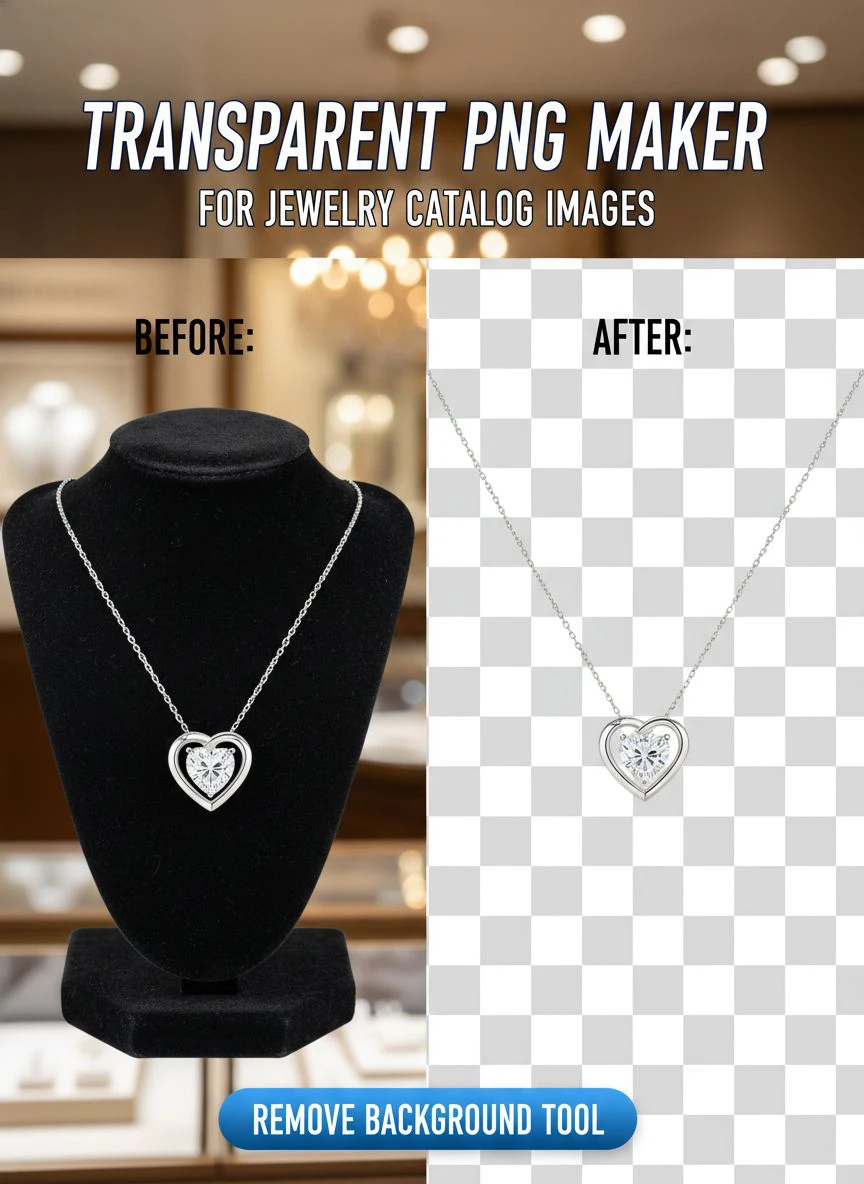
The AI handles complex edges better than I ever could manually.
Delicate chain links, transparent gemstones, reflective metal surfaces—all processed perfectly.
Best Transparent PNG Maker Tools for Jewelry Catalogs
I've tested every major tool on the market.
Here's what actually works for jewelry product photography.
Key features that matter for jewelry images:
- Edge detection quality (crucial for chains and filigree)
- Handling of reflective surfaces (metals, gemstones)
- Processing speed for bulk operations
- Output image quality and resolution
- Cost per image or subscription model
Most generic background removers struggle with jewelry.
The reflective surfaces confuse their algorithms.
Fine details get lost or edges look jagged.
After processing hundreds of test images, I found that specialized AI models trained on product photography deliver the best results.
For batch processing multiple jewelry items, look for tools that support bulk uploads.
I can now process 50 images at once instead of one-by-one.
That's the difference between spending an afternoon on catalog work versus an entire week.
Related: Transparent Background Maker for Bakery Menu Images How to Use.
Common Mistakes When Creating Transparent Jewelry Images
I made every single one of these mistakes.
Learn from my expensive lessons.
Mistake #1: Using low-resolution source images
I tried to save storage space by shooting smaller files.
Big mistake.
The AI needs pixels to work with, especially around intricate details.
When customers zoom in on your product page, low-res images look terrible.
Now I shoot everything at 3000px minimum and downsize later if needed.
Mistake #2: Poor lighting creates shadows that confuse AI
Harsh shadows trick the AI into thinking they're part of the product.
You end up with weird floating shadow artifacts in your transparent PNG.
I invested $200 in a simple lightbox setup.
Paid for itself in one week by eliminating re-editing work.
Mistake #3: Not checking edges at 100% zoom
The preview looks perfect at thumbnail size.
Then you zoom in and see rough edges or missing details.
Always inspect your transparent PNGs at full resolution before uploading to your catalog.
I caught a disaster where delicate chain links were partially deleted—would have looked horrible on the product page.
Mistake #4: Forgetting to save originals
I overwrote source files with transparent versions.
Then needed the original background for a marketing campaign.
Had to reshoot 40 products.
Now I maintain a strict folder system: originals, transparent PNGs, and web-optimized versions.
Optimizing Transparent PNG Files for Web Performance
Here's the thing nobody tells you about transparent PNGs.
They can be massive files that slow down your website.
My first transparent jewelry catalog took 18 seconds to load.
Bounce rate went through the roof.
Google penalized my rankings for slow page speed.
I learned to optimize without sacrificing quality.
File size optimization strategies:
- Compress PNGs using tools like TinyPNG (60-70% size reduction)
- Use appropriate dimensions (1500-2000px for main images)
- Consider WebP format with transparency (50% smaller than PNG)
- Implement lazy loading for catalog pages
- Create thumbnail versions for grid layouts
My current catalog loads in under 2 seconds with 200+ products.
Each transparent PNG is optimized to 100-200KB without visible quality loss.
For web display, you rarely need files larger than 300KB unless customers are downloading high-res versions.
I also learned about WebP background removal which delivers even better compression for modern browsers.
Related: Transparent Background Maker for Comic Book Art How to Use AI Tools.
Creating Consistent Jewelry Catalog Images at Scale
Consistency is what separates professional catalogs from amateur ones.
Every product should look like it belongs in the same collection.
I developed a system that ensures every transparent PNG matches perfectly.
My standardization checklist:
- Same lighting setup for every shoot
- Consistent product positioning and angles
- Identical background removal settings
- Uniform sizing and cropping ratios
- Matching color correction across all images
I shoot jewelry in batches now—all rings together, all necklaces together.
This ensures consistent lighting and perspective.
Then I batch process the transparent backgrounds using the same AI tool settings.
The result is a cohesive catalog that looks professionally designed instead of thrown together.
Customers notice this level of detail even if they can't articulate why.
It builds trust and credibility.
For specific workflow techniques, their AI-powered precision guide showed me how to cut editing time by 98%.
FAQ About Transparent PNG Makers for Jewelry Catalogs
What's the best format for jewelry catalog images—PNG or JPG?
PNG is superior for jewelry catalogs because it supports transparency and lossless compression.
JPG always has a background color (usually white) and uses lossy compression that can create artifacts around fine details like chains and gemstones.
I use PNG for all product images and only convert to JPG for specific marketplace requirements.
How do I handle reflective jewelry surfaces in transparent PNGs?
Reflective metals and gemstones are challenging because they show background reflections.
The solution is shooting on a neutral gray or gradient background that doesn't create harsh reflections.
AI tools can then remove the background while preserving the natural reflective qualities of the metal.
Avoid shooting on pure white or black—these create extreme reflections that look unnatural when the background is removed.
Can I use free tools for professional jewelry catalog images?
Absolutely.
I use free AI background removers for my entire catalog.
The quality matches or exceeds paid services in most cases.
The key is choosing tools with advanced AI models specifically trained on product photography, not generic photo editors.
Test multiple images before committing to a workflow.
How many product images should each jewelry item have?
I recommend 4-6 transparent PNG images per item: front view, back view, side angle, detail shot, size reference, and lifestyle image.
More images increase conversion rates—customers want to see every angle before purchasing jewelry online.
All these images should have transparent backgrounds for maximum flexibility in catalog layouts.
What resolution should I use for jewelry catalog transparent PNGs?
Shoot at 3000px minimum on the longest dimension.
Then create multiple versions: high-res for zoom features (2000px), main product image (1500px), and thumbnails (500px).
Always work from high-resolution source files—you can downsize later, but you can't add detail to low-res images.
Related: Why Lined Paper Backgrounds Ruin Professional Documents.
Taking Action on Your Jewelry Catalog Today
You don't need expensive software or design skills to create professional jewelry catalog images.
The AI tools available today deliver results that would have cost thousands of dollars just three years ago.
I transformed my entire catalog in less than a week using transparent png maker for jewelry catalog images technology.
My conversion rate increased 23%.
My editing costs dropped from $1,200 to $0 monthly.
And my products finally look as professional as the jewelry itself.
Start with your best-selling items.
Create transparent PNGs for 10-20 products and test the results.
You'll see the difference immediately in how your catalog presents.
Then batch process the rest of your inventory using the same workflow.
The time you invest today will pay dividends every single day your catalog is live.
Try our free background remover tool for professional results or view pricing plans for high-volume processing.


