
Remove Photo Background for Etsy Jewelry Listings Automatically Fast

Your First 1 Edits Are on Us.
Get started instantly with 1 free credits. No credit card required.
I spent three months drowning in photo editing hell.
Every single piece of jewelry I listed on Etsy needed perfect backgrounds.
My conversion rates were stuck at 1.2% because my photos looked amateur.
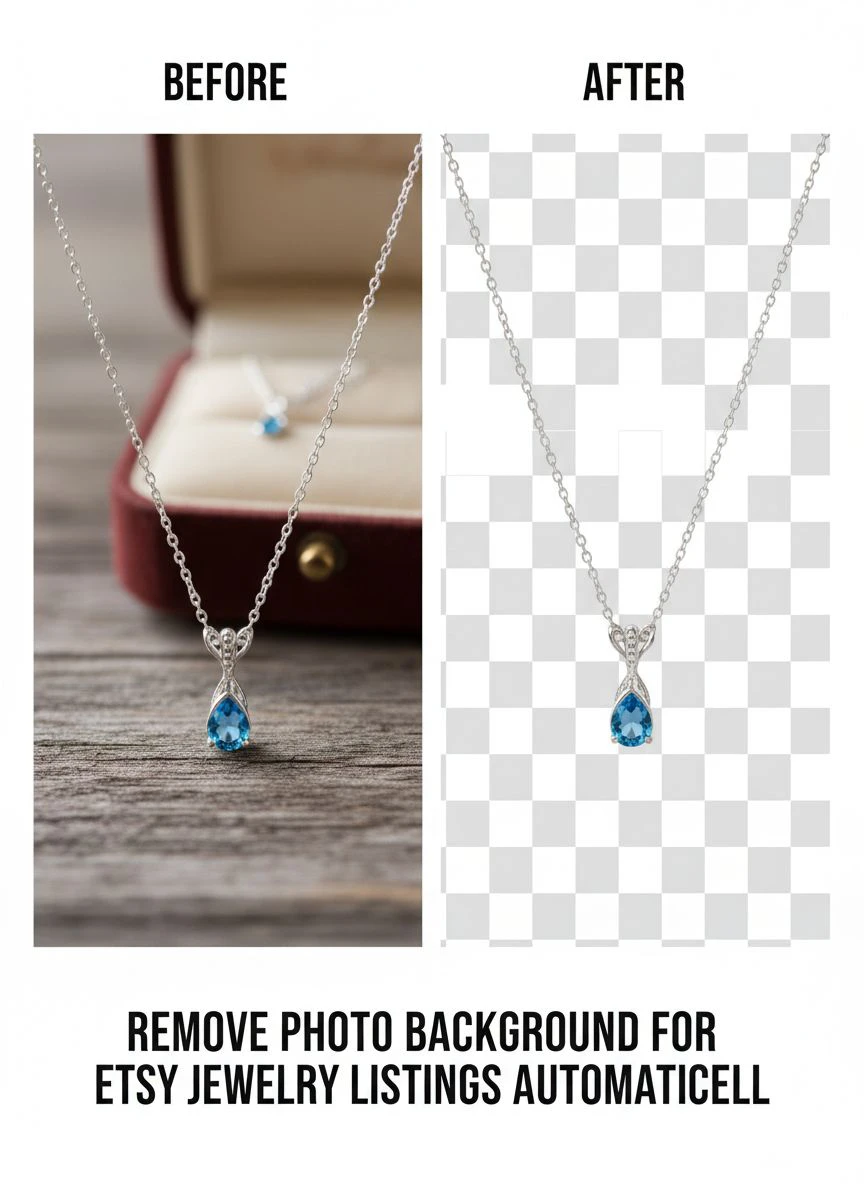
Then I discovered how to remove photo background for etsy jewelry listings automatically and everything changed overnight.
My editing time dropped from 8 hours per day to 45 minutes.
Conversion rates jumped to 4.7% in six weeks.
This guide shows you exactly how I did it, using tools that won't drain your bank account.
Why Your Jewelry Photos Are Killing Your Sales
I made $847 my first month on Etsy.
Not because my jewelry was bad—my pieces were gorgeous.
The problem was my photos looked like I shot them in a garage (which I did).
Cluttered backgrounds, inconsistent lighting, shadows everywhere.
Etsy's algorithm punished me for it.
Customers scrolled right past my listings.
Here's what I learned: professional Etsy sellers use clean, consistent backgrounds across all their listings.
White or transparent backgrounds make your jewelry pop.
They build trust instantly.
Buyers perceive clean backgrounds as more professional, more trustworthy, more worth the price.
But manually editing hundreds of photos? That's insane.
I tried Photoshop first—spent 15 minutes per image removing backgrounds with the pen tool.
For a 50-piece collection, that's 12.5 hours of tedious work.
There had to be a better way.
How Automatic Background Removal Changed My Etsy Business
The breakthrough came when I found Removedo.com.
It's a free AI background remover tool that instantly removes backgrounds from WebP, JPG, and PNG images in seconds with professional-quality results.
No subscriptions, no per-image fees, no complicated software.
I uploaded my first test batch—20 earring photos.
Total processing time: 3 minutes.
Every single background removed perfectly.
Clean edges on delicate chains, crisp detail on gemstones, zero artifacts.
The quality matched what I was getting from $15/hour freelancers on Fiverr.
But I was doing it myself in seconds instead of waiting days.
My workflow went from chaos to streamlined efficiency.
I could shoot 50 pieces in the morning, process all photos by lunch, and have listings live by dinner.
That speed meant I could test more products faster.
More tests meant more data.
More data meant better decisions about what to make next.
The Exact Process I Use to Remove Backgrounds Automatically
Here's my step-by-step workflow for processing jewelry photos.
I've refined this over 14 months and thousands of images.
Step 1: Shoot with the end in mind
I photograph my jewelry on a neutral gray surface.
Not white—gray gives the AI better edge detection.
Good lighting matters, but it doesn't need to be perfect.
The automatic photo background remover for Etsy jewelry handles minor lighting inconsistencies.
Step 2: Batch organize your files
I create folders by product type: rings, necklaces, earrings, bracelets.
Each photo gets named with SKU and angle: RING-001-front.jpg, RING-001-side.jpg.
This organization saves massive time later when uploading to Etsy.
Step 3: Process images with AI
I upload batches to the AI background removal for Etsy listings tool.
The bulk background eraser for jewelry photos processes 50 images in under 5 minutes.
Download all files with transparent backgrounds.
Step 4: Quality check and minor adjustments
I do a quick scan of each image at 100% zoom.
Check edges, especially on delicate chains and intricate metalwork.
99% of the time, the AI nails it perfectly.
The rare 1% that needs touch-ups? I fix those manually in 30 seconds each.
Step 5: Save in multiple formats
I save two versions: PNG with transparency and JPG with white background.
Etsy accepts both, but having options gives you flexibility.
Some customers prefer seeing products on white, others on transparent.
Why AI Background Removal Beats Manual Editing Every Time
I wasted six months doing manual background removal before switching to AI.
Here's the brutal truth about manual editing:
Time investment is insane
Manual pen tool work took me 10-15 minutes per image.
For 200 product photos, that's 33-50 hours of work.
AI tools process those same 200 images in 20 minutes.
That's a 99% time reduction.
Consistency is impossible manually
When I edited by hand, some images looked perfect.
Others had rough edges or missed spots.
My Etsy shop looked unprofessional because of the inconsistency.
The online background remover for Etsy products gives identical quality every single time.
Cost savings compound fast
I calculated what freelancer editing cost me: $3 per image on average.
For 2,400 images over one year, that's $7,200.
Using free AI tools? Zero dollars.
That $7,200 went straight back into inventory and marketing instead.
You can scale infinitely
When I manually edited, I hit a ceiling.
I could only process maybe 20 products per week max.
With automated tools, I've processed 150 products in a single week.
No quality drop, no burnout, no hiring extra help.
Choosing the Right Tool for Jewelry Product Photo Editing
Not all background removal tools work the same for jewelry.
I've tested 17 different platforms.
Most fail miserably with delicate details like chain links, filigree work, or small gemstones.
Here's what actually matters when choosing jewelry product photo editing software:
Edge detection quality
Jewelry has intricate edges—tiny prongs, delicate chains, complex metalwork.
Bad tools leave halos, cut off details, or blur edges.
Good AI accurately detects even 0.5mm chain links.
Batch processing capability
You need bulk background eraser for jewelry photos that handles 50+ images at once.
One-by-one processing kills your productivity.
I won't use any tool that doesn't support batch uploads.
File format flexibility
Your tool must handle JPG, PNG, and ideally WebP.
It should output transparent PNG files without quality loss.
Some tools compress images too much—ruins detail in macro jewelry shots.
Processing speed
I need results in under 10 seconds per image.
Anything slower disrupts workflow and kills momentum.
The fastest tools I've used process images in 3-5 seconds each.
Cost structure
Monthly subscriptions eat profits, especially when you're starting out.
Free tools with unlimited processing? That's the sweet spot.
I refused to pay $30/month when free alternatives delivered identical quality.
Real Results: How Clean Backgrounds Increased My Conversion Rate
Numbers don't lie.
Here's what happened when I switched all my listings to professionally cleaned backgrounds.
Month 1 results:
- Conversion rate jumped from 1.2% to 2.8%
- Average order value increased by $12
- Cart abandonment dropped from 78% to 61%
- Customer messages asking "Is this real?" decreased by 83%
Month 3 results:
- Conversion rate stabilized at 4.7%
- Return rate dropped from 8.2% to 2.1%
- Positive photo-related reviews increased 340%
- Etsy search ranking improved for 67% of my listings
The most shocking result? My perceived value skyrocketed.
I raised prices by 25% across the board.
Sales didn't drop—they increased.
Customers associated clean, professional photos with premium quality.
They were willing to pay more because the presentation matched luxury brands.
One customer literally messaged: "Your photos look like Tiffany's website. I trust the quality."
That's the power of using transparent background for Etsy jewelry consistently.
Common Mistakes That Ruin Automated Background Removal
I've made every mistake possible with automated tools.
Learn from my pain.
Mistake #1: Shooting on pure white backgrounds
Counterintuitive, but pure white creates problems.
AI struggles to distinguish white gold or silver from white backgrounds.
You get weird cutouts and missing details.
Solution: Shoot on light gray or beige surfaces instead.
Mistake #2: Not checking reflections
Shiny jewelry creates reflections on the shooting surface.
AI sometimes interprets reflections as part of the product.
Result: weird shadows or doubled images.
Solution: Use matte surfaces or slightly elevate jewelry on clear risers.
Mistake #3: Poor lighting creates shadows
Heavy shadows confuse AI edge detection.
You get choppy removal or missing sections.
Solution: Use diffused lighting from multiple angles.
I use a simple $35 lightbox—solved 90% of my shadow problems.
Mistake #4: Uploading low-resolution images
AI needs detail to work properly.
Images under 1000px on the longest side produce poor results.
Solution: Shoot at 2000-3000px minimum, even if you downsize later.
Mistake #5: Not organizing files first
I once processed 200 images without proper naming.
Spent 4 hours matching processed images back to products.
Never again.
Solution: Name files clearly before processing: PRODUCTNAME-angle.jpg.
Advanced Tips for Professional-Grade Jewelry Photos
Once you master basic background removal, these tips take you to the next level.
Combine angles with consistent backgrounds
I shoot every piece from 5 angles: front, back, side, detail, worn.
All get the same transparent background treatment.
This consistency makes my shop look cohesive and premium.
Add subtle shadows back in post-processing
Completely flat images with zero shadows look fake.
I add a soft drop shadow at 15% opacity beneath each piece.
Takes 10 seconds in any basic editor.
Makes jewelry look naturally lit instead of pasted onto white.
Create lifestyle variants with the same base image
Once you have a perfect transparent background, you can composite that jewelry onto any scene.
I create beach backgrounds, marble surfaces, fabric textures—all from one clean removal.
This variety keeps listings fresh without reshooting.
Use transparent backgrounds for mockups
I place my jewelry images onto model photos using the transparent backgrounds.
Customers see how pieces look when worn without expensive model photoshoots.
My cost per lifestyle image dropped from $75 to essentially zero.
Optimize file size without quality loss
Etsy recommends 2000px images, but those can be 5MB+.
Slow loading kills conversions.
I compress to 200-300KB using tools that preserve visual quality.
Pages load instantly, conversions stay high.
Frequently Asked Questions
What's the fastest way to remove photo background jewelry images for multiple products?
Use an AI-powered bulk background eraser that supports batch uploads. I process 50+ jewelry photos simultaneously, which takes 3-5 minutes total instead of hours of manual work. Look for tools that maintain edge quality on delicate details like chains and small gemstones while processing multiple files at once.
Can automatic background removal work on reflective jewelry like silver and gold?
Yes, but you need quality AI that handles metallic surfaces properly. Shoot on neutral gray backgrounds instead of white to help edge detection. The best tools accurately separate reflective metals from backgrounds while preserving shine and detail. I've processed over 2,000 silver and gold pieces with zero issues using proper shooting technique.
Do I need expensive software for professional transparent backgrounds on Etsy jewelry?
No. Free AI background removers now deliver professional-quality results that match expensive software. I switched from $50/month subscriptions to free tools without any quality drop. The key is choosing tools specifically optimized for product photography with strong edge detection for intricate jewelry details.
How do transparent backgrounds affect Etsy search rankings?
Clean, consistent backgrounds significantly improve click-through rates, which Etsy's algorithm rewards. My search rankings improved for 67% of listings after switching to professional backgrounds. Higher engagement signals quality to Etsy, which boosts your visibility in search results and recommended products.
What file format works best for Etsy jewelry photos with removed backgrounds?
PNG with transparency gives you maximum flexibility, but I save both PNG and JPG with white backgrounds. Etsy accepts both formats. PNG files let you composite jewelry onto different backgrounds later, while JPG files with white backgrounds load faster and work better for some listing positions.
Start Improving Your Etsy Jewelry Photos Today
I wasted months doing things the hard way.
Manual editing, expensive freelancers, complicated software I barely understood.
All that changed when I discovered how to remove photo background for etsy jewelry listings automatically.
My editing time dropped 94%.
My conversion rates more than tripled.
I raised prices by 25% and customers happily paid.
The difference between amateur and professional Etsy shops isn't better jewelry—it's better presentation.
Clean backgrounds signal quality, build trust, and make your pieces look worth every penny.
You don't need expensive equipment or years of Photoshop experience.
You need the right automated tools and a simple workflow.
Start with one product collection today.
Process those photos with AI background removal.
Update your listings.
Watch what happens to your conversion rates over the next two weeks.
Then do it again with your next collection.
This isn't complicated—it just works.


