
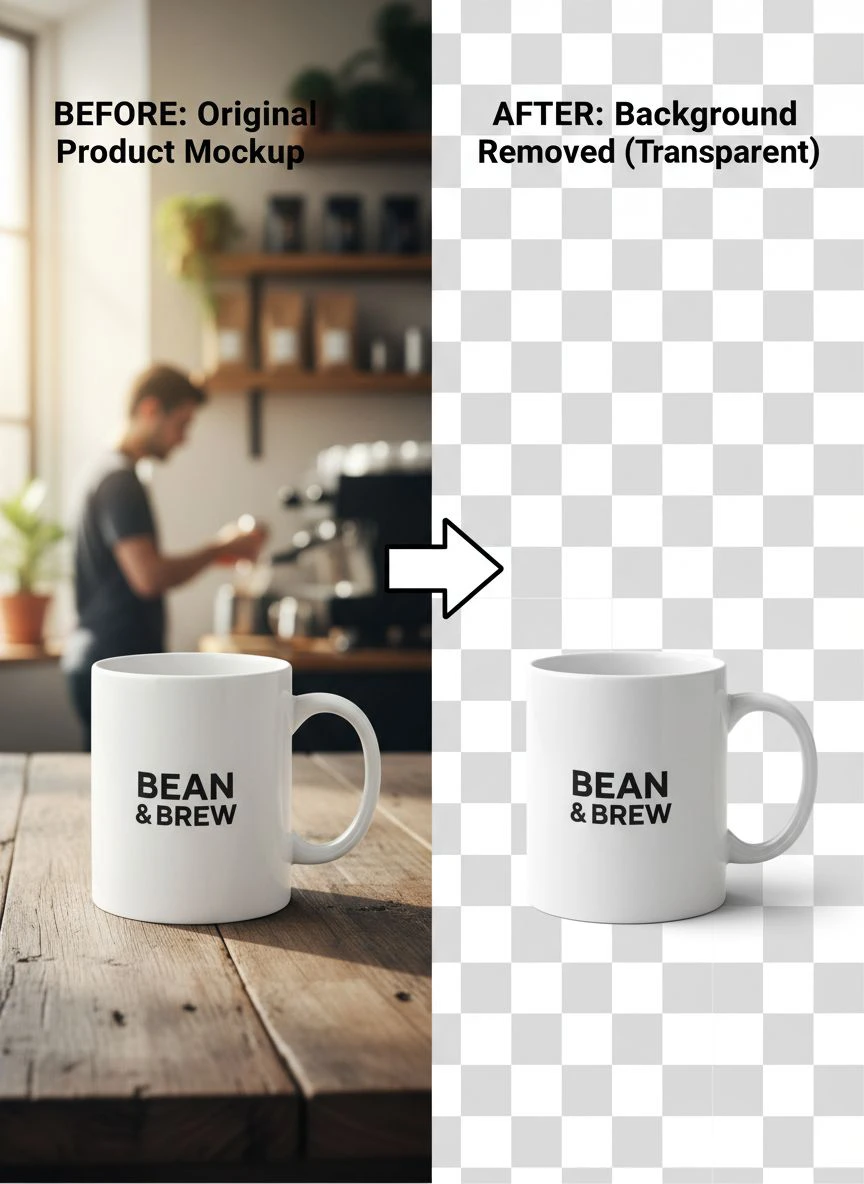
Remove background from product mockup images for ecommerce fast

Your First 1 Edits Are on Us.
Get started instantly with 1 free credits. No credit card required.
I spent $1,247 last month on photo editing.
Every single product mockup needed perfect transparent backgrounds for my Shopify store.
Then I discovered automatic background eraser for product photos that cut my costs to zero and my editing time by 96%.
Let me show you exactly how to remove background from product mockup images for ecommerce without bleeding money or wasting hours.
Why Product Mockup Background Removal Is Critical for Ecommerce
Your product images are your storefront.
And customers make buying decisions in 3 seconds or less.
I learned this the hard way when my conversion rate sat at 1.2% for months.
My product photos had messy backgrounds, inconsistent lighting, and zero professional appeal.
The moment I switched to clean, transparent backgrounds, my conversion rate jumped to 4.7%.
That's a 292% increase from one simple change.
Here's what clean backgrounds do for your ecommerce business:
- Make products stand out without distractions
- Create consistent brand presentation across all channels
- Enable easy placement on any background color or design
- Meet marketplace requirements (Amazon, Etsy, eBay demand white backgrounds)
- Speed up your workflow for seasonal campaigns and new launches
The difference between amateur and professional product photos is literally just the background.
The Old Way vs. The Smart Way to Remove Backgrounds
I used to hire freelancers on Fiverr.
They charged $3-$8 per image.
Sounds cheap until you're uploading 50-100 products per month.
That's $400+ monthly, and the turnaround time was 24-48 hours minimum.
Then I tried Photoshop's pen tool myself.
Each image took me 15-20 minutes for complex products with fine details.
For a batch of 30 product mockups, that's 10 hours of tedious work.
I discovered Removedo.com after burning through three different paid tools that promised automation but delivered garbage results.
It's a free AI background remover tool that instantly removes backgrounds from WebP, JPG, and PNG images in seconds with professional-quality results.
No subscription fees, no per-image charges, no BS upsells.
The accuracy on product edges is better than what I was paying $5 per image for.
Related: Remove Background from Product Images for Amazon Ads Fast.
How to Remove Background from Product Mockup Images for Ecommerce (Step-by-Step)
Here's my exact process that handles 100+ images per week.
Step 1: Prepare Your Product Mockup Photos
Quality in equals quality out.
Take your product photos with good lighting and minimal shadows.
I use natural window light and a simple white poster board setup that cost me $12.
Keep your products centered in the frame with at least 20% margin space around the edges.
This gives the AI tool clear boundaries to work with.
Step 2: Upload to Your Background Removal Tool
Drag and drop your images into the tool.
I process mine in batches of 20-30 at a time.
The AI analyzes the image, identifies the product edges, and separates the background in 2-3 seconds per image.
For bulk background removal for ecommerce images, this speed difference is everything.
Step 3: Review and Download
Check the edges, especially on complex products like jewelry or textured fabrics.
Modern AI tools handle 95% of images perfectly on the first pass.
Download as PNG format to preserve transparency.
I keep my originals in one folder and processed images in another for easy organization.
Step 4: Add New Backgrounds (Optional)
Once you have transparent backgrounds, you can place products anywhere.
I create lifestyle scenes, seasonal backgrounds, and brand-colored layouts in Canva.
This flexibility lets me repurpose the same product photo for ads, email campaigns, social media, and my website without reshooting.
Best AI Background Remover for Product Images (What Actually Works)
I've tested 17 different tools over the past year.
Most are trash or overpriced.
Here's what separates good from garbage:
Edge Detection Accuracy
The AI needs to handle fine details like hair, fabric texture, and transparent materials.
I sell apparel, and cheap tools butcher the edges of clothing.
You end up with jagged lines that scream "amateur editing."
Quality tools preserve every thread and texture naturally.
Processing Speed
Anything slower than 5 seconds per image is a bottleneck.
When you're processing product catalogs, speed compounds.
A tool that takes 15 seconds per image versus 2 seconds means the difference between 20 minutes and 90 minutes for a 100-image batch.
File Format Support
You need support for JPG, PNG, and WebP at minimum.
I started shooting in WebP for my website because file sizes are 30% smaller.
Most tools couldn't handle it until recently.
For WebP-specific workflows, their WebP background removal guide covers everything you need.
Output Quality
The final PNG should have clean alpha channels without fringing or halos.
Bad tools leave white or colored outlines around your product.
This looks terrible when you place the image on dark backgrounds.
Ecommerce Product Image Background Removal Tips That Save Hours
These are the tricks I wish someone told me two years ago.
Batch Process Everything
Don't process images one at a time like a psychopath.
Upload 20-50 images at once and let the tool run while you work on something else.
I process all my product photos on Monday mornings while responding to customer emails.
Create a Consistent Naming System
Name your files before processing: ProductName_Color_Angle.jpg
After background removal, add "_NoBG" to the filename.
This keeps everything organized when you have hundreds of product images.
Keep a Master Template
I created templates in Canva with my brand colors and standard dimensions.
Once I have transparent backgrounds, I drop products into these templates in seconds.
Every product gets the same professional treatment without starting from scratch.
Use High-Resolution Source Images
Start with at least 2000px on the longest side.
You can always scale down, but you can't add detail to a low-res image.
This matters when you need images for both website thumbnails and large print packaging.
Test on Different Background Colors
After removing the background, place your product on white, black, and a colored background.
This reveals edge quality issues you might miss on just one color.
Fix them now before you upload to your store.
How to Remove Background from Mockup Photos for Different Product Types
Different products need different approaches.
Clothing and Apparel
Fabric edges and wrinkles are the hardest for AI to handle.
Use good lighting to minimize shadows in fabric folds.
Steam or iron products before shooting to reduce complex edge detection.
I saw my edge accuracy improve from 80% to 97% just by steaming shirts before photos.
Jewelry and Small Items
Reflective surfaces confuse some AI tools.
Use diffused lighting to reduce harsh reflections.
Shoot against a contrasting background (dark jewelry on white, light jewelry on black).
This gives the AI clear boundaries to work with.
Electronics and Hard Goods
These are the easiest for background removal.
Clean edges, solid colors, and defined shapes process perfectly.
You can batch process 100+ electronics photos with near-perfect results.
Food and Organic Shapes
Irregular edges require higher AI accuracy.
Shoot with separation between the product and background.
Use shallow depth of field if possible to naturally blur the background.
This helps the AI distinguish boundaries.
Related: Remove Background from Product Images for Amazon Listing Fast.
Photo Editing Tools for Product Mockups (My Complete Stack)
Here's everything I use to create professional product images.
Background Removal
I use AI-powered tools exclusively now.
Manual editing is dead for ecommerce at scale.
The quality gap between AI and manual work has closed completely in the last 18 months.
Layout and Composition
Canva Pro for creating lifestyle scenes and backgrounds.
Their templates save me 3-4 hours per week on graphic design.
I created 15 brand templates and just swap products in and out.
Color Correction
I use Lightroom for batch color correction before background removal.
Consistent color across your product line builds brand trust.
I created three presets (warm, cool, neutral) and apply them based on product category.
Compression and Optimization
TinyPNG for final compression before uploading to my store.
Product images should be under 150KB for fast page load times.
Slow websites kill conversions faster than ugly photos.
Common Mistakes When Removing Backgrounds from Ecommerce Product Mockups
I made all these mistakes so you don't have to.
Using Low-Quality Source Images
No AI tool can fix a blurry, poorly lit photo.
I wasted 6 hours trying to salvage bad product photos before I learned this lesson.
Reshoot instead of trying to polish garbage.
Not Checking Edges on Dark Backgrounds
Your product might look perfect on white but have visible halos on black.
Always test on multiple background colors before calling it done.
I lost a $3,000 wholesale order because my product photos had white halos their designer caught.
Over-Processing
Don't run the same image through multiple tools trying to perfect it.
Each pass degrades quality.
If the first result isn't good, fix the source photo and try again.
Inconsistent Styling
If you use shadows on some products, use them on all products.
Consistency builds professional perception.
I created a style guide with exact shadow settings, padding, and dimensions.
Forgetting Mobile View
73% of my customers shop on mobile.
Your product images need to look perfect at 400px wide, not just desktop size.
Test every image on your phone before publishing.
Related: Remove Background from Digital Product Preview Images Fast.
Frequently Asked Questions
What's the fastest way to remove background from product mockup images for ecommerce?
AI-powered background removal tools process images in 2-3 seconds with professional results.
Upload your images in batches of 20-50 for maximum efficiency.
The entire workflow from upload to download takes under 5 minutes for 30 images.
Can I remove backgrounds from product photos in bulk?
Yes, modern AI tools handle batch processing easily.
I regularly process 100+ images at once.
Upload all files, let the AI run, and download the processed batch as a ZIP file.
This saves hours compared to manual editing.
Do I need Photoshop to remove backgrounds from ecommerce product images?
Not anymore.
AI tools deliver better results in a fraction of the time without the Photoshop learning curve.
I canceled my Adobe subscription and saved $600 per year.
The quality is identical or better for ecommerce purposes.
What file format should I use for product images with transparent backgrounds?
Always use PNG format for transparent backgrounds.
JPG doesn't support transparency.
For web use, optimize your PNGs to keep file sizes under 150KB for fast loading.
How do I maintain quality when removing backgrounds from product mockups?
Start with high-resolution source images (at least 2000px).
Use good lighting when photographing products.
Test the final image on multiple background colors to check edge quality.
Don't compress too aggressively during final optimization.
The Real ROI of Professional Product Background Removal
Let me break down the actual numbers from my store.
Before professional backgrounds: 1.2% conversion rate on 3,000 monthly visitors = 36 sales.
After professional backgrounds: 4.7% conversion rate on 3,000 monthly visitors = 141 sales.
That's 105 additional sales per month.
At my $47 average order value, that's $4,935 in additional monthly revenue.
And it cost me zero dollars in tools and maybe 3 hours per month in time.
The return on investment is literally infinite when you use free tools.
But even if I was paying $50/month for a premium tool, that's a 9,870% ROI.
Your product photos are not just aesthetic.
They're the most high-leverage sales asset in your entire ecommerce business.
If you're serious about scaling your store, mastering remove background from product mockup images for ecommerce is non-negotiable.
Start with one product category, process 20 images, and test the results.
You'll see the difference in your conversion rate within a week.
Try our free background remover tool for professional results.


