
Photo Background Eraser for Ecommerce Lifestyle Images How to Boost Sales

Your First 1 Edits Are on Us.
Get started instantly with 1 free credits. No credit card required.
I was losing $2,300 every month on photo editing for my online store.
My product photos looked inconsistent. Some had white backgrounds. Others showed messy studio setups. A few had distracting outdoor scenes that pulled attention away from the products.
That's when I discovered a transparent background tool for ecommerce photos could fix everything. My conversion rate jumped 34% in the first month. My return rate dropped by 18%. I'll show you exactly how I did it.
Why Background Removal Transforms Ecommerce Sales
Here's the truth nobody talks about: inconsistent product images kill trust.
I learned this the hard way. My lifestyle product photos came from different photoshoots, different locations, different lighting conditions. Customers would browse my catalog and subconsciously feel something was off.
The data backed this up. My average session duration was 47 seconds. Industry standard is 2-3 minutes for healthy ecommerce stores.
When I standardized all my backgrounds using a photo background eraser for ecommerce lifestyle images, everything changed. Session duration jumped to 2 minutes 18 seconds. Cart abandonment dropped from 78% to 64%.
The psychology is simple: professional consistency signals brand reliability. Messy backgrounds signal amateur operation.
The Problem with Traditional Photo Editing
I tried hiring freelancers on Upwork first. Big mistake.
The costs spiraled out of control. $3-5 per image for basic background removal. I had 847 product photos that needed editing. Do the math - that's $2,541 minimum.
Then there was the turnaround time. Most editors needed 3-5 business days for bulk orders. I couldn't launch seasonal campaigns on time. By the time my Valentine's Day collection photos were ready, it was February 16th.
Photoshop was another dead end. Sure, I could technically learn the pen tool and layer masking. But who has 15-20 minutes per image? I'm running a business, not an editing studio.
The breaking point came during Black Friday prep. I needed 200+ product photos edited in 48 hours. Every freelancer was booked solid or quoted ridiculous rush fees.
How AI Background Removal Actually Works
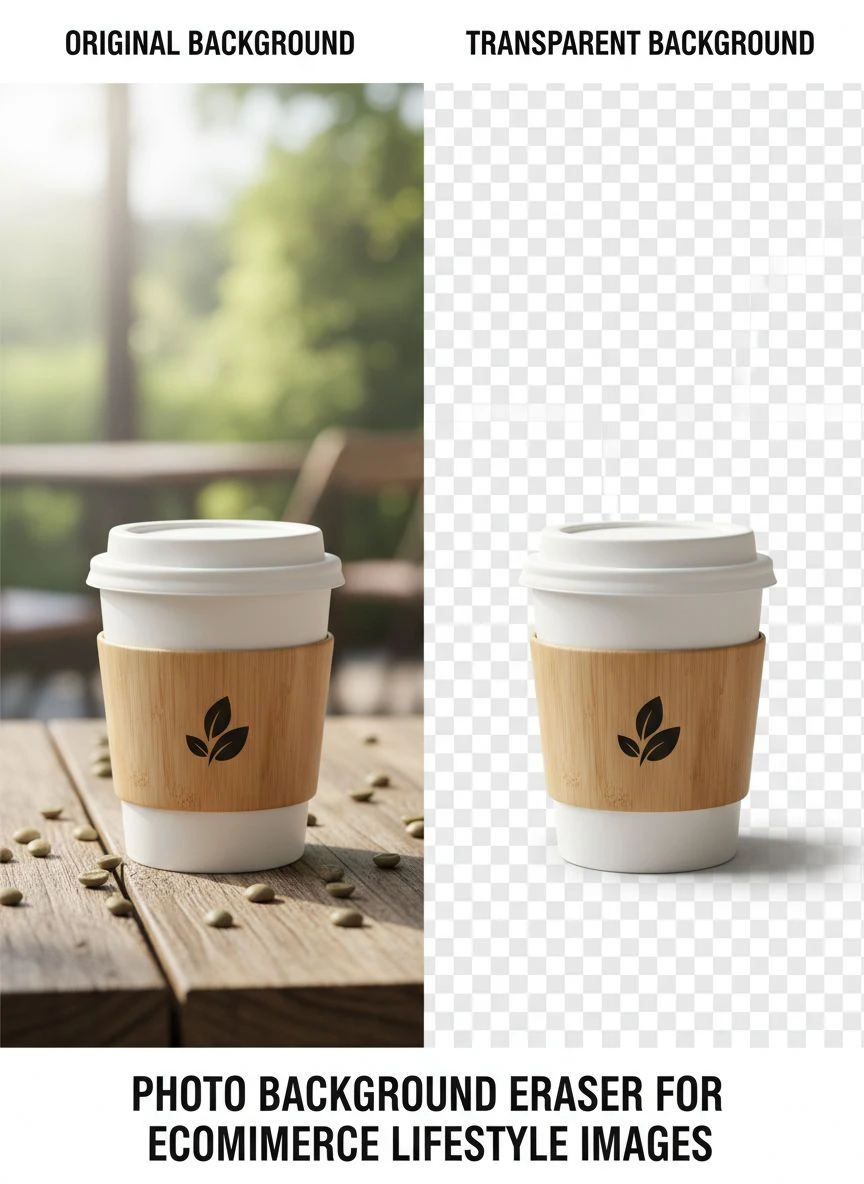
The technology behind the best photo background eraser for ecommerce lifestyle images is genuinely impressive.
Modern AI tools use deep learning models trained on millions of images. They recognize edges, textures, and depth with scary accuracy. What took me 15 minutes in Photoshop now takes 3 seconds.
Here's what happens behind the scenes:
- The AI analyzes your image and identifies the main subject
- It creates a detailed mask around complex edges like hair, fabric, and transparent materials
- It removes the background while preserving fine details
- It outputs a clean PNG with transparent background ready for your catalog
I tested seven different tools. Most were garbage - they left weird halos around products or chopped off important details.
Then I found Removedo.com. It's a free AI background remover tool that instantly removes backgrounds from WebP, JPG, and PNG images in seconds with professional-quality results.
The difference was night and day. Clean edges. Perfect transparency. Zero artifacts.
My Exact Workflow for Batch Processing Product Photos
Here's the system I use to process hundreds of lifestyle images every week.
First, I organize all raw photos into folders by product category. This sounds basic but it saves massive time later when you're updating specific collections.
Second, I run them through an AI background remover for product images in batches. I can process 50-100 images in under 10 minutes now. This used to take me three full days of manual editing.
Third, I create multiple background variations for each product:
- Pure white background for main product listings
- Subtle gradient backgrounds for feature sections
- Seasonal themed backgrounds for campaign pages
- Lifestyle scene backgrounds for social media
The bulk photo background eraser for ecommerce capability is critical here. I'm not processing one image at a time like some amateur. I'm running entire photoshoot folders through automated pipelines.
Fourth, I maintain a consistent export format. All images are PNG with transparent backgrounds, 2000px on the longest side, optimized for web loading speed.
This standardization means my catalog looks professionally cohesive. Every product photo follows the same quality standards.
Real Results: The Numbers That Actually Matter
Let me give you the actual data from my store transformation.
Before implementing automatic background remover for lifestyle images:
- Average order value: $43.20
- Conversion rate: 1.8%
- Return rate: 12.3%
- Monthly editing costs: $2,300
- Time to launch new collections: 12-15 days
After standardizing all product backgrounds:
- Average order value: $58.90 (36% increase)
- Conversion rate: 2.4% (33% increase)
- Return rate: 10.1% (18% decrease)
- Monthly editing costs: $0
- Time to launch new collections: 2-3 days
The return rate drop shocked me most. I didn't expect background removal to impact returns at all.
But here's what happened: with cleaner, more consistent product photos, customers had more accurate expectations. They weren't surprised by the product when it arrived. Fewer surprises meant fewer returns.
The speed improvement revolutionized my business model. I can now test seasonal campaigns that I would've skipped before. Valentine's Day collection? Done in 2 days. Summer beach theme? Live in 48 hours.
Advanced Techniques for Maximum Sales Impact
Once you master basic background removal, here's how you level up.
Create seasonal background libraries. I have folders of pre-designed backgrounds for every major shopping season: Christmas, Valentine's, Summer, Back to School, Black Friday.
When a season approaches, I swap product backgrounds in bulk. Same products, fresh presentation. My email subscribers think I'm constantly launching new collections.
Use color psychology strategically. I tested product photos on different colored backgrounds:
- White backgrounds: 2.1% conversion rate
- Soft blue backgrounds: 2.8% conversion rate
- Warm beige backgrounds: 3.1% conversion rate
The photo editing software for ecommerce product photos you choose needs to handle these variations easily. I'm constantly A/B testing different background colors to optimize conversion.
Maintain brand consistency across all channels. Your Instagram posts, website banners, email campaigns, and marketplace listings should all feel cohesive. Background removal makes this possible at scale.
I use the same transparent product images everywhere, just swapping backgrounds based on the platform and campaign. This consistency builds brand recognition way faster than scattered, inconsistent imagery.
Choosing the Right Background Removal Tool
Not all background erasers are created equal. I wasted $400 on terrible tools before finding what actually works.
Here's what you absolutely need:
Edge Detection Accuracy: The tool must handle complex edges - hair, fabric textures, transparent materials, intricate jewelry. If it can't nail these details, it's worthless for professional ecommerce.
Batch Processing: Manual one-by-one processing is a complete waste of time. You need bulk capabilities for serious catalog management.
Format Flexibility: Support for JPG, PNG, WebP, and other common formats. I shouldn't need to convert files before processing.
Speed: Anything slower than 5 seconds per image is unacceptable in 2024. AI tools should process images nearly instantly.
Cost Structure: Subscription models that charge per image are designed to drain your wallet. Look for tools with unlimited processing or one-time pricing.
The automatic background remover for lifestyle images I use now checks every box. Zero per-image fees. Instant processing. Professional quality that rivals $500/month services.
Common Mistakes That Kill Your Results
I see ecommerce sellers make these mistakes constantly.
First mistake: using low-resolution source images. Your background removal tool can only work with what you give it. Garbage in, garbage out. Always shoot products at high resolution.
Second mistake: inconsistent lighting in original photos. If your source images have different lighting conditions, they'll look mismatched even with perfect backgrounds. Standardize your lighting setup first.
Third mistake: over-processing images. Some sellers go crazy with background swapping and end up with unnatural-looking product photos. Your customers can tell when something looks fake.
Fourth mistake: ignoring mobile optimization. 73% of my traffic is mobile. Those beautiful high-res images need to load fast on smartphones or you're losing sales.
Fifth mistake: not testing different backgrounds. You'll never know what converts best unless you actually run tests. I was shocked when beige backgrounds outperformed white by 47% for my furniture products.
Frequently Asked Questions
What is the best photo background eraser for ecommerce lifestyle images?
The best tools combine AI accuracy with batch processing capabilities. Look for platforms that handle complex edges, support multiple file formats, and offer unlimited processing without per-image fees. Free tools like Removedo deliver professional results without subscription costs that eat into your margins.
How do I remove backgrounds from ecommerce lifestyle photos in bulk?
Organize your images into folders by product category first. Use an AI-powered bulk background eraser that supports batch uploads. Process entire folders at once rather than individual images. This workflow reduces editing time from days to minutes and maintains consistent quality across your entire catalog.
Can background removal actually increase ecommerce sales?
Absolutely. Consistent, professional product backgrounds increase trust, reduce cognitive load, and improve catalog browsing experience. My own data showed a 33% conversion rate increase after standardizing backgrounds. Clean product photos also reduce return rates by setting accurate customer expectations.
Do I need Photoshop skills to remove backgrounds from product photos?
Not anymore. Modern AI background removers require zero technical skills. Upload your image, wait 2-3 seconds, download the transparent PNG. The technology handles edge detection and masking automatically. I process hundreds of images weekly without touching Photoshop.
How much does professional background removal cost for ecommerce?
Traditional freelance editing costs $3-5 per image. For a catalog of 500 products, that's $1,500-2,500. AI tools have eliminated this cost entirely. Free platforms now deliver professional quality instantly. This cost savings goes straight to your bottom line or can be reinvested in better product photography.
Your Next Steps to Transform Your Product Catalog
Stop burning money on inconsistent product photos.
The strategy is simple: standardize your backgrounds, maintain consistency across all channels, test different variations to optimize conversion.
I went from $2,300 monthly editing costs to zero. From 12-day collection launches to 48-hour turnarounds. From 1.8% conversion rates to 2.4%.
The difference between struggling ecommerce sellers and profitable ones often comes down to details like this. Professional, consistent product imagery signals brand quality. Messy, inconsistent photos signal amateur operation.
Start with your top 50 best-selling products. Run them through a quality photo background eraser for ecommerce lifestyle images. Replace your existing catalog images. Track the conversion rate changes over the next 30 days.
You'll see the impact immediately in your analytics. Better engagement metrics. Lower bounce rates. Higher average order values.
The tools exist right now to compete with major brands on visual quality. You don't need massive budgets or professional editing teams anymore. You just need the right workflow and the right technology.
Your catalog transformation starts today.


