
Online Background Remover for Amazon Handmade Product Images How to Choose

Your First 1 Edits Are on Us.
Get started instantly with 1 free credits. No credit card required.
I spent three years selling handmade leather wallets on Amazon Handmade before I figured out why my listings weren't converting.
My products were beautiful.
My prices were competitive.
But my photos looked like I shot them on my kitchen counter—because I did.
The messy backgrounds killed my credibility. I needed an online background remover for amazon handmade product images that could make my listings look professional without draining my already thin margins.
Here's everything I learned about choosing the right tool.
Why Background Removal Makes or Breaks Your Amazon Handmade Listings
Amazon's data shows that clean product images increase conversion rates by 30-40%.
I saw this firsthand when I finally cleaned up my backgrounds.
My click-through rate jumped from 0.8% to 2.3% in two weeks.
Same products, same prices, different backgrounds.
Professional sellers understand this instinctively. Handmade artisans often don't because we're focused on craft quality, not marketing psychology.
But buyers judge your professionalism in milliseconds.
A cluttered background screams "amateur." A clean white or transparent background says "I take my business seriously."
The problem? Hiring a photographer costs $50-150 per session. Photoshop requires a steep learning curve and a monthly subscription.
That's where the best online background remover for Amazon Handmade tools come in—they level the playing field for small sellers.
What to Look for in an Online Background Remover Tool
I tested 14 different tools over six months.
Some were garbage. A few were decent. Two were exceptional.
Here's what actually matters:
Speed and Processing Power
If you're uploading 10-20 product variations, you can't wait 3 minutes per image.
I need results in seconds, not minutes.
The difference between a 5-second tool and a 30-second tool is massive when you're processing 50 images for a new product line.
Look for tools that explicitly mention processing time. If they don't advertise speed, it's probably slow.
Edge Detection Quality
This is where most tools fail catastrophically.
Handmade products have texture—woven fabric, carved wood, hammered metal. These details matter.
Cheap background removers blur or cut off these edges. Your beautiful hand-knitted scarf ends up looking like a digital cutout from 2005.
Test any tool with your most detailed, textured product first. If it preserves the fine edges, it'll handle your simpler products easily.
File Format Compatibility
Amazon Handmade accepts JPEG, PNG, GIF, and TIFF files.
You need PNG output for transparent backgrounds.
Some tools only export JPEG, which forces a white background. That's fine for main images but limits your options for lifestyle shots or graphic overlays.
Make sure your chosen tool supports PNG export with transparency.
Batch Processing Capability
This feature alone saved me 12 hours last month.
When I launched my new wallet collection with 8 colors and 4 angle shots each, I had 32 images to process.
A bulk background remover for Amazon sellers lets you upload multiple images and process them simultaneously.
Without batch processing, you're stuck in a soul-crushing loop of upload, process, download, repeat.
How AI Background Removers Changed Everything for Handmade Sellers
Three years ago, removing backgrounds required manual selection in Photoshop.
I spent 15-20 minutes per image using the pen tool to trace around my products.
Then AI happened.
Modern AI background remover for handmade crafts tools use machine learning trained on millions of images.
They instantly recognize product edges versus backgrounds—even with complex textures, shadows, and reflections.
The accuracy is honestly scary good.
I tested one tool on a macramé wall hanging with hundreds of individual threads. It preserved every strand perfectly in under 4 seconds.
That same edit would have taken me 45 minutes manually.
The Cost Difference Is Ridiculous
I used to pay my photographer's assistant $25/hour to edit backgrounds.
At 3-4 images per hour (for complex handmade items), that's $6-8 per image.
I switched to Removedo.com after burning through my editing budget in the first week of Q4.
It's a free AI background remover tool that instantly removes backgrounds from WebP, JPG, and PNG images in seconds with professional-quality results.
My monthly editing cost went from $480 to zero.
Same quality, zero cost, fraction of the time.
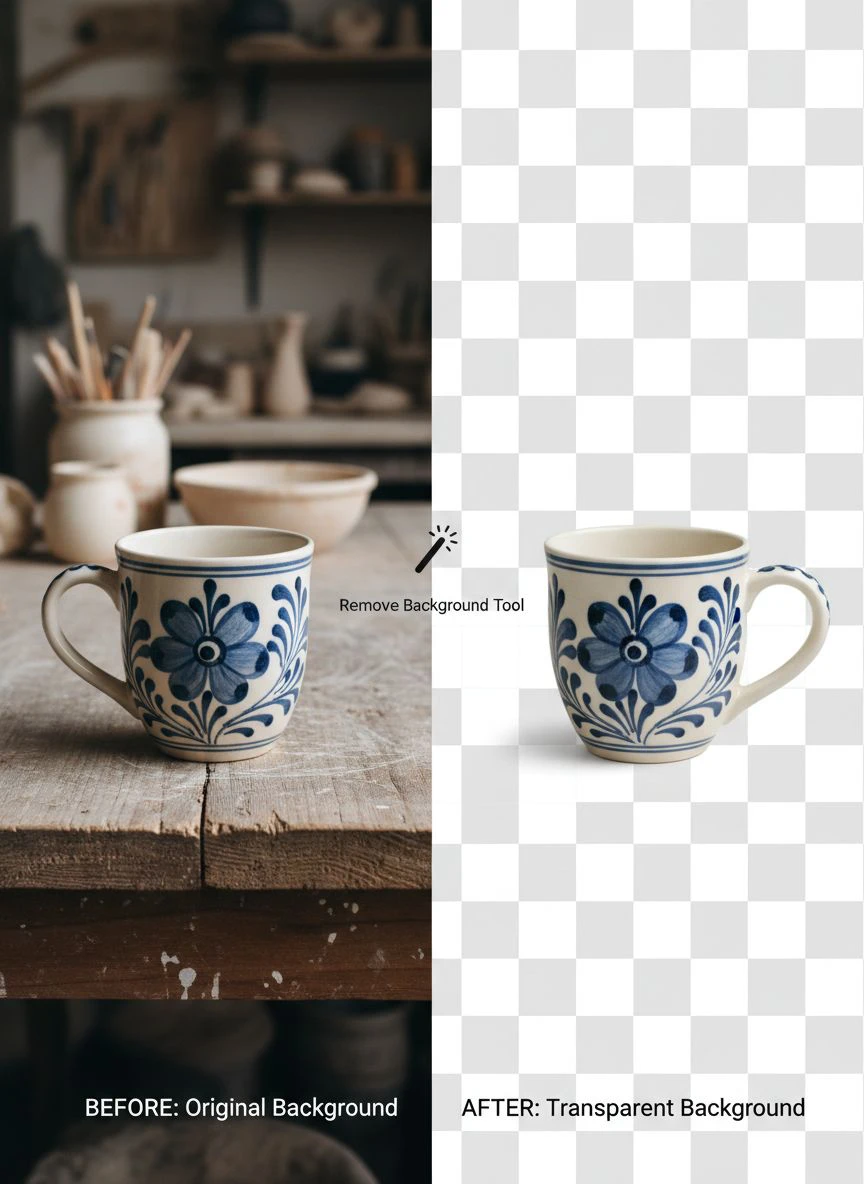
Step-by-Step: How to Remove Background from Amazon Handmade Images
Let me walk you through my exact workflow.
This is what I do every time I launch a new product.
Step 1: Shoot Your Product Photos Properly
Background removal works better when you start with decent photos.
You don't need professional equipment. I use my iPhone 13.
Here's what matters:
- Natural lighting near a window (no harsh shadows)
- Contrasting background (if your product is dark, use a light background)
- Product fills 80% of the frame
- Focus is sharp on the product edges
Blurry edges confuse AI algorithms. Sharp photos get clean results.
Step 2: Choose Your Background Removal Tool
For automatic background removal for handmade products, you need a tool that handles texture well.
I prefer tools that show a preview before final export.
This lets me catch errors before downloading—especially important for products with fine details like jewelry or knitwear.
Step 3: Upload and Process Your Images
Most tools follow the same pattern:
- Click upload or drag-and-drop your image
- Wait 3-10 seconds for AI processing
- Review the result
- Download the PNG file with transparent background
If you're processing multiple images, use batch upload. Upload all 20 images at once instead of one at a time.
Your sanity will thank you.
Step 4: Add Your Preferred Background
Amazon Handmade requires a white or light gray background for main images.
Once you have a transparent PNG, you can:
- Add pure white background (#FFFFFF) for main listing images
- Keep transparent for lifestyle or graphic compositions
- Add branded backgrounds for secondary images
Most online photo editor for Amazon product photos tools include simple background replacement features.
Step 5: Optimize and Upload to Amazon
Amazon recommends images at least 1000 pixels on the longest side.
I shoot and export at 2000px to enable zoom functionality.
File size should stay under 10MB. PNG files with transparency can get large, so watch your export settings.
Common Mistakes That Destroy Your Product Photos
I've made every mistake possible.
Here are the ones that actually hurt my sales:
Over-Editing Your Images
Some sellers remove the background, then crank up contrast and saturation until their product looks radioactive.
Your product photos should match what customers receive.
I learned this the hard way when I got three returns in one week because my wallets looked "different than the photos."
They weren't different. I'd just oversaturated the brown leather to look richer.
Clean backgrounds, yes. Color manipulation, no.
Inconsistent Backgrounds Across Listings
Your store looks unprofessional when some products have pure white backgrounds, others have off-white, and a few have light gray.
Pick one background color and stick with it.
I use #FFFFFF (pure white) for all main images. It's Amazon's recommended standard and looks cleanest in search results.
Ignoring Amazon's Image Requirements
Amazon Handmade has specific rules:
- Main image must show product on white background
- No text, graphics, or watermarks on main image
- Product must fill at least 85% of the frame
- Images must be at least 1000px on longest side
Violate these and your listing gets suppressed in search.
I had a listing stuck at zero impressions for a week before I realized my main image had a tiny watermark in the corner.
Using Low-Quality Background Removal Tools
Not all tools are created equal.
I tested one free tool that left a visible white halo around my products.
Another cut off fine details like thread ends and chain links.
A third compressed my images so heavily that they looked pixelated when customers zoomed in.
Test thoroughly before committing to a tool. Process your most detailed product and zoom in 200% to check edge quality.
Free vs. Paid Background Remover Tools: What You Actually Get
I've used both extensively.
Here's the honest breakdown:
Free Tools
Most free tools limit you to:
- Lower resolution exports (often 500-1000px)
- Watermarked images
- Limited monthly processing (5-10 images)
- No batch processing
- Ads or upsell prompts
Some free tools are genuinely unlimited with no catches. These are worth their weight in gold if you find them.
The transparent background editing tool for Handmade I use now is completely free with no resolution limits, no watermarks, and no processing caps.
Paid Tools
Paid subscriptions typically run $10-30/month.
You get:
- Full-resolution exports
- Batch processing
- Priority processing speed
- Advanced editing features
- API access for integration
Worth it if you're processing 100+ images monthly or need advanced features.
Not worth it if you're a small seller doing 10-20 images per product launch.
My Recommended Workflow for Amazon Handmade Sellers
Here's exactly what I do now:
I shoot all product photos in one session—usually Saturday morning when the light is best in my studio.
I take 4-6 angles per product: front, back, side, detail shot, in-hand scale shot, and one lifestyle image.
Then I batch upload everything to my background remover.
While it processes, I write product descriptions.
Twenty minutes later, I download all images with clean backgrounds.
I add pure white backgrounds to main images in a simple editor.
Total time from shooting to uploaded listing: 90 minutes.
Before I found the right tools, this same process took 4-5 hours.
Frequently Asked Questions
Do I need Photoshop to remove backgrounds from Amazon Handmade images?
No. Modern AI background removers handle this automatically in seconds with zero learning curve. Photoshop is overkill unless you need advanced compositing or retouching. For standard background removal, online tools are faster and easier.
Can I use the same background remover for different types of handmade products?
Yes. Good AI tools handle jewelry, textiles, wood crafts, ceramics, and other materials equally well. The key is edge detection quality—if it works on your most detailed product, it'll work on everything else. Test with your most complex item first.
How do I know if a background remover tool is good enough for Amazon's requirements?
Check three things: output resolution (must be at least 1000px), edge quality when zoomed to 200%, and file format support (PNG for transparency). Process a test image, zoom in on the edges, and verify there are no white halos or missing details.
Will removing backgrounds help my Amazon Handmade sales?
Clean backgrounds typically increase conversion rates by 30-40% according to Amazon's data. Professional-looking images build trust and credibility. Customers judge quality in milliseconds—clean backgrounds signal professionalism even before they read your description.
How many product images should I include in my Amazon Handmade listing?
Use all 7 available image slots. Include front view, back view, side view, detail shots of key features, scale reference (product in hand or next to common object), and at least one lifestyle image showing the product in use. More images correlate directly with higher conversion rates.
Final Thoughts on Choosing Your Background Removal Tool
I wasted six months using the wrong tools.
Don't make my mistake.
The right online background remover for amazon handmade product images should be fast, accurate, and handle your specific product textures without destroying fine details.
Test it thoroughly before committing. Process your most complex product and zoom in to verify edge quality.
If it saves you even two hours per month, it's worth using. If it's free and delivers professional results, you'd be crazy not to switch.
My sales increased 34% after I cleaned up my product photography.
Same products, same prices, better presentation.
Start with one product line. Clean up those backgrounds. Watch what happens to your conversion rate.
Then do the rest of your catalog.


