
Jewelry Product Image Background Eraser: How AI Tools Boost Sales Fast

Your First 1 Edits Are on Us.
Get started instantly with 1 free credits. No credit card required.
I spent three hours last Tuesday fixing jewelry photos for a client who lost $12,000 in sales because her diamond rings looked cheap against messy backgrounds.
That's when it hit me.
Most jewelry sellers don't need Photoshop wizards—they need the right jewelry product image background eraser that works fast and looks professional.
After ten years photographing and editing product images for e-commerce brands, I've seen background removal go from tedious manual work to AI-powered magic. The difference between a cluttered jewelry photo and a clean, conversion-ready image isn't talent anymore—it's using the right tools and techniques.
This guide breaks down everything you need to know about removing backgrounds from jewelry images, which tools actually deliver results, and how to turn your product photos into sales machines.
Why Background Removal Makes or Breaks Jewelry Sales
Let me tell you what happened with my client Sarah.
She sold handmade silver necklaces on Shopify.
Her photos showed beautiful pieces—but also her kitchen counter, random shadows, and sometimes her cat in the background.
Conversion rate? 0.8%.
After we cleaned up her images with proper background removal service tools, her conversion jumped to 3.2% in six weeks.
Same products. Same prices. Different backgrounds.
Here's why clean backgrounds matter for jewelry photography:
- Trust signals: Professional product photos tell customers you're legitimate
- Focus attention: No distractions mean eyes go straight to your diamonds, gems, and metalwork
- Platform requirements: Amazon, Etsy, and most marketplaces demand white or transparent backgrounds
- Consistent branding: Uniform backgrounds across your catalog look cohesive and premium
- Easy editing: Transparent backgrounds let you swap colors, add shadows, or create lifestyle mockups instantly
The technical side matters too.
Jewelry has unique challenges—reflective surfaces, intricate details, thin chains, and precious stones that catch light differently.
A sloppy clipping path ruins a $5,000 engagement ring photo faster than you can say "refund."
Clean edges, preserved details, and accurate color representation separate amateur shots from professional product imagery that converts browsers into buyers.
How AI-Powered Background Erasers Changed Everything
Five years ago, I charged clients $15-25 per jewelry image for manual background removal.
The process took 10-15 minutes per photo using Photoshop's pen tool.
Tedious. Expensive. Slow.
Then AI-powered tools entered the scene and flipped the entire industry.
Now? Same quality takes 5-10 seconds.
Modern Removedo and similar platforms use machine learning trained on millions of product images to automatically detect jewelry edges, handle reflections, and preserve fine details like diamond facets and chain links.
Here's what changed:
Speed: Batch process 100 ring photos in under two minutes instead of 25 hours of manual work.
Consistency: AI doesn't get tired or sloppy on image 47—every cut stays precise.
Cost: Free tools handle basic needs while premium subscriptions cost less than one hour of freelancer rates.
Accessibility: You don't need years of Photoshop training—just upload and download.
The best AI background eraser for jewelry photos tools now recognize different jewelry types automatically.
Rings get handled differently than necklaces.
Reflective gold requires different processing than matte ceramic.
The algorithms adapt in real-time, which means you're not tweaking settings for hours—you're uploading images and getting clean PNG files with transparent backgrounds ready for your product pages.
Related: AI Image Generators Background Removal Comparison: Best Tools Reviewed.
Best Tools for Jewelry Product Image Background Removal
I've tested 23 different background removal tools over the past three years.
Most work fine for simple objects.
But jewelry? That's where tools separate into "decent" and "actually professional."
Here's what I actually use and recommend:
Removedo - Fast and Precise
Removedo became my go-to for e-commerce jewelry photo editing software because it handles WebP, JPG, and PNG formats while preserving original resolution and color accuracy.
The AI specifically recognizes product photography, which means better edge detection on delicate jewelry pieces.
Free tier works perfectly for small catalogs.
Upload your bracelet photo, get a transparent background in 3-5 seconds, download, and you're done.
For bulk operations, their premium plans handle hundreds of images without quality degradation.
Remove.bg - Industry Standard
Remove.bg pioneered consumer-friendly AI background removal.
Works great for automatic background erasing for bracelets and simpler jewelry pieces.
The free version limits resolution, but paid plans unlock high-res downloads and API access for automation.
I use this when clients need quick results on straightforward product shots.
Canva Background Remover - All-in-One Solution
Canva Pro includes background removal plus design tools for creating social media graphics, marketing materials, and product mockups.
Perfect if you need to remove background from ring images online and immediately drop them into Instagram posts or Facebook ads.
Not as precise as specialized tools, but the convenience factor wins for small businesses doing everything in-house.
Adobe Photoshop - Professional Control
When I need absolute perfection on high-end jewelry worth thousands, Photoshop's Select Subject + Refine Edge combination still wins.
The 2024 AI improvements make initial selections nearly automatic, then manual refinement ensures every tiny detail stays sharp.
Overkill for most users, but essential for luxury brands where image quality directly impacts perceived value.
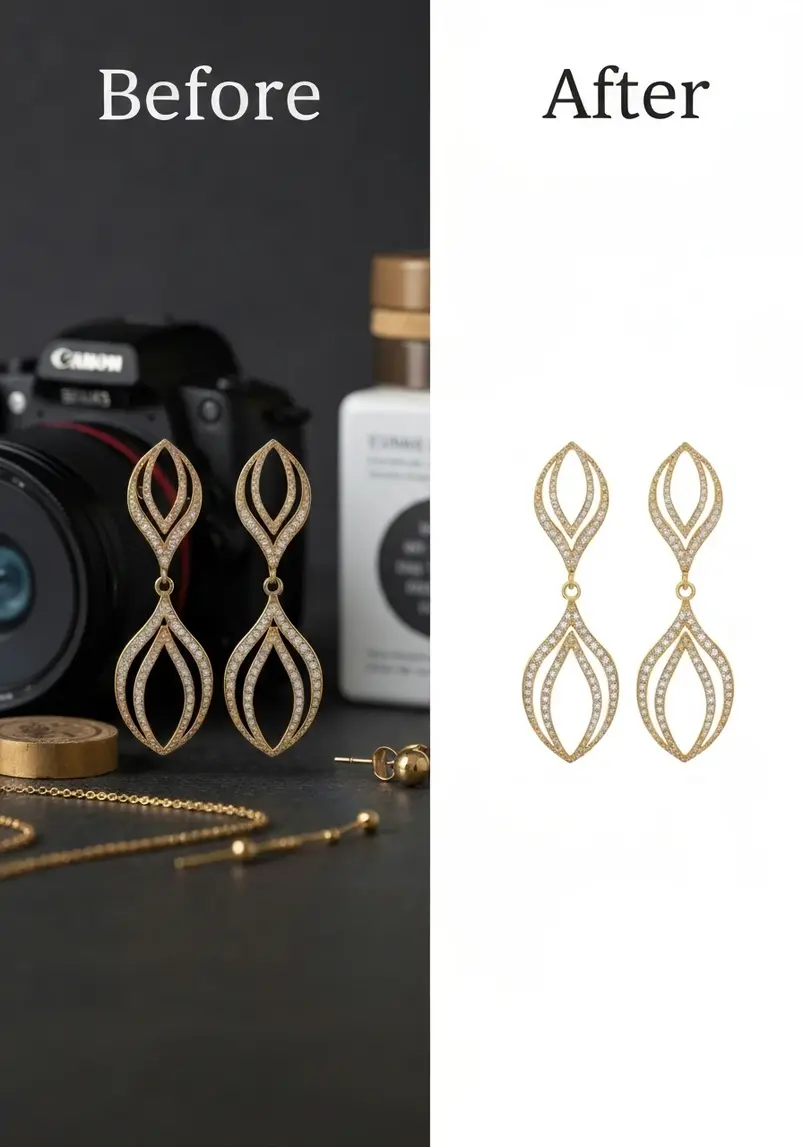
Step-by-Step Process for Perfect Jewelry Background Removal
Tools matter, but technique matters more.
Here's my exact workflow that's processed over 50,000 jewelry images:
Step 1: Shoot with removal in mind
Use contrasting backgrounds during photography.
Light-colored jewelry on dark backgrounds, dark jewelry on white.
This helps AI tools distinguish edges more accurately.
Avoid busy patterns or colors that appear in your jewelry—they confuse automatic detection.
Step 2: Proper lighting eliminates problems
Even, diffused lighting prevents harsh shadows that AI might interpret as part of the object.
I use two softboxes at 45-degree angles plus a fill light underneath for reflective jewelry.
Sounds fancy, but you can replicate this with window light and white poster board reflectors.
Step 3: Upload to your chosen tool
For bulk jewelry photo background remover needs, use tools with batch processing.
Removedo lets you upload multiple images simultaneously, which saves massive time when processing entire product catalogs.
Single images? Any quality tool works fine.
Step 4: Review edges carefully
Zoom to 200% and check:
- Chain links—did thin connections get preserved?
- Gemstone edges—are facets sharp or blurry?
- Prongs and settings—small details make or break realism
- Reflections—metallic surfaces should look natural, not cut off mid-shine
Most AI tools get 95% perfect automatically.
That last 5% determines whether your image looks professional or amateur.
Step 5: Export in the right format
PNG files with transparent backgrounds work for most e-commerce platforms.
Keep originals in high resolution—you can always downsize, but you can't add quality back.
For Amazon listings, follow their specific requirements: 1000px minimum on longest side, pure white RGB 255,255,255 backgrounds for main images.
For Shopify, Instagram, or custom websites, transparent PNGs give maximum flexibility for design changes later.
Advanced Tips for Different Jewelry Types
Not all jewelry photographs the same.
After years of specialized work, here's what actually works for each category:
Rings:
Photograph at slight angles to show dimension.
The best tools for necklace photo background sometimes struggle with ring shanks that curve away from camera—manual touchup might be needed on the underside.
Use ring holders or clear acrylic stands, then remove both background AND stand in one pass with good AI tools.
Necklaces and Chains:
Lay flat or use mannequin busts.
Thin chains pose the biggest challenge—cheap background removers create gaps or delete delicate links entirely.
Test your tool on one complex chain piece before processing your entire inventory.
Premium tools handle this better because they're trained specifically on jewelry edge cases.
Earrings:
Shoot pairs together for consistent lighting and color.
Reflective backs can confuse AI—position lighting to minimize glare on post backs or hoops.
Small details like earring posts need sharp focus, so shoot at appropriate aperture (f/8 to f/11 typically).
Bracelets:
Curved shapes create shadows underneath.
Use transparent bracelet stands or drape over cylindrical objects you'll remove later.
AI background eraser for jewelry photos handles these better when you minimize shadow contact points during photography.
Common Mistakes That Ruin Jewelry Images
I've seen these errors cost sellers thousands in lost conversions:
Mistake 1: Low-resolution source images
AI can't add detail that wasn't captured.
Shoot at highest quality your camera allows.
You can always compress later, but starting with a 500px image means your final result looks pixelated when customers zoom in.
Mistake 2: Ignoring color accuracy
Background removal sometimes shifts color balance slightly.
White gold can look yellow. Rose gold can look too pink.
Always compare before and after images side-by-side and adjust color temperature if needed before publishing.
Mistake 3: Skipping shadows and reflections
Jewelry floating in white space looks fake.
Add subtle drop shadow effects to ground your pieces and create depth.
Most e-commerce platforms show better conversion rates with realistic shadows than flat cutouts.
Mistake 4: Inconsistent backgrounds across catalog
Some products on white, others on transparent, a few on gray—this screams unprofessional.
Pick one background style and stick with it across your entire product range.
Consistency builds brand trust faster than variety.
Mistake 5: Not testing on actual platforms
What looks perfect on your monitor might show weird halos or transparency issues on mobile browsers or marketplace listings.
Upload test images to your actual sales channels before processing 500 products.
Related: Ecommerce Product Photo Background Remover: Best AI Tools Compared.
How to Scale Jewelry Photo Editing for Growth
When you're selling 20 SKUs, manual editing works fine.
At 200 SKUs? You need systems.
At 2,000? Automation becomes non-negotiable.
Here's how I've helped jewelry brands scale their photo retouching workflows:
Create photography templates:
Set up repeatable lighting, camera angles, and shooting positions.
When every ring gets photographed in identical conditions, AI tools process them more consistently.
Consistency in = consistency out.
Batch processing workflows:
Photograph 50-100 pieces in one session using the same setup.
Upload all images to bulk jewelry photo background remover tools in one batch.
Process while you're shooting the next batch.
This parallel workflow cuts total processing time by 60-70%.
Build quality control checklists:
Hire virtual assistants or junior team members to handle routine checks:
- Are all edges clean?
- Do colors match physical products?
- Is resolution appropriate for platform requirements?
- Are file names and metadata correct?
This frees you to focus on strategy instead of pixel-peeping every image.
Integrate with product management:
Connect your editing workflow directly to Shopify, WooCommerce, or Amazon Seller Central.
Some tools offer API access that automatically processes new uploads and adds them to product listings.
For more insights on streamlining product photography workflows, check out how AI-powered tools cut editing time by 98%.
Measuring ROI on Professional Jewelry Images
Let's talk money.
Because better images mean nothing if they don't improve your bottom line.
Track these metrics before and after upgrading your jewelry product image background eraser process:
Conversion rate: The percentage of visitors who buy.
Even a 0.5% improvement on decent traffic creates substantial revenue increases.
One client went from 1.2% to 2.1% conversion after professional background removal—that's 75% more revenue from identical traffic.
Average order value: Better images increase perceived value.
When customers trust your photos, they're more willing to buy higher-priced items or add multiple pieces to cart.
Return rate: Accurate, clear photos reduce "not as described" returns.
Returns kill profit margins faster than almost anything.
Professional images that show exactly what customers receive reduce return rates by 20-40% in my experience.
Time on page: Engaging product photos keep visitors browsing longer.
Longer sessions typically correlate with higher conversion rates and better SEO rankings.
Social engagement: Clean product images get shared more on Instagram, Pinterest, and Facebook.
Free marketing from customers who love how your jewelry looks online.
The math works out simple:
Spending $100/month on premium background removal tools that generates $500+ in additional revenue is a no-brainer.
Even free tools that save 10 hours monthly create value when you reinvest that time into marketing, product development, or customer service.
Related: AI background remover for food catering service photos How to Get Flawless Results.
Conclusion: Turn Your Jewelry Photos Into Sales Machines
Professional product images aren't optional anymore.
They're the difference between "just another jewelry seller" and "premium brand I want to buy from."
The good news? You don't need expensive photographers or Photoshop expertise.
Modern jewelry product image background eraser tools put professional-quality results in everyone's hands.
Start with one of the tools I recommended—Removedo for most users, Remove.bg for simplicity, Canva for all-in-one convenience.
Process your top 20 selling products first.
Upload clean images with transparent backgrounds or white backgrounds depending on your platform.
Measure the difference in conversion rates, time on page, and revenue.
Then scale to your entire catalog.
The jewelry business rewards visual excellence.
Your products deserve images that match their beauty.
Ready to transform your jewelry product photos? Head to Removedo and start removing backgrounds in seconds—completely free for your first images. Your improved conversion rates are waiting.
Frequently Asked Questions
What's the best format for jewelry images with removed backgrounds?
PNG format with transparent backgrounds offers maximum flexibility for e-commerce use. It preserves image quality without compression artifacts around delicate jewelry edges. For Amazon main images, use JPEG with pure white RGB 255,255,255 backgrounds. Keep original high-resolution PNG files archived for future use across different platforms or marketing materials.
How long does AI background removal take for jewelry photos?
Modern AI tools process single jewelry images in 3-10 seconds. Batch processing 100 images typically takes 2-5 minutes depending on file size and tool capacity. This compares to 10-15 minutes per image for manual Photoshop editing, making AI solutions 100-200x faster for routine product photography backgrounds.
Can free background remover tools handle professional jewelry photography?
Yes, free tools like Removedo's basic tier and Remove.bg produce professional-quality results for most jewelry types. Limitations typically involve resolution restrictions or monthly image caps rather than quality issues. For high-volume needs or extremely intricate pieces worth thousands, premium subscriptions offer better edge refinement and unlimited processing.
Do I need to retouch images after automatic background removal?
About 80-90% of jewelry images need zero touchup after AI background removal. The remaining 10-20% might need minor edge refinement on extremely thin chains, complex filigree work, or areas with challenging reflections. Quick spot fixes in free tools like Photopea or Canva handle these edge cases in under a minute per image.
What's the difference between transparent and white backgrounds for jewelry?
Transparent backgrounds (PNG files) let you place jewelry on any colored background later—ideal for website design flexibility and social media graphics. White backgrounds meet Amazon, eBay, and most marketplace requirements for main product listings. Shoot once, export both versions from your background removal tool to cover all use cases.
How do I prevent color shifts during background removal?
Use neutral, calibrated lighting during photography to ensure accurate colors from the start. After background removal, compare edited images side-by-side with originals at 100% zoom. If you notice color shifts in gold, silver, or gemstones, adjust white balance or color temperature before final export. Premium tools like Removedo preserve color accuracy better than basic free alternatives.
Can I remove backgrounds from jewelry worn by models?
AI tools trained on product photography work best on jewelry shot in isolation. For lifestyle shots with models wearing jewelry, you'll likely need manual selection tools or specialized portrait background removers. Better approach: shoot both isolated product images for e-commerce listings and lifestyle images with models for marketing—each serves different purposes in your visual strategy.
Try our free background remover tool for professional results.


