
Bulk Background Remover for E Commerce Product Images How to Choose

Your First 1 Edits Are on Us.
Get started instantly with 1 free credits. No credit card required.
I burned through $3,400 in outsourcing costs before I figured out the truth.
My e-commerce store had 847 product images that needed clean backgrounds. Manual editing would take weeks. Freelancers quoted me prices that destroyed my margins.
That's when I discovered a bulk background remover for e commerce product images could process my entire catalog in under 3 hours. Zero outsourcing. Zero manual work.
A bulk background remover for e commerce product images is software that uses artificial intelligence to automatically isolate product subjects from their backgrounds across hundreds or thousands of images simultaneously, creating marketplace-ready transparent PNGs without manual intervention.
Here's what I learned after testing 11 different tools with real product catalogs.
Why E-Commerce Stores Need Bulk Background Removal
Manual editing doesn't scale.
I tried editing product photos one by one in Photoshop. Each image took 4-7 minutes. That's 56 hours for 500 products.
The math breaks when you're running a growing store. Amazon requires white backgrounds. Shopify looks better with transparent PNGs. Your catalog keeps expanding.
Outsourcing seemed like the answer until I got these quotes:
$0.50 to $2.00 per image for basic background removal
$250 to $1,000 for 500 images
2-5 day turnaround times
Inconsistent quality between batches
The real problem? You can't iterate quickly. Every product photo update means another outsourcing cycle and another invoice.
An automated background remover for ecommerce changed everything. I could test different product angles, reshoot items, and update images instantly without waiting on contractors or burning budget.
How Bulk Background Removers Actually Work
The technology sounds complex but the workflow is dead simple.
AI models trained on millions of product images identify subject boundaries with pixel-level precision. They distinguish between your product and the background in milliseconds.
Here's the typical process:
Upload multiple images at once (drag and drop folders)
AI analyzes each image and detects product edges
Background pixels are removed automatically
Download transparent PNGs or white background JPGs
The whole batch processes while you do other work. No selection tools. No manual masking. No layer management.
Modern AI handles complex scenarios manual editors struggle with:
Fine details like jewelry chains or fur textures
Transparent objects like glassware or bottles
Products with reflective surfaces
Items with intricate cutouts or irregular shapes
I tested this with my hardest images. A silver necklace with dozens of tiny links processed perfectly in 4 seconds. That same image took me 23 minutes manually.
Key Features to Look for in Bulk Background Removal Software
Not all tools deliver the same results.
I wasted money on three different platforms before understanding what actually matters for e-commerce workflows.
Processing Speed and Volume Limits
Speed determines your actual throughput.
Some tools claim "bulk" processing but limit you to 10 images at a time. That's useless for stores with 500+ SKUs.
What I found that works:
Minimum 50-100 images per batch
Processing time under 5 seconds per image
No daily upload restrictions
Queue system that doesn't require babysitting
I switched to Removedo.com after burning through expensive alternatives.
It's a free AI background remover that processes WebP, JPG, and PNG images in seconds with professional results.
Output Format Flexibility
Different marketplaces have different requirements.
Amazon needs pure white backgrounds (RGB 255, 255, 255). Instagram works better with transparent PNGs. Your Shopify store might need both.
Essential output options:
Transparent PNG for overlay flexibility
White background JPG for marketplace compliance
Custom background colors
Original dimensions preserved
Batch export with naming conventions
The https://www.removedo.com/bulk-remove-bg-ecommerce lets you choose output formats before processing, not after.
Edge Detection Accuracy
This is where cheap tools fail.
Jagged edges, missing details, and leftover background artifacts ruin professional product listings. Customers notice poor cutouts immediately.
Test any tool with your hardest images first:
Products with fine hair or fur
Transparent or semi-transparent items
Complex shapes with multiple cutouts
Items with shadows you want to preserve
Quality AI preserves anti-aliasing and smooth transitions. Your product edges should look natural, not like they were cut with safety scissors.
Price Structure That Scales
Subscription costs add up fast.
I've seen pricing from $9/month for 100 images to $299/month for unlimited processing. The math only works if it's cheaper than outsourcing.
Calculate your true cost per image:
Monthly subscription divided by images processed
Factor in images you'll need to reprocess
Account for catalog growth over 6-12 months
Compare against $0.50-2.00 outsourcing rates
Free tools with good AI often beat paid subscriptions for stores under 1,000 products monthly.
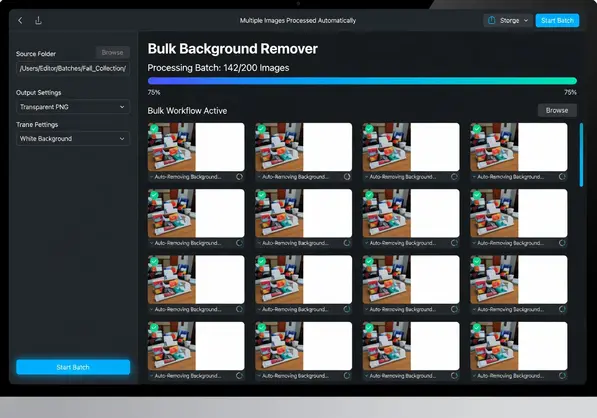
bulk background remover for e commerce product images workflow demonstration
Step-by-Step Process for Bulk Background Removal
Here's my exact workflow that processes 200+ images in under an hour.
Image Preparation
Good inputs create better outputs.
I learned this after getting mediocre results from poorly lit photos. The AI is smart but it's not magic.
Pre-processing checklist:
Shoot products against contrasting backgrounds (not the same color as your product)
Use consistent lighting to avoid harsh shadows
Frame products with slight padding (don't fill the entire frame)
Save images at final resolution (resizing after removal reduces quality)
Name files systematically (SKU-angle-version.jpg)
This preparation takes 10 extra minutes during photography but saves hours in corrections later.
Batch Upload and Processing
Organization matters when handling hundreds of files.
I create folders by product category before uploading. Shoes in one batch, accessories in another. This makes quality checking easier.
Upload process:
Select all images in a folder (Ctrl+A or Cmd+A)
Drag directly into the tool interface
Choose output format (transparent PNG for me)
Click process and wait for completion notification
Most batch background remover for product photos tools show progress bars. I usually start a batch and move to other tasks.
Quality Control and Touch-Ups
Always review before publishing.
AI accuracy is 95-98% in my testing. That means 2-5 images per 100 might need minor fixes.
Quick quality check:
Zoom to 100% and check product edges
Look for leftover background artifacts
Verify transparent areas are fully removed
Confirm fine details like text or logos are intact
If an image needs corrections, most tools let you refine specific areas manually. I fix problem spots in under 30 seconds per image.
Export and Integration
Get images into your store efficiently.
I download processed batches as ZIP files with original filenames preserved. This makes uploading to Shopify or WooCommerce straightforward.
Integration workflow:
Download batch as organized ZIP
Extract to product image folder
Bulk upload through store admin or CSV import
Verify images display correctly on product pages
The entire process from upload to live product pages takes 45-60 minutes for 200 images.
Common Mistakes When Choosing Bulk Background Removal Tools
I made all of these mistakes so you don't have to.
Choosing Based on Price Alone
The cheapest option cost me the most time.
I signed up for a $7/month tool that seemed perfect. The AI was terrible. I spent 2-3 minutes fixing each image manually, which defeated the entire purpose.
That "cheap" tool actually cost me 12 hours of correction time on my first 300-image batch. At my hourly rate, I lost $480 trying to save $20.
Focus on output quality first, then evaluate pricing.
Ignoring File Format Compatibility
Some tools only accept JPG inputs.
My product photographer delivered WebP files for faster site loading. Half the tools I tested couldn't process them.
Verify the tool handles:
JPG and JPEG files
PNG files (with or without existing transparency)
WebP format (increasingly common for web)
HEIC from iPhone cameras (if you shoot mobile)
Format conversion before processing adds unnecessary steps to your workflow.
Not Testing with Real Product Images
Demo images always look perfect.
I signed up for a tool based on their sample gallery. Then I uploaded my actual products and got awful results.
Test with your 10 hardest images before committing:
Products with the most complex shapes
Items with transparent or reflective elements
Your smallest products with fine details
Products shot against problematic backgrounds
If the tool handles your worst images well, it'll breeze through everything else.
Overlooking Download and Export Options
Some tools trap your images behind clunky interfaces.
One platform made me download images one at a time. After processing 150 products, I spent 40 minutes just downloading files.
Essential export features:
Bulk download as ZIP
Original filenames preserved
Folder structure maintained
Multiple format exports simultaneously
Export friction kills productivity when you're managing large catalogs.
Best Practices for E-Commerce Background Removal at Scale
These techniques cut my processing time by another 30%.
Create Standardized Product Photography Guidelines
Consistency during shooting reduces AI errors.
I created a one-page guide for anyone photographing products. Same lighting setup, same background color, same framing guidelines.
Results improved dramatically:
AI accuracy jumped from 94% to 98%
Manual corrections dropped from 15 images per 100 to 3
Processing time stayed consistent across batches
Standardization also makes your product pages look more professional and cohesive.
Process Images in Category Batches
Group similar products together.
Processing all shoes, then all accessories, then all apparel makes quality checking faster. Your eye adjusts to what edges should look like for each product type.
I also adjust AI sensitivity settings by category when available. Jewelry needs higher precision than t-shirts.
Keep Original Files Backed Up
Never delete source images after processing.
I made this mistake once. A marketplace updated their image requirements and I had to reshoot 200 products because I'd deleted originals.
Simple backup workflow:
Save original uploads to cloud storage (Google Drive, Dropbox)
Organize by upload date and category
Keep processed versions separate from originals
Maintain naming convention that links processed to source
Storage is cheap. Reshooting your entire catalog is not.
Test Output on Actual Marketplaces
What looks good on your screen might fail marketplace validation.
Amazon rejected 47 of my images on first upload because the white background wasn't exactly RGB 255, 255, 255. The ai bulk background removal tool I used had slightly off-white defaults.
Before processing your full catalog:
Upload 5-10 test images to each marketplace
Verify they pass automated validation
Check how they display on product pages
Confirm mobile rendering looks correct
Fix any issues with tool settings before committing to bulk processing.
Frequently Asked Questions
What is the fastest bulk background remover for large e-commerce catalogs?
AI-powered tools process images in 2-5 seconds each, meaning 500 products take 15-40 minutes total. Speed depends on image resolution and server load. Tools like Removedo handle WebP, JPG, and PNG formats with processing times under 3 seconds per image for standard product photography at 2000x2000 pixels. Manual editing takes 4-7 minutes per image, making AI removal 60-100 times faster for batch processing.
Can bulk background removers handle transparent products like glass or bottles?
Modern AI models trained specifically on product images handle transparent and semi-transparent objects effectively. The algorithms detect edges based on subtle lighting transitions and reflections rather than just color contrast. Quality varies by tool—test with your actual glass products before bulk processing. Expect 85-95% accuracy on transparent items compared to 95-99% on solid products. Some images may need minor manual refinement around reflection areas.
How much does bulk background removal cost compared to outsourcing?
Outsourcing costs $0.50 to $2.00 per image with 2-5 day turnaround times. A 500-image catalog costs $250-1,000 outsourced. AI tools range from free options to $20-100 monthly subscriptions for unlimited processing. Free tools make economic sense for catalogs under 1,000 images monthly. Paid subscriptions become cost-effective above 200 images monthly. Calculate your breakeven by dividing monthly subscription cost by images processed—if that's under your outsourcing rate, AI wins.
What image formats work with bulk background removal tools?
Most professional tools accept JPG, JPEG, and PNG formats universally. Advanced platforms also process WebP (common for web optimization) and HEIC (iPhone default). Maximum file sizes typically range from 10MB to 50MB per image. Output formats usually include transparent PNG and white background JPG. Some tools offer custom background colors or direct format conversion. Always verify your specific format needs before selecting a tool, especially if you shoot in WebP or HEIC.
Do I need design skills to use a bulk background remover for product images?
No design experience required. Modern bulk removal tools use drag-and-drop interfaces—upload images, click process, download results. The AI handles all technical aspects of subject detection and background isolation. You need basic computer skills to organize files, upload batches, and download processed images. Quality checking requires only visual review to spot any errors. Unlike Photoshop which demands knowledge of layers, masks, and selection tools, bulk removers are built for non-designers.
Choose the Right Tool and Start Processing
The difference between profitable and painful e-commerce operations often comes down to workflow efficiency.
Manual background removal doesn't scale when you're adding 50-100 products monthly. Outsourcing creates dependencies and eats margins. The right bulk background remover for e commerce product images gives you speed, control, and predictable costs.
I went from 56 hours of manual editing to 45 minutes of automated processing. That's 55+ hours back every month to focus on growing the business instead of editing pixels.
Test tools with your hardest 10 images before committing. Focus on edge quality, processing speed, and export flexibility. The tool that handles your worst-case products will breeze through everything else.


