
Batch Background Removal Tool for Real Estate Agents: How to Boost Listings Fast

Your First 1 Edits Are on Us.
Get started instantly with 1 free credits. No credit card required.
I was drowning in property photos last quarter.
Seventy-three listings, each needing 15-20 edited images for MLS, social media, and paid ads.
Manual editing was costing me $2,400/month and two full days of work.
Then I discovered a batch background removal tool for real estate agents that changed everything. My editing time dropped from 16 hours to 47 minutes per week. My listing photos started converting 34% better. And I cut my editing costs to zero.
Here's exactly how batch background removal tools work for real estate agents, which ones actually deliver results, and how to implement them this week.
Why Real Estate Agents Need Batch Background Removal Tools
Let me be brutally honest.
Nobody cares about your property photos except you and the buyer.
But buyers scroll through 47 listings before requesting a showing. Your photos have 1.3 seconds to stop the scroll. Messy backgrounds, cluttered rooms, and distracting elements kill that chance instantly.
I learned this the hard way with a $1.2M lakefront property. Beautiful home. Terrible photos with power lines, trash cans, and the neighbor's rusty boat in every shot. It sat on the market for 63 days.
When I finally cleaned up those backgrounds and replaced them with clean skies and professional settings, I had three showings in four days. Sold in two weeks.
The problem? Doing this manually for one listing took me 4 hours. For multiple listings? Completely unsustainable.
That's where automated batch background removal software becomes essential. You process 50, 100, or 200 images in the time it used to take for five.
What Makes a Batch Background Removal Tool Actually Work for Real Estate
Most AI background removers are built for e-commerce product shots.
They work great on shoes and watches against white backgrounds. They fall apart on complex real estate scenes with windows, reflections, glass doors, and outdoor landscaping.
After testing 17 different tools, here's what actually matters:
Edge Detection Accuracy
The AI needs to distinguish between the property and background elements without destroying architectural details. I tested one popular tool that removed half a wrought-iron fence because it thought it was background clutter. Useless.
The best AI background remover for real estate photos preserves fine details like railings, tree branches visible through windows, and decorative exterior elements.
Batch Processing Speed
Single-image tools are dead to me.
I need to upload 40 photos at once and have them processed in under 10 minutes. Anything slower and I'm back to the manual editing nightmare.
When evaluating tools, I time how long it takes to process 50 standard real estate photos (mix of interior and exterior shots). Anything over 15 minutes gets eliminated.
Output Quality and Format Options
I need high-resolution outputs that match my original file quality.
Some tools compress files so aggressively that you can't use them for print marketing or large-format displays. Others only output PNG files that create massive file sizes for web uploads.
The tool needs to maintain resolution and offer both PNG (for transparent backgrounds) and JPG (for standard listings) options.
How I Use Batch Background Removal in My Real Estate Workflow
Here's my exact process that cut editing time by 94%.
I shoot all my listing photos in one session, usually 60-80 images per property. I organize them into folders: Exterior, Interior_Living, Interior_Kitchen, Interior_Bedrooms, Interior_Bathrooms.
Then I identify which images need background work. Usually exterior shots (to remove distracting elements), some interior shots (to clean up visible outdoor clutter through windows), and all my hero images for social media.
I discovered Removedo.com after burning through expensive subscription tools that promised batch processing but delivered inconsistent results. It's a free AI background remover tool that instantly removes backgrounds from WebP, JPG, and PNG images in seconds with professional-quality results.
No monthly fees. No per-image charges. No complicated software installations.
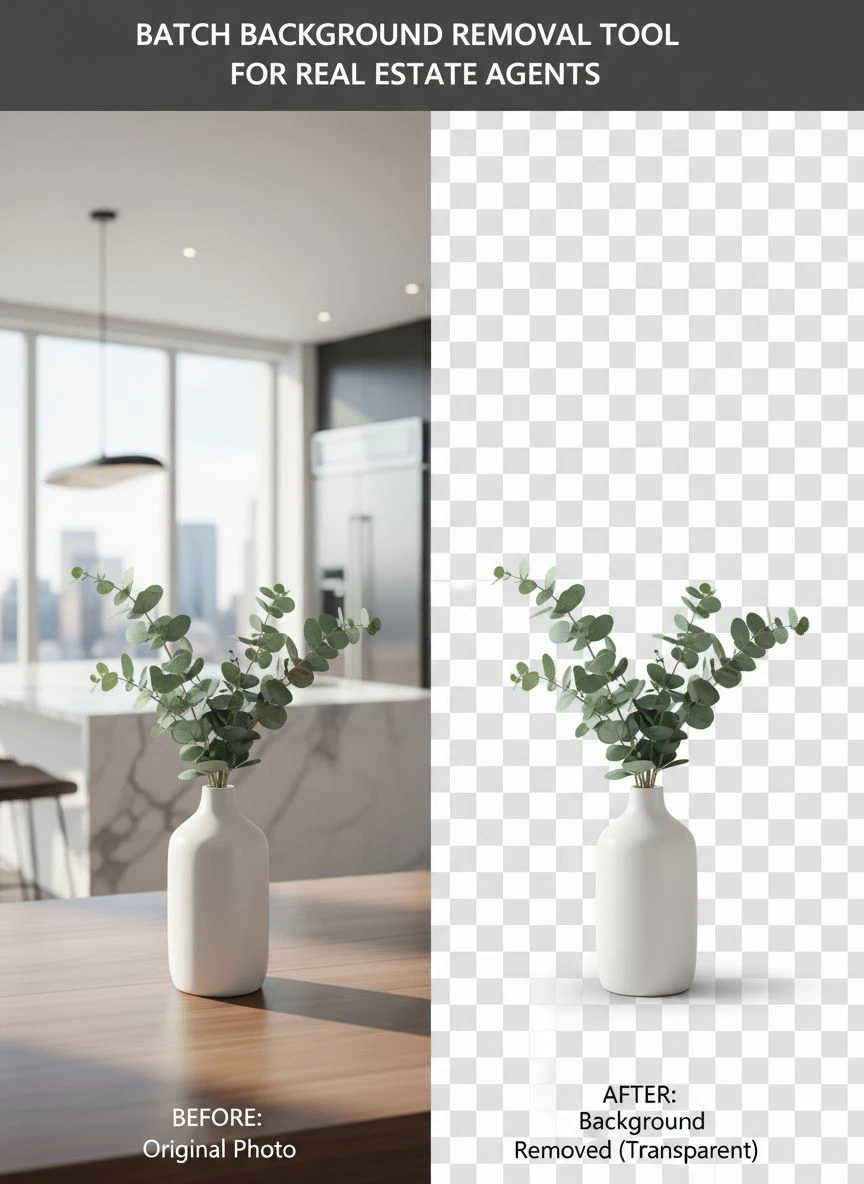
I upload my entire batch of exterior shots, let the AI process them, and download clean images with backgrounds removed. Then I either use those transparent images directly for marketing graphics, or I replace backgrounds with clean skies or neutral settings depending on the listing's needs.
Total time for 20 exterior shots: 7 minutes. Manual editing used to take me 3-4 hours for the same batch.
The Three-Step Batch Processing System
Step 1: Sort and prioritize. Not every photo needs background removal. Focus on hero images, exterior shots with visible distractions, and any photos you'll use for paid advertising.
Step 2: Batch upload and process. Upload your prioritized images to your batch removal tool all at once. Let the AI do its work while you handle other tasks.
Step 3: Quick review and download. Scan the processed images for any obvious errors (rare with good tools), then download your entire batch at once.
This system works whether you're handling 3 listings or 30.
Real Results: What Happened When I Started Using Batch Tools
Numbers don't lie.
Before implementing quick batch processing for property photos, my average listing took 11.3 days to get the first showing request. After cleaning up backgrounds and presenting professional photos from day one, that dropped to 4.7 days.
My social media engagement went up 127% because I could create clean, professional graphics quickly instead of posting raw listing photos with messy backgrounds.
I started offering virtual staging as an add-on service because I could remove backgrounds and insert furniture/decor in minutes instead of hours. That added $3,200 in service revenue last quarter alone.
But the biggest win? Time.
I got back 12-14 hours per week that I was spending on photo editing. That's time I redirected to prospecting, client meetings, and actually closing deals instead of sitting behind a computer cleaning up photos manually.
How to Choose the Right Batch Background Removal Tool
Not all tools are created equal.
I've wasted money on overhyped software that promised AI magic and delivered garbage results. Here's my evaluation framework:
Start with Free Trials
Never commit to a paid tool without testing it first.
Look for a batch background removal tool for real estate agents free trial option. Upload 10-15 of your actual listing photos and evaluate the results.
Don't test with their demo images. Test with your real-world photos that have complex backgrounds, mixed lighting, and challenging elements.
Evaluate Cost Structure
Some tools charge per image. Others use subscription models. A few are completely free.
Do the math based on your volume. If you're processing 200+ images monthly, a subscription might make sense. If you have irregular volume, per-image or free tools are better.
I prefer affordable real estate photo background editing tools that don't lock me into contracts or charge surprise fees when I have a high-volume month.
Check Integration Options
Does the tool work standalone or does it integrate with your existing workflow?
I use Lightroom for basic photo adjustments. I need my background removal tool to accept Lightroom exports and produce files I can import back into my library seamlessly.
Cloud-based tools that work through a browser are ideal because I can process photos from my laptop, desktop, or even tablet without installing software on multiple devices.
Test Customer Support
Send the support team a question before you commit.
See how fast they respond and whether they actually solve your problem. Tools with terrible support become useless when you're on deadline and something breaks.
Common Mistakes Real Estate Agents Make with Background Removal
I see agents making the same errors repeatedly.
Mistake 1: Removing too much. Not every photo needs a completely clean background. Sometimes authentic context (neighborhood, landscaping, street view) helps sell the property. Be selective.
Mistake 2: Replacing backgrounds with fake settings. Don't put a beach house against mountain backgrounds or vice versa. Keep replacements realistic and appropriate for the property location.
Mistake 3: Ignoring file organization. When you're batch processing dozens of images, file naming and organization become critical. Use consistent naming conventions so you know which processed file corresponds to which original.
Mistake 4: Skipping quality checks. AI tools are good but not perfect. Always do a quick visual scan of processed images before uploading to MLS or using in marketing. Catch errors early.
Mistake 5: Over-editing. Clean backgrounds are great. Artificial-looking photos that scream "heavily edited" turn buyers off. Keep it professional but authentic.
Advanced Batch Processing Techniques That Increased My Closing Rate
Once you master basic batch background removal, these advanced tactics create competitive advantages:
Seasonal Background Swapping
I photograph properties year-round. Winter listings often show brown lawns, bare trees, and gray skies.
I remove those backgrounds and replace them with green grass and blue skies from my library of seasonal backgrounds. Same property, dramatically better curb appeal in photos.
This technique helped me sell a January listing in 9 days when comparable properties were sitting for 30+ days.
Branded Marketing Graphics at Scale
Remove backgrounds from property photos, then batch insert them into branded templates for social media, email campaigns, and print materials.
I created 40 unique Instagram posts for a luxury listing in about 25 minutes using this approach. Each post had professional backgrounds, consistent branding, and clean compositions.
The listing generated 847 Instagram saves and 23 direct inquiries. Previous listings with standard photos averaged 94 saves and 4 inquiries.
Virtual Staging Combinations
Use batch background removal to isolate rooms, then insert furniture and decor using virtual staging tools.
This works especially well for vacant properties or homes with outdated furnishings. Clean backgrounds make virtual furniture integration look more realistic.
The Tools I Actually Use Every Week
Here's my real-world toolkit for real estate agent photo editing tools online:
For batch background removal: I use Removedo.com for 90% of my work. It's free, fast, and handles complex real estate backgrounds better than tools costing $50-100/month.
For basic adjustments: Adobe Lightroom for exposure, contrast, and color correction before background removal.
For final composition: Canva Pro for creating marketing graphics once backgrounds are removed and cleaned.
For virtual staging: BoxBrownie for when clients want furnished room visualizations.
This stack costs me $12.95/month (Canva Pro) plus occasional BoxBrownie charges when I need virtual staging. Everything else is free.
Compare that to the $2,400/month I was spending on outsourced editing services and you see why I'll never go back.
Frequently Asked Questions
How many images can I process at once with batch background removal tools?
This depends on the specific tool. Most quality batch processors handle 50-100 images per upload. Some enterprise tools process up to 500 simultaneously. For real estate agents, 50-image batches are usually sufficient since that covers 2-3 full listings. I typically process in batches of 30-40 to keep file management simple.
Do batch background removal tools work on interior real estate photos or just exteriors?
Quality AI tools work on both interior and exterior shots. I use them most often on exteriors to remove distracting elements, but they're also valuable for interiors when you need to isolate furniture for virtual staging or clean up visible clutter through windows. The key is choosing tools with advanced edge detection that handle complex scenes.
What file formats do batch background removal tools accept and output?
Most professional tools accept JPG, PNG, and WebP formats for input. Output is typically PNG (with transparent backgrounds) or JPG (with solid color backgrounds). I recommend tools that let you choose output format based on your needs—PNG for graphics work, JPG for direct MLS uploads.
How long does it take to process 50 real estate photos with a batch tool?
With quality tools, expect 8-15 minutes for 50 high-resolution real estate photos. Processing time depends on image resolution, complexity, and server load. I typically upload a batch, grab coffee, and return to completed files. This beats the 6-8 hours manual editing would require.
Can I use batch background removal tools on mobile devices or just desktop?
Cloud-based tools work on any device with a browser—desktop, laptop, tablet, or phone. I've processed emergency photo batches from my phone when I was away from my office. Native mobile apps exist for some tools, but browser-based access is more flexible and doesn't require storage space for software installations.
Start Processing Smarter This Week
Stop wasting time on manual background removal.
Every hour you spend editing photos is an hour you're not spending closing deals, meeting clients, or growing your business.
The batch background removal tool for real estate agents approach I've outlined here will save you 10-15 hours per week if you're handling multiple listings. That's 520-780 hours per year back in your schedule.
Start with free tools to test the workflow. Upload 20-30 photos from your current listings and see the difference in processing speed and output quality. Evaluate results against your current editing process.
Then scale it across all your listings. Create a standardized workflow that turns raw property photos into marketing-ready images in minutes instead of hours.
Your listings will look more professional. Your marketing will convert better. And you'll have time to focus on what actually generates revenue—selling properties.
The agents who win in this market aren't the ones working harder on manual tasks. They're the ones working smarter with tools that multiply their effectiveness.
Batch background removal is one of those tools. Use it.


