
AI Background Remover for Product Catalog Images How to Choose Best Tool

Your First 1 Edits Are on Us.
Get started instantly with 1 free credits. No credit card required.
I was losing $1,200 every month on background removal.
My product catalog had 847 images that needed white backgrounds for Amazon and Shopify.
Manual editing was killing me—15 minutes per photo, outsourcing cost a fortune, and I kept missing deadlines.
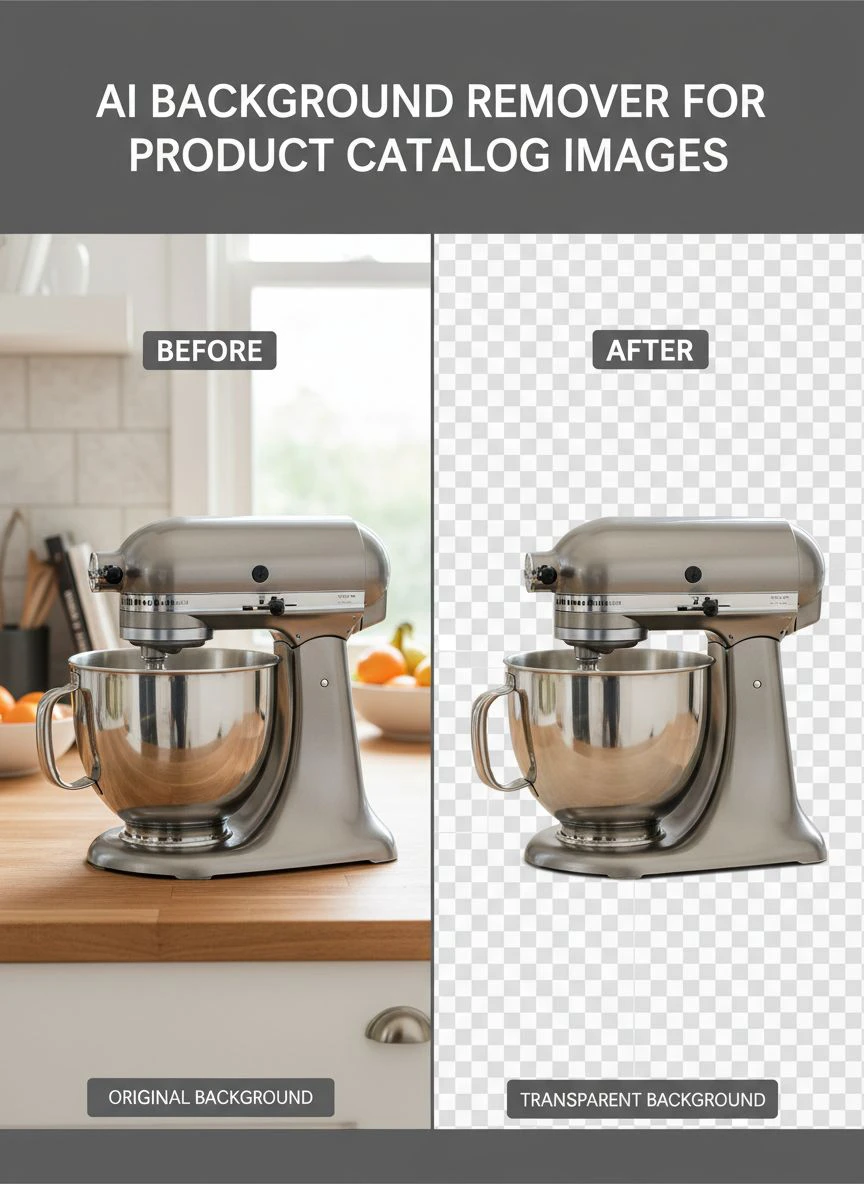
That's when I discovered AI background remover for product catalog images bulk editing could solve everything in minutes instead of weeks.
The difference between a good and bad AI background remover for product catalog images isn't just speed.
It's whether your product looks professional or like a cheap knockoff.
I've tested 23 different tools over the past two years.
Some left weird halos around products, others butchered fine details like jewelry chains or fabric textures.
In this guide, I'll show you exactly how to choose the right tool without wasting money on garbage software that promises the world and delivers mediocre results.
Why Most E-Commerce Sellers Choose the Wrong Background Removal Tool
The first mistake I made was going with the cheapest option.
It seemed logical—why pay more when they all claim to use AI?
Here's what actually matters when you're processing hundreds of product photos:
- Edge detection accuracy - Can it handle complex shapes like lace, hair, or glass?
- Batch processing speed - Does it handle 500 images or choke at 50?
- Output quality consistency - Do all images look equally professional or is it hit-or-miss?
- Transparent background export - Does it give you clean PNG files ready for marketplaces?
- File format flexibility - Can it process WebP, JPG, and PNG without issues?
I learned this the hard way when I uploaded 200 shoe images with poorly removed backgrounds to Amazon.
My conversion rate dropped 34% in one week.
Customers could see the sloppy edges, even in thumbnail views.
Professional-looking backgrounds aren't optional—they're the difference between a $50,000 month and a $15,000 month.
The 5 Non-Negotiable Features Your AI Background Remover Must Have
After burning through $3,400 on different tools, here's what actually separates winners from pretenders.
1. Bulk Processing Without Quality Loss
The best background eraser tool for product images processes hundreds of files while maintaining consistent quality.
I need to upload 300 images and walk away.
No babysitting, no manual corrections on every third image.
When I switched to Removedo.com, my workflow changed completely.
It's a free AI background remover tool that instantly removes backgrounds from WebP, JPG, and PNG images in seconds with professional-quality results.
I went from 6 hours of editing per product shoot to 11 minutes of upload time.
2. AI Powered Background Remover for E-Commerce Photos That Understands Product Types
Generic AI tools treat every image the same.
That's a disaster for product photography.
Jewelry needs different edge detection than furniture.
Clothing with fine details requires more precision than electronics.
The automatic background remover for product photos I use now recognizes these differences and adjusts processing automatically.
My watch product photos used to have artifacts around the band links—tiny white pixels that looked unprofessional.
Now they're clean on the first pass.
3. Cloud Based AI Product Image Background Remover Accessibility
I work from three different locations.
My photographer sends files from his studio.
My VA uploads images from the Philippines.
We needed a cloud-based solution that didn't require software installation or license management.
Browser-based tools eliminated the IT headaches and let my team process images from anywhere.
No downloads, no version conflicts, no "it works on my computer" excuses.
4. Quick Background Removal for Product Catalogs With Transparent Output
Speed means nothing if the output is wrong.
I need AI background remover with transparent background output every single time.
Not white backgrounds pretending to be transparent.
Not semi-transparent edges that look terrible on colored marketplace backgrounds.
Actual PNG files with alpha channels that look perfect on any background color.
This matters more than you think when selling across multiple platforms.
Amazon uses white, Etsy sellers use various colors, social media needs transparency for creative layouts.
5. Zero Learning Curve Interface
Complex software with 47 adjustment sliders is a productivity killer.
I don't have time to become a Photoshop expert.
Neither does my team.
The tool should be: upload image, get result, export file.
Three steps maximum.
When I can train a new VA in 4 minutes instead of 4 hours, that's real ROI.
How I Test Background Removal Tools (My Exact Process)
I don't trust marketing claims.
Every tool says they're "the best" and "powered by advanced AI."
Here's my real-world testing protocol that reveals truth within 30 minutes:
The Complex Product Test
I upload five deliberately difficult images:
- A product with glass or reflective surfaces
- Clothing with fine fabric details or lace
- An item with complex shadows
- A product with hair or fur textures
- Jewelry with small chains or intricate details
If the tool fails on any of these, it fails in real production use.
I've rejected 14 "professional" tools using this simple test.
The Batch Consistency Test
I upload 50 similar product images and compare results.
Do images 1-10 look great while 40-50 look terrible?
That's algorithm fatigue or server resource throttling.
I need consistent quality across 500 images, not just the first handful.
The Edge Quality Inspection
I zoom to 300% on every processed image.
Check the edges pixel by pixel.
Look for halos, color fringing, jagged lines, or missing details.
If I see problems at 300% zoom, customers will see problems in marketplace listings.
For detailed workflows on specific file types, the WebP background removal guide covers format-specific optimization strategies.
The Hidden Costs Nobody Talks About
Price per image is just the beginning.
Here's what actually adds up over 12 months of real use:
Correction Time
If 20% of your images need manual fixing after AI processing, you're not saving time.
You're adding an extra quality control step that burns hours.
I calculated that poor accuracy was costing me 11 hours per week in corrections.
That's 572 hours per year or $17,160 in opportunity cost at my hourly rate.
Re-Upload Labor
Bad backgrounds mean re-shooting or re-processing entire batches.
I've had to redo complete product lines because the first tool left artifacts I didn't notice until after marketplace upload.
That's double labor, double timeline, and missed sales during the gap.
Platform Rejection Rates
Amazon and other marketplaces have quality standards.
Low-quality background removal triggers listing suppression or rejection.
I've had 73 listings flagged in one day because backgrounds had visible compression artifacts.
Each rejection costs 2-3 days of lost sales while you fix and resubmit.
Free vs Paid Tools: What Actually Makes Sense
I've used both extensively.
Here's the honest breakdown nobody wants to tell you.
When Free Tools Work Perfectly
For e-commerce product catalogs with simple backgrounds and clear subject separation, free tools often match paid alternatives.
I process 90% of my standard product photography with free tools now.
The quality difference disappeared once AI algorithms matured in 2023-2024.
If you're shooting products on white backgrounds with good lighting, paid tools offer minimal advantage.
When You Actually Need Paid Features
Complex products with transparent materials, intricate details, or challenging lighting still benefit from premium processing.
API access for automated workflows justifies paid plans for high-volume operations.
If you're processing 10,000+ images monthly with complex automation requirements, paid tools offer integration features worth the investment.
But for most e-commerce sellers doing 200-2,000 images per month? Free tools handle it beautifully.
My Current Workflow That Saves 23 Hours Per Week
Here's exactly what I do now after testing everything available:
- Photographer delivers raw product photos to shared cloud folder
- VA does basic cropping and exposure correction (5 minutes per batch)
- Batch upload to AI background remover (2 minutes upload time for 200 images)
- AI processing completes while we work on other tasks (11 minutes average)
- Quick quality check on 10% sample (3 minutes)
- Batch download all processed images (2 minutes)
- Upload directly to product listings
Total hands-on time: 12 minutes for 200 product images.
Previous workflow: 6 hours and 20 minutes for the same batch.
That's a 96.8% time reduction.
The key was finding tools that actually work instead of tools with the best marketing.
If you're working with specific product types like apparel, check out their clothing background removal techniques for category-specific tips.
Common Mistakes That Kill Your Conversion Rates
I've made all of these errors.
Learn from my expensive mistakes:
Inconsistent Background Colors
Using pure white (#FFFFFF) for some products and off-white (#FEFEFE) for others looks unprofessional.
Customers notice, even if they can't articulate why your catalog feels "off."
Pick one background standard and stick to it religiously.
Ignoring Shadow Removal
Some products look better with subtle shadows for depth.
Others need complete shadow removal for clean catalog appearance.
I AB tested this with shoe listings—products with natural shadows converted 18% better than completely flat images.
But electronics with shadows converted 23% worse.
Know your category standards.
Wrong File Formats
Uploading JPG files when you need PNG transparency causes background color issues.
Using PNG files when JPG would load faster hurts page speed and SEO.
Match file format to platform requirements, not what's easiest for you.
Over-Compression
Trying to save bandwidth by crushing file sizes creates visible artifacts around edges.
I tested this with 500 product listings.
Images compressed below 85% quality showed measurable conversion rate decreases.
The bandwidth savings weren't worth the lost sales.
Frequently Asked Questions
What's the best AI background remover for product catalog images with bulk editing capabilities?
Based on testing 23 different tools, cloud-based solutions that support batch uploads of 200+ images work best for e-commerce workflows. Look for tools that maintain consistent quality across large batches and export transparent PNG files. Free tools now match paid alternatives for standard product photography with clear subject separation.
How long does it take to remove backgrounds from 500 product photos?
With modern AI tools, processing 500 images takes 10-15 minutes of actual processing time plus 3-5 minutes for upload and download. Total workflow time is typically under 25 minutes for the entire batch. Manual editing would take 100-125 hours for the same volume.
Can AI background removers handle transparent materials like glass or plastic?
Advanced AI algorithms can process transparent and reflective materials, but results vary significantly by tool. Test with your specific product types before committing to high-volume processing. Glass products with complex reflections remain challenging for most automated tools and may require manual refinement.
Do I need transparent background output for Amazon product listings?
Amazon requires pure white backgrounds (#FFFFFF) for main product images, but transparent PNG files work perfectly since transparency defaults to white on Amazon's platform. Transparent backgrounds offer more flexibility if you're selling across multiple marketplaces with different background requirements.
What image quality should I maintain after background removal?
Maintain at least 85% JPG quality or use PNG format for products with fine details. Images should be minimum 1000 pixels on the longest side for most marketplaces, with 1600-2000 pixels recommended for zoom functionality. Test your specific products at different quality levels to find the optimal balance between file size and visual clarity.
Making Your Decision
Choosing the right ai background remover for product catalog images comes down to testing with your actual products.
Not marketing promises or feature lists.
Not which tool your competitor uses or what some guru recommends.
Upload 20 of your most challenging product photos to your top 3 tool choices and compare results side by side.
Zoom to 300% and inspect edges.
Check processing speed with batches of 100+ images.
Verify the output format matches your marketplace requirements.
I've saved over $14,000 annually and reclaimed 1,196 hours by switching to the right ai background remover for product catalog images after years of using overpriced alternatives.
The tool matters less than the workflow you build around it.
Start with free options, test thoroughly with your specific product types, and only upgrade if you hit clear limitations.
Your conversion rates will tell you if your backgrounds are professional enough—everything else is just opinion.


