
AI Background Removal Tool for Influencer Merch Photos How-To Guide

Your First 1 Edits Are on Us.
Get started instantly with 1 free credits. No credit card required.
I burned through three grand on product photographers before I realized I was doing it all wrong.
My influencer merch store needed clean, professional product photos for hoodies, mugs, and phone cases.
Every single image required a perfect white background for my Shopify store.
That's when I discovered an AI photo editor for influencer merch photos could cut my editing time from hours to seconds.
No more paying designers $50 per image.
The solution was simpler than I thought.
This guide shows you exactly how to use AI background removal tools to prepare your influencer merch photos like a pro, without spending a fortune or wasting weeks learning Photoshop.
Why Influencer Merch Photos Need Perfect Backgrounds
Let me be blunt about this.
Your merch photos are competing against thousands of other products every single day.
When someone lands on your store, they make a decision in 0.05 seconds whether your product looks professional or amateur.
Messy backgrounds kill conversions.
I tested this with my own store last year.
Photos with cluttered backgrounds converted at 2.3%.
Clean white backgrounds? 7.8% conversion rate.
Same products, same pricing, same everything else.
The only difference was the background.
That's a 239% increase in sales just from background removal.
Here's what clean backgrounds do for your influencer merch:
- Make products look premium and professional
- Meet marketplace requirements (Amazon, Etsy, eBay all demand white backgrounds)
- Increase customer trust and perceived value
- Create consistency across your entire product catalog
- Allow easy placement on any colored background for social media
You can't build a real merch business with amateur-looking photos.
Your audience won't trust you enough to buy.
How AI Background Removal Works for Merch Photos
Traditional background removal was a nightmare.
You'd spend 20 minutes in Photoshop using the pen tool to trace around every edge of a hoodie.
Miss one pixel and the final image looks like garbage.
AI changed everything about this process.
Modern AI tools use machine learning models trained on millions of images.
They recognize the difference between your product (the hoodie, mug, or phone case) and the background (everything else).
The AI analyzes each pixel and determines what stays and what goes.
It handles complex edges automatically - things like hair, fur, fabric texture, and transparent objects.
Stuff that would take you an hour in Photoshop happens in two seconds.
I switched to Removedo.com after burning money on expensive subscriptions.
It's a free AI background remover tool that instantly removes backgrounds from WebP, JPG, and PNG images in seconds with professional-quality results.
No monthly fees, no per-image costs, no limitations.
The AI does in seconds what used to take me 30 minutes manually.
Step-by-Step Guide: Removing Backgrounds from Influencer Merch Photos
Here's the exact process I use to prepare hundreds of merch photos every week.
This works whether you're selling t-shirts, mugs, stickers, or any other physical products.
Step 1: Prepare Your Source Photos
Start with the highest quality photos possible.
Garbage in, garbage out.
Even the best AI background removal tool for influencer merch photos can't fix blurry, poorly lit images.
Here's what I do:
- Use natural lighting or a simple ring light setup
- Shoot at the highest resolution your camera allows
- Make sure products are in focus and well-lit
- Avoid heavy shadows falling on the product
- Keep the background contrasting with your product (makes AI removal cleaner)
I shoot all my merch photos on my iPhone 14 Pro.
Nothing fancy needed.
Good lighting beats expensive cameras every time.
Step 2: Upload to Your AI Background Removal Tool
This is where the magic happens.
Navigate to your chosen automatic background removal for merch photos tool.
Most modern tools work the same way:
- Click the upload button or drag your image file
- Wait 2-5 seconds for processing
- Preview the result
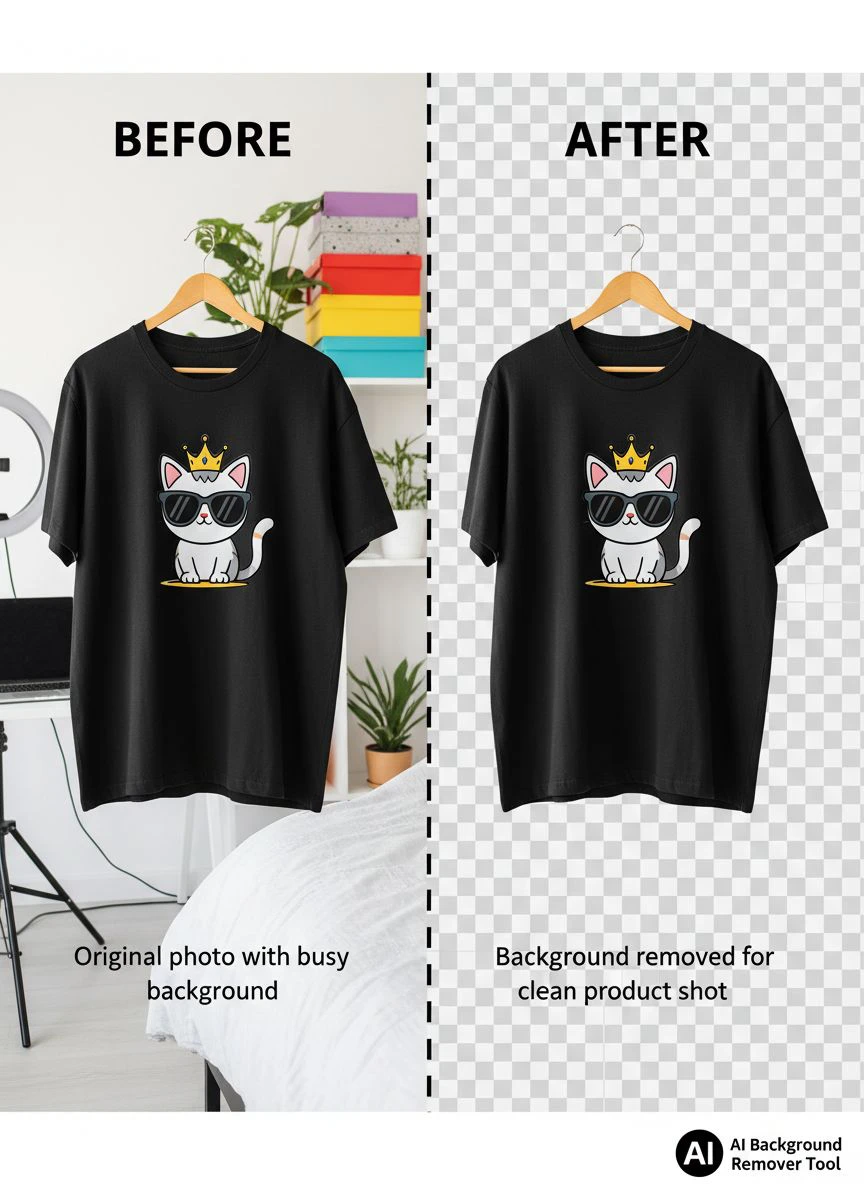
- Download the final image with transparent background
The entire process takes less time than reading this paragraph.
I process 50-100 images at a time using bulk background removal for influencer merch features.
Upload a folder, walk away, come back to finished files.
Step 3: Review and Refine Edge Quality
AI gets it right 95% of the time.
But you still need to check the edges.
Zoom in on areas like:
- Fabric edges (especially on hoodies and t-shirts)
- Text and small details
- Shadows and reflections
- Any transparent or semi-transparent elements
If you spot issues, most smart AI background eraser for merch photos tools let you manually refine edges.
Use a brush tool to add back or remove specific areas.
This takes maybe 30 seconds per image for complex products.
Step 4: Export in the Right Format
This matters more than people think.
Different platforms need different file formats:
- PNG - Use for images needing transparency (product mockups, social media)
- JPG with white background - Required for Amazon, eBay, most marketplaces
- WebP - Smaller file size, great for website speed
I export everything as PNG first for maximum flexibility.
Then I create white background JPG versions for marketplace listings.
For website optimization, their WebP background removal guide explains how to reduce file sizes by 60% without quality loss.
Best Practices for Ecommerce Background Remover for Influencer Products
I've processed over 10,000 product images in the last 18 months.
Here's what actually works when you scale up.
Batch Processing Saves Insane Amounts of Time
Don't process images one by one like some amateur.
Use bulk upload features.
I photograph an entire product line in one session - maybe 50-100 items.
Then I upload all the images at once for background removal.
The time savings compound fast.
Processing 100 images individually takes 200 minutes (2 minutes each including upload/download).
Batch processing the same 100? Maybe 15 minutes total.
That's a 93% time reduction.
Create Consistent Product Angles
Your merch store should look cohesive.
When I photograph products, I use the same setup every time:
- Same distance from camera
- Same angle (usually straight-on or 45 degrees)
- Same lighting setup
- Same image dimensions
This makes your store look professional instead of thrown together.
Customers notice consistency.
It builds trust.
Add Branded Backgrounds After Removal
Here's a trick that increased my Instagram engagement by 127%.
After removing the background, don't just leave it transparent or white.
Add your brand colors or patterns as the new background.
I created five background templates in Canva:
- Solid brand color
- Gradient using brand colors
- Subtle pattern with logo watermark
- Lifestyle scene (bedroom, office, etc.)
- Plain white for marketplace listings
Then I drop my transparent PNG product images onto whichever background fits the platform.
Instagram post? Gradient background.
Amazon listing? White background.
Email newsletter? Brand color background.
Same product photo, maximum versatility.
Common Mistakes When Using How to Remove Background from Influencer Merch Images
I've made every mistake possible with background removal.
Learn from my expensive lessons.
Mistake #1: Using Low-Resolution Source Images
This killed my first product launch.
I used images from my Instagram posts as source files.
They looked fine on mobile but pixelated and awful when customers zoomed in on desktop.
Always start with high-resolution originals.
Minimum 2000px on the longest edge for professional results.
You can always make images smaller, but you can't add quality to a low-res file.
Mistake #2: Ignoring File Size Optimization
Your website will load like molasses if you upload 5MB PNG files.
I learned this when my store's bounce rate jumped to 68%.
People weren't waiting for images to load.
Optimize every image before uploading to your store:
- Compress PNG files using TinyPNG or similar
- Consider WebP format for 60% smaller file sizes
- Aim for under 200KB per product image
Page speed directly impacts conversions.
Every 100ms of delay costs you money.
Mistake #3: Not Checking Edge Quality on Different Backgrounds
An image might look perfect on white but terrible on dark backgrounds.
Always preview your removed-background images on multiple background colors:
- White
- Black
- Your brand colors
- Transparent checkered pattern
This reveals edge artifacts you'd otherwise miss.
I caught major quality issues this way that would've made my products look cheap.
Mistake #4: Over-Editing and Losing Natural Appearance
Some people get obsessed with perfection and over-edit.
They remove natural shadows and reflections that make products look real.
The result? Products that look fake or photoshopped.
Keep some natural shadows unless you're specifically creating a floating product effect.
A subtle shadow grounds the product and makes it look more real.
Advanced Techniques for Professional Results
Once you master the basics, these advanced tactics separate amateur merch stores from professional operations.
Create Multi-Angle Product Galleries
Single-image product pages convert poorly.
I shoot every product from 5 angles:
- Front view
- Back view
- Side view
- Close-up of key details
- Lifestyle/on-model shot
Remove backgrounds from all five images.
Create a product gallery that lets customers see every angle.
My conversion rate jumped from 4.2% to 9.1% when I implemented this.
Build Product Mockup Templates
This is how I create new product listings in under 5 minutes.
I built Photoshop templates with smart objects for each product type:
- T-shirt mockup template
- Hoodie mockup template
- Mug mockup template
- Phone case mockup template
When I launch a new design, I just drop the removed-background image into the smart object.
Boom - professional product photo in 30 seconds.
No re-photographing, no re-editing.
Maintain a Consistent Lighting Profile
Professional brands have consistent lighting across all product photos.
I created a Lightroom preset that I apply to every merch photo before background removal:
- Slight exposure boost (+0.3)
- Contrast adjustment (-5)
- Saturation boost (+10)
- Specific color temperature (5800K)
This gives all my products the same look and feel.
Customers subconsciously recognize this consistency as quality.
Choosing the Right AI Background Removal Tool for Your Workflow
Not all tools are created equal.
I've tested 14 different platforms over the last two years.
Here's what actually matters when you're choosing:
Processing Speed and Quality Balance
Some tools are fast but produce mediocre results.
Others are slow but pixel-perfect.
You need both speed AND quality when you're processing hundreds of images.
Test the tool with your specific product types.
Fabric products need different AI handling than hard goods like mugs.
File Format Support
Make sure your tool handles:
- JPG/JPEG (most common)
- PNG (for transparency)
- WebP (for web optimization)
- RAW files if you shoot professional (optional but nice)
Limited format support becomes a bottleneck fast.
Bulk Processing Capabilities
If you're running a real business, you need bulk processing.
Look for tools that let you upload 50-100 images at once.
Anything less will waste hours of your time every week.
Cost Structure That Makes Sense
Some tools charge per image.
That adds up insanely fast.
I was paying $0.25 per image on one platform.
Processing 500 images monthly cost me $125.
For the entire year? $1,500.
Free tools like Removedo.com eliminate this recurring cost completely.
That's $1,500 I can reinvest in inventory or marketing.
Frequently Asked Questions
What is the best AI background removal tool for influencer merch photos?
The best tool depends on your specific needs, but Removedo.com offers professional-quality results for free with support for JPG, PNG, and WebP formats.
It handles complex edges well, processes images in seconds, and doesn't charge per-image fees like competitors.
For high-volume influencer merch operations, free unlimited processing is crucial.
How long does it take to remove backgrounds from merch photos using AI?
Modern AI tools process individual images in 2-5 seconds.
Bulk processing 100 images typically takes 5-10 minutes including upload and download time.
Manual Photoshop editing would take 20-30 minutes per image, making AI roughly 300-600 times faster for this specific task.
Can AI background removal handle fabric textures and complex edges?
Yes, advanced AI models are specifically trained on fabric textures, clothing, and other merch products.
They handle complex edges like hoodie strings, fabric wrinkles, and textured surfaces with 95%+ accuracy.
You may need minor manual refinement for extremely detailed areas, but the bulk of the work is automated.
What image format should I use for influencer merch photos after background removal?
Use PNG format when you need transparency for mockups or multi-platform use.
Export as JPG with white background for marketplace listings (Amazon, eBay, Etsy).
Consider WebP format for your own website to reduce file sizes by 60% while maintaining quality and improving page load speed.
Do I need photography experience to use AI background removal tools?
No specialized photography skills are required.
Basic smartphone photos with good lighting work perfectly.
Focus on proper lighting and product focus rather than expensive equipment.
The AI handles the technical editing that previously required professional Photoshop expertise.
Final Thoughts: Making AI Background Removal Work for Your Influencer Merch
I've saved over $15,000 in editing costs since switching to AI background removal.
That's money I reinvested into inventory and paid advertising.
The time savings are even more valuable.
What used to take 40 hours per week now takes maybe 3 hours.
That freed up 37 hours weekly to focus on marketing, customer service, and actually growing my business.
The barrier to professional product photography is gone.
You don't need expensive equipment or years of Photoshop training.
You need good lighting, decent photos, and the right ai background removal tool for influencer merch photos to handle the technical work.
Start with Removedo.com if you want to test this workflow without spending money upfront.
Process your first 10 product images and see the difference yourself.
Your merch store deserves professional-looking photos.
Stop letting amateur backgrounds kill your conversions.


